Forum Discussion

ric007
Oct 24, 2016Guide
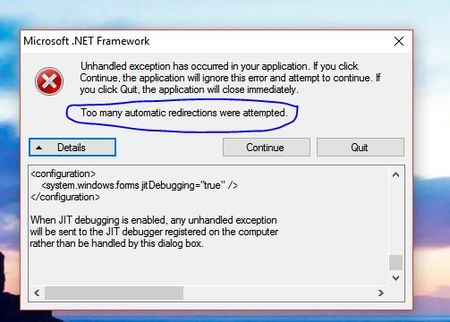
Microsoft .NET error after update ReadyCloud client v1.13
See the end of this message for details on invoking just-in-time (JIT) debugging instead of this dialog box. ************** Exception Text ************** System.Net.WebException: Too many auto...
 Nov 02, 2016
This trial version of Windows ReadyCLOUD app v1.14 should fix this issue:
https://readycloud.netgear.com/client/dllink.html#t=0vw1uxqn0ru/ReadyCloudSetup_v1.14_beta.exe
Thank you.
ric007
Nov 01, 2016Guide
ok here is what I did.... Found the ip adress the nas unit is on ...two with this unit . type ip address into browser log in ..clicked on network tap ,clicked on gear icon ,chose settings ,,clicked on IPv4 tab,clicked on dns servers + icon,window opens new dns ip address this is where I put in 8.8.8.8 clicked add .Did again for the 8.8.4.4 clicked add... this worked for me ...dont know if I can get it at work yet...I will let you know ...
Related Content
NETGEAR Academy

Boost your skills with the Netgear Academy - Get trained, certified and stay ahead with the latest Netgear technology!
Join Us!
