NETGEAR is aware of a growing number of phone and online scams. To learn how to stay safe click here.
Forum Discussion

Björn_Eberhardt
Jul 23, 2015Aspirant
Problems with cloud users and reinviting them
So I have sent a couple of invitations to some Email-addresses, some of which already have a ReadyCloud-account, and some who don't. I have issues with all of the following classes of users: Users ...

rrentrop
Jul 28, 2015Aspirant
I am experiencing the exact same problem. I share my ReadyNAS 104 with about 20 people. About half of them failed to register properly when they clicked the invitation link. An account would be created but the icon remained an envelope rather than the person on a cloud. Deleting the user and retrying usually works on the second or third try.
I have resorted to using my Gmail account with aliases for each user and registering them myself so they don't have to got through this multiple times. Even then, it fails half the time. there is definately an issue as I am following the correct procedure. I've even reset my ReadyNAS to factory and started over but the issue persists.

Björn_Eberhardt
Jul 29, 2015Aspirant
This may or may not update the user's email addresses in the .passwd file. But I don't know if that is any important. By the way, I couldn't continue trying recently, because my X-RAID2 was busy expanding until yesterday. Will continue trying this evening (in 3-4 hours).
- BrianL2Jul 29, 2015NETGEAR Employee Retired
Hi Björn_Eberhardt,
I hope you could try to invite the same email addresses again after the volume resync completes. I am upbeat that this will work fine this time :)
Kind regards,
BrianL
NETGEAR Community- Björn_EberhardtJul 29, 2015Aspirant
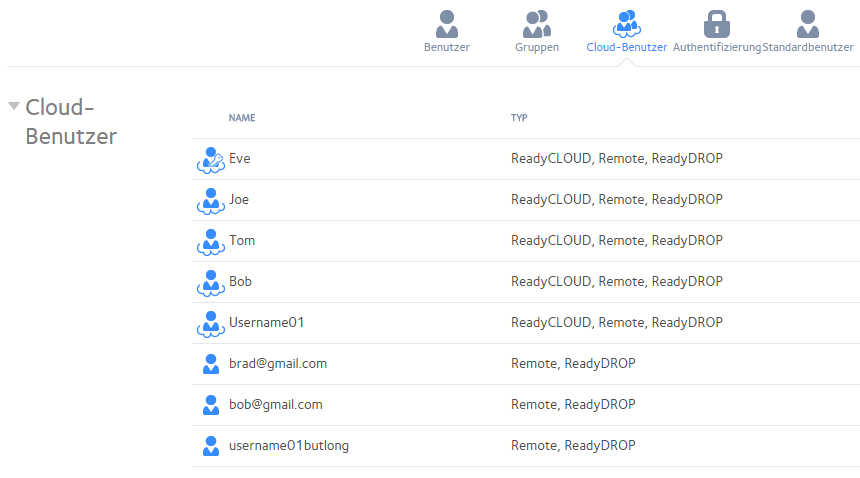
I was still struggling with Username01ButLong. This time, I wanted to unregister and register him on Readycloud again. I just thought...
Why not try a shorter username this time? Instead of 17 characters, it has now 10 characters. It *finally* worked :D
However I don't know if this remaining zombie name or the doubling of Bob with his email address will be an issue or can be ignored.
Brad is the one who has never looked into his inbox. The names on the Screenshot are changed, of course ;)
Either the cloudless mannequins on bottom were the problem, or the length of the username. I don't know.
- BrianL2Jul 29, 2015NETGEAR Employee Retired
Hi Björn_Eberhardt,
You can remove the said usernames (without the "cloud icon") on the device admin page on the cloud tab under ReadyNAS Remote users. Also you can delete these usernames if you want or just ignore them.
Hope this helps!
Kind regards,
BrianL
NETGEAR Community

Related Content
NETGEAR Academy

Boost your skills with the Netgear Academy - Get trained, certified and stay ahead with the latest Netgear technology!
Join Us!
