NETGEAR is aware of a growing number of phone and online scams. To learn how to stay safe click here.
Forum Discussion

claynz
May 13, 2019Guide
Changing volume name of ReadyNAS RN314
Hi, I have factory reset my NAS unit and it created a Volume name of (data) can I change this?
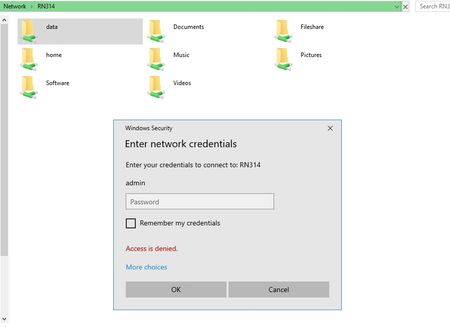
Now when I open Network icon and click on my NAS it shows a folder called data and I can not access it...
claynz
May 14, 2019Guide
Thanks for the link
However when I bought this NAS unit 5 years ago I never saw a data folder, only happenned now since I upgraded the drives and factory reset, may due to firmware updates over the years

StephenB
May 14, 2019Guru - Experienced User
You will see this folder if you are accessing the NAS using admin credentials.
From your screen shot, it looks like you are doing that (though perhaps with the wrong password for the NAS admin account).
The solution is not to use that credential. You can set the username you want to use in the Windows credential Manager.
- SandsharkMay 14, 2019Sensei
Even if you change it in SSH, the NAS UI won't recognize it.
I successfully changed a volume name, then removed and re-imported it with the new name; but only on a second volume in the NAS, Trying to do the same with the primary/only volume gave only grief.
My intent was to write a tutorial on how to do it if I was successful, so I tried a lot of ways without any successes.
- claynzMay 15, 2019Guide
Thanks for the info.
How do I get rid of the admin, data and home folder shares? they never showed up prior to the factory reset I did the other day?
- StephenBMay 15, 2019Guru - Experienced User
As I said earlier, you are seeing them because you are accessing the NAS with admin credentials. Before the reset you weren't.
The way to make them go away is to use a different credential. You solve this by going into the Windows Credential Manager, and deleting any exising credentials for your NAS. Then add a new one with the appropriate user name. If you access the NAS by IP address and by hostname, you'll want to add one credential for each.

Related Content
NETGEAR Academy

Boost your skills with the Netgear Academy - Get trained, certified and stay ahead with the latest Netgear technology!
Join Us!
