NETGEAR is aware of a growing number of phone and online scams. To learn how to stay safe click here.
Forum Discussion

Jacobnz
Jun 18, 2019Guide
Connected, no internet
I'm a rookie and I know nothing about networks etc. So please talk in noobie terms. I have connected my nas to the back of the wireless router via ethernet cable, I can log in to the admin page and...
- Jun 18, 2019Solved.
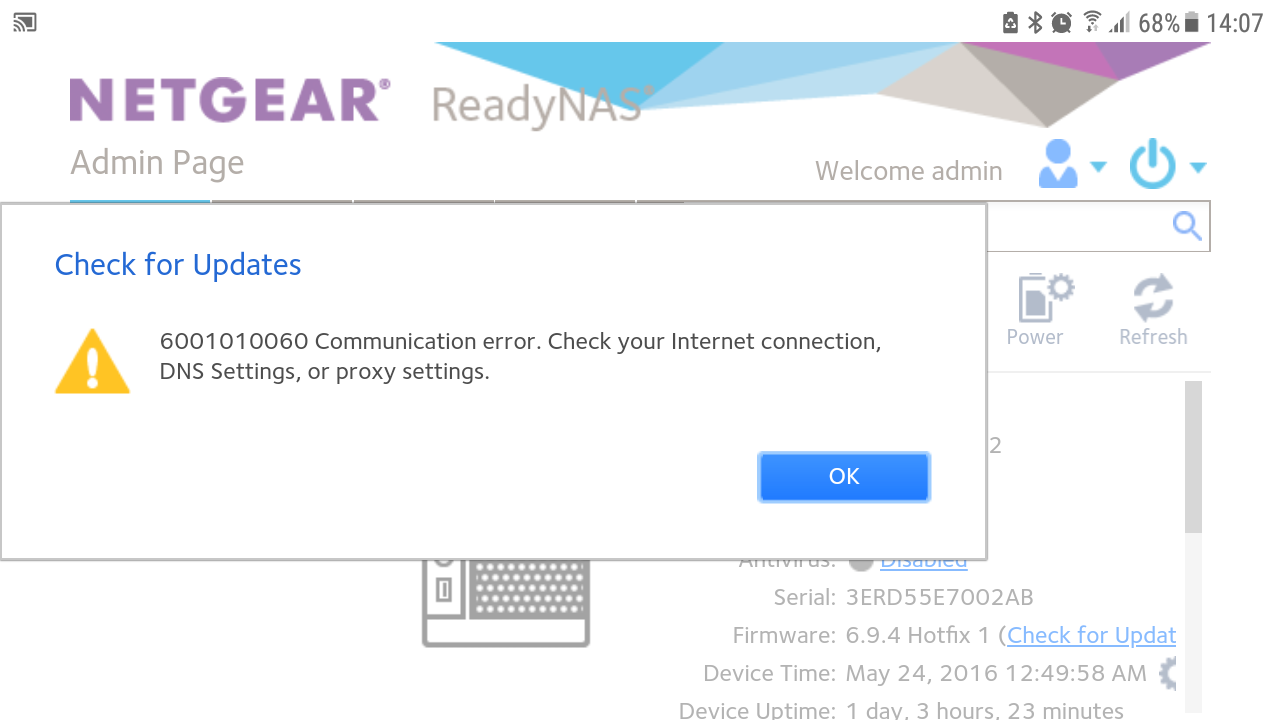
When looking at the screenshot I noticed the date on the nas was set to 2016.
Once setting that to the correct date all issues resolved.

Marc_V
Jun 18, 2019NETGEAR Employee Retired
Have you checked if you have Internet connection from your router and that other devices can connect to on the Internet? Is the ReadyNAS joined already on ReadyCloud? You have access over LAN so you just need to make sure that the router can connect on the Internet.
Try to reboot both NAS and router or if you have set a static IP on the NAS then change it back to DHCP. Hope to hear an update.
HTH
Regards

StephenB
Jun 18, 2019Guru - Experienced User
Marc_V wrote:
Try to reboot both NAS and router or if you have set a static IP on the NAS then change it back to DHCP.
Also, is it possible that your router is set up to block internet access for devices unless you explicitly tell it to allow it?
What router do you have (manufacturer + model)?
- JacobnzJun 18, 2019GuideI have internet working off every other connected device in the house, just the readynas can't check for updates and although the readycloud app is set to on it shows as device offline when I try and access via the android ready share app.
All was working at my old address.
I've looked at the router and it looks as though it sees the nas as connected. The router is a spark modem HG659b.
Screen shot attached from trying to check firmware via the admin page.
Related Content
NETGEAR Academy

Boost your skills with the Netgear Academy - Get trained, certified and stay ahead with the latest Netgear technology!
Join Us!