NETGEAR is aware of a growing number of phone and online scams. To learn how to stay safe click here.
Forum Discussion

NASguru
Nov 03, 2016Apprentice
First impressions of RN626X and then some
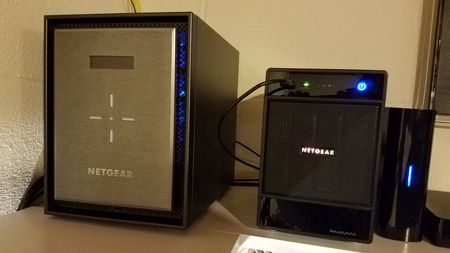
I finally made the jump from my old Ultra 4 Plus to the new RN626X and so far it's a very nice leap forward. I did have some challenges getting started which probably could have been avoided if I re...

StephenB
Nov 03, 2016Guru - Experienced User
NASguru wrote:
- I'm unable to find a logout button from the Admin page. Does one exist or is it simply not needed?
Netgear says "not needed".
NASguru wrote:
On a side note, I was able to transcode three 1080P MKV movies at the same time without any issues. I suspect the 626 can do more but I don't have enough devices to test that theory. All I can say is my Ultra 4 Plus could not transcode 1080P without buffering.
It'd be great if you can try some 4K transcoding (HEVC and AVC 4K trailers are pretty easy to find). I tested the 526 with samples from http://4ksamples.com/
As I noted in my streaming post on the 526X, it can't handle 4K transcoding. Like the 626X, it easily keeps up with gigabit connections.

JBDragon1
Nov 07, 2016Virtuoso
So there's power Icon on the right top of the Admin page? Right next to the Question mark for Shutdown or Restart? That seems strange to me. How about you want to power down your NAS to do something like Move it? Or you upgrade some started or have a issue with some software and want to reboot the NAS? You mean you have to now get up, do to teh NAS and manually push a button? That seems silly to me. I don't get the not needed bit at all.

- StephenBNov 08, 2016Guru - Experienced User
JBDragon1 wrote:
...I don't get the not needed bit at all...
Is this aimed at my comment? If so, perhaps you mis-read it. That comment was about the need for a log-out function on the ui, not about power controls.
You can of course power down/restart the 526X and 626X ReadyNAS from the web-ui, and you can set a power schedule - just like the other OS-6 ReadyNAS. You can also shut it down from the button on the NAS (and probably the insight app, though I haven't run that lately),
NASguru wrote:
...I really don't need an email on it every day it shuts down due to the power schedule....
More control over alerts has already been asked on the idea exchange - you might vote for it: https://community.netgear.com/t5/Idea-Exchange-for-ReadyNAS/Make-all-alerts-deselectable-refine-alert-UI/idi-p/1068758
There are some other related ideas there - here are two:
https://community.netgear.com/t5/Idea-Exchange-for-ReadyNAS/User-settings-for-disk-errors-in-email-alerts
https://community.netgear.com/t5/Idea-Exchange-for-ReadyNAS/OS6-NAS-Email-Alerts-To-Include-Result-in-the-email-Subject/idi-p/1024469- NASguruNov 08, 2016Apprentice
StephenB wrote:NASguru wrote:
...I really don't need an email on it every day it shuts down due to the power schedule....
More control over alerts has already been asked on the idea exchange - you might vote for it: https://community.netgear.com/t5/Idea-Exchange-for-ReadyNAS/Make-all-alerts-deselectable-refine-alert-UI/idi-p/1068758
There are some other related ideas there - here are two:
https://community.netgear.com/t5/Idea-Exchange-for-ReadyNAS/User-settings-for-disk-errors-in-email-alerts
https://community.netgear.com/t5/Idea-Exchange-for-ReadyNAS/OS6-NAS-Email-Alerts-To-Include-Result-in-the-email-Subject/idi-p/1024469Excellent, I voted for the idea exchange to have more control over notifications. It simply makes sense and probably should have been there from the beginning. I just hope Netgear is sincerely listening and considering the opinions of the forum and that our efforts are not in vain.
Related Content
- Jan 01, 2016Retired_Member
NETGEAR Academy

Boost your skills with the Netgear Academy - Get trained, certified and stay ahead with the latest Netgear technology!
Join Us!
