NETGEAR is aware of a growing number of phone and online scams. To learn how to stay safe click here.
Forum Discussion

antongibbs
Aug 21, 2011Aspirant
Netgear duo windows 7
Hi , I’m hoping someone would be able to assist me with a problem I have with a Netgrear nas duo it works totally ok on my 32 bit windows XP sp3 Machine, however I have an odd problem with raidar on ...

PapaBear1
Aug 21, 2011Apprentice
I am running Windows 7 64bit on three machines, two desktops and one laptop (Home Premium). This custom built (by me) desktop is running the upgrade version as is my HP laptop, and the newly built desktop is running the OEM edition. I installed the upgrade on this desktop the day it was released and I downloaded it from MS.
While I have never had a problem accessing a file. (All of my data is on my NAS units and all my active PC's are running Win7. This desktop can also boot into 32bit Vista on another drive, and I do have some inactive XP based PCs). However, this seems to be a recurrent problem and could be related to the Windows Firewall. I have prowled around before, but have not seemed to be able to help.
A few things to check - open network and sharing center by right clicking the network icon in the lower right hand tray. (Or going through the control panel, but it takes more steps). Is your network listed as a home network? If not, you may have to set up another network connection on your PC as I have never found an effective way to change public to home once it is setup.
Then while you are in the center, click on "see full map" in the upper right corner. You should have all network items on when you do this or they won't show up properly. My NAS2 (backup for NAS1) is set to spin the drives down, so it doesn't show up the first time, I have to refresh the map. All items on your network should be shown and if you mouse over them it will give you the device name, the IP addresses, and the MAC address. If it does not show up, do your other computers?
If none of your other computers show up, go to the system info page (CP -> System and Security -> System) and check the workgroup name. Since you started your network with XP units, it should be MSHOME (as is mine. The current default with Vista and Win7 is WORKGROUP). If your PC and NAS are not in the name workgroup, you cannot access it. Note: RAIDar will see all ReadyNAS units in any workgroup on your network.
The final thing to check is firewall settings. (CP -> System and Security -> Windows Firewall -> Allowed Programs) In the allowed programs settings, I found these line:
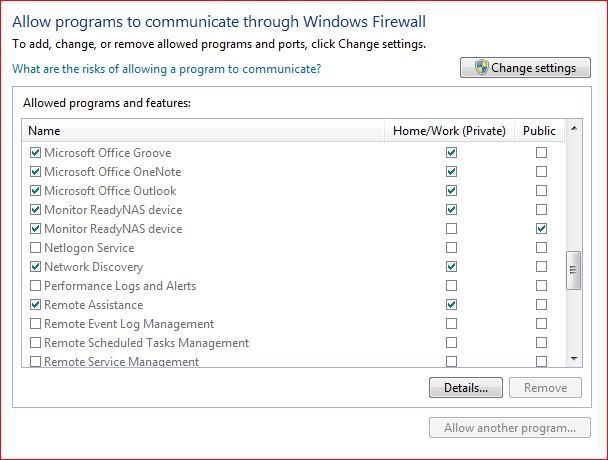
I would make sure that "Network Discovery" is checked as should "Monitor ReadyNAS device".
Let me know how it goes.
While I have never had a problem accessing a file. (All of my data is on my NAS units and all my active PC's are running Win7. This desktop can also boot into 32bit Vista on another drive, and I do have some inactive XP based PCs). However, this seems to be a recurrent problem and could be related to the Windows Firewall. I have prowled around before, but have not seemed to be able to help.
A few things to check - open network and sharing center by right clicking the network icon in the lower right hand tray. (Or going through the control panel, but it takes more steps). Is your network listed as a home network? If not, you may have to set up another network connection on your PC as I have never found an effective way to change public to home once it is setup.
Then while you are in the center, click on "see full map" in the upper right corner. You should have all network items on when you do this or they won't show up properly. My NAS2 (backup for NAS1) is set to spin the drives down, so it doesn't show up the first time, I have to refresh the map. All items on your network should be shown and if you mouse over them it will give you the device name, the IP addresses, and the MAC address. If it does not show up, do your other computers?
If none of your other computers show up, go to the system info page (CP -> System and Security -> System) and check the workgroup name. Since you started your network with XP units, it should be MSHOME (as is mine. The current default with Vista and Win7 is WORKGROUP). If your PC and NAS are not in the name workgroup, you cannot access it. Note: RAIDar will see all ReadyNAS units in any workgroup on your network.
The final thing to check is firewall settings. (CP -> System and Security -> Windows Firewall -> Allowed Programs) In the allowed programs settings, I found these line:
I would make sure that "Network Discovery" is checked as should "Monitor ReadyNAS device".
Let me know how it goes.
Related Content
NETGEAR Academy

Boost your skills with the Netgear Academy - Get trained, certified and stay ahead with the latest Netgear technology!
Join Us!
