NETGEAR is aware of a growing number of phone and online scams. To learn how to stay safe click here.
Forum Discussion

antongibbs
Aug 21, 2011Aspirant
Netgear duo windows 7
Hi , I’m hoping someone would be able to assist me with a problem I have with a Netgrear nas duo it works totally ok on my 32 bit windows XP sp3 Machine, however I have an odd problem with raidar on ...

PapaBear1
Aug 30, 2011Apprentice
Once you have the image snipped and saved on your PC, you will need to upload the image to a third party image hosting service (I use photobucket, but there are others). On Photobucket, when you put your cursor on the image, four lines of codes show up below the image. Click on the fourth line (bottom) that starts with IMG and it will then say copied. Then click back on the forum tab, place your cursor where you want the image and right click and then click on paste. In the full edit window you can click on preview to see how the image posted.
I am not a techie, so when dealing with some of these wireless dongle aspects, I don't have a lot of experience. This is why I asked if you could connect with ethernet cable, even if only temporarily to see how that worked. This bypasses all the wireless security setup, since it is hardware and cannot be intercepted as wireless can be. Until we know for sure whether it is the wireless adapter of Win 7 settings, we will be spinning wheels.
If you have connection with another PC, open RAIDar and open Frontview. Then go into Network -> Interfaces in Frontview. In the middle where it says "IPv4 assignment" click on the down arrow and change to "Use values below" Note in the image, I have mine set to 203. My three NAS units all have static IP's set starting with 201. This gets it out of the dynamic range of most routers. (The router should skip one that is set manually, but why tempt fate).
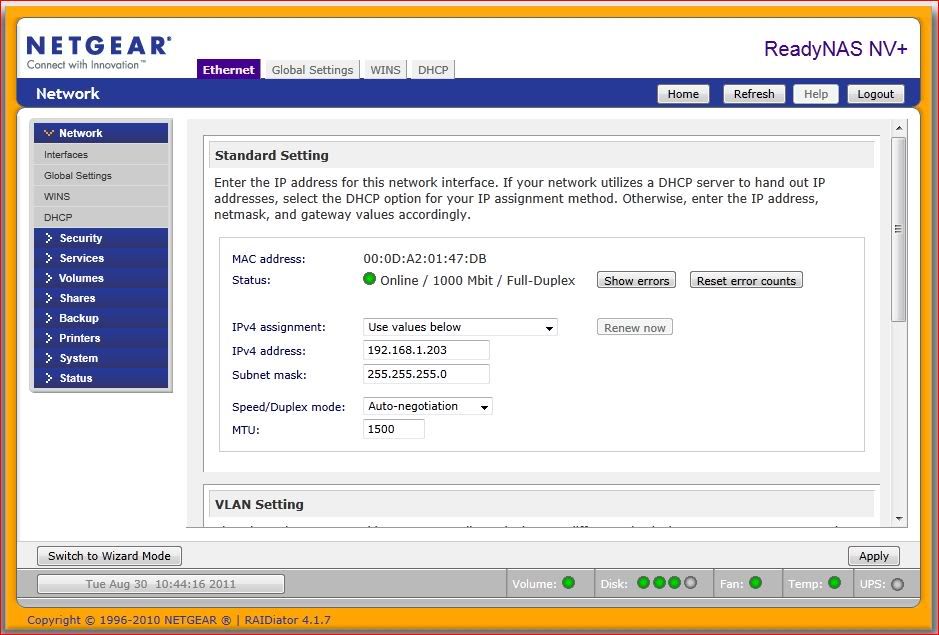
This will only solve the problem if there should happen to be a conflict somewhere in the network. At one point you indicated the DHCP was setting the fourth postiion to 64 and then possibly later to 66. (Do not exceed 255 on the fourth number. It shouldn't accept an address that high anyway).
I am not a techie, so when dealing with some of these wireless dongle aspects, I don't have a lot of experience. This is why I asked if you could connect with ethernet cable, even if only temporarily to see how that worked. This bypasses all the wireless security setup, since it is hardware and cannot be intercepted as wireless can be. Until we know for sure whether it is the wireless adapter of Win 7 settings, we will be spinning wheels.
If you have connection with another PC, open RAIDar and open Frontview. Then go into Network -> Interfaces in Frontview. In the middle where it says "IPv4 assignment" click on the down arrow and change to "Use values below" Note in the image, I have mine set to 203. My three NAS units all have static IP's set starting with 201. This gets it out of the dynamic range of most routers. (The router should skip one that is set manually, but why tempt fate).
This will only solve the problem if there should happen to be a conflict somewhere in the network. At one point you indicated the DHCP was setting the fourth postiion to 64 and then possibly later to 66. (Do not exceed 255 on the fourth number. It shouldn't accept an address that high anyway).
Related Content
NETGEAR Academy

Boost your skills with the Netgear Academy - Get trained, certified and stay ahead with the latest Netgear technology!
Join Us!
