NETGEAR is aware of a growing number of phone and online scams. To learn how to stay safe click here.
Forum Discussion

UniqueGreen
Apr 08, 2018Aspirant
Netgear ReadyNAS NV+ RND4000
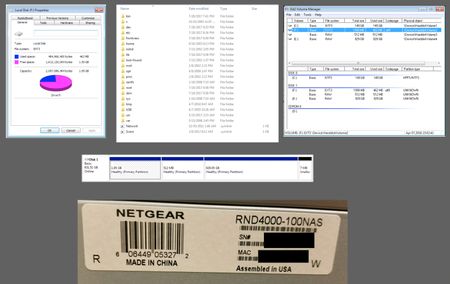
Problem: Was trying to access NAS (Raid 1 setup), drive went away from windows explorer. Manualy rebooted NAS, NAS won't start. The PSU went bad. Since this NAS is very old I'ld like to upgrade and m...

StephenB
Apr 09, 2018Guru - Experienced User
You should be looking at E (the 1 TB volume). Your screen shot is of the OS partition. The "C" folder there is a placeholder (the NAS mounts the data volume to that mount point).
Generally I recommend using R-linux for Windows (which is also free). https://www.r-studio.com/free-linux-recovery/
When you say you are using RAID-1... Do you mean you set up the NAS to use flexraid/raid-1? Or do you mean that you are using XRAID with two drives?
UniqueGreen
Apr 09, 2018Aspirant
Thnak you very much for replying StephenB! I have a quesiton reguarding why look in E: (RAW) vs F: (EXT3), if the data that has all my files are on E: what is F: for? F: has a ton of empty folders, why is that?
During the setup of the Netgear I choose Raid 1 (don't recall if it was flexraid/raid-1, but it was a Raid 1 setup) so I would always have a backup of my work.
One more quick question, if I buy another Netgear ReadyNAS NV+ RND4000 and put 1 of the drives I know has data will the new Netgear read my drive without any issues?
- StephenBApr 09, 2018Guru - Experienced User
UniqueGreen wrote:
Thnak you very much for replying StephenB! I have a quesiton reguarding why look in E: (RAW) vs F: (EXT3), if the data that has all my files are on E: what is F: for? F: has a ton of empty folders, why is that?
You'll notice that F is only 2 GB in size. It's the OS partition that the NAS boots from. As I explained with C, many of the folders there are placeholders for mount points from other places (for instance the data volume).
UniqueGreen wrote:
During the setup of the Netgear I choose Raid 1 (don't recall if it was flexraid/raid-1, but it was a Raid 1 setup) so I would always have a backup of my work.
The difference between XRAID and FlexRAID might matter here.
Try using the other disk drive, and see if E is also shown as RAW there. It might well show up as EXT. And try r-linux for windows.
UniqueGreen wrote:
One more quick question, if I buy another Netgear ReadyNAS NV+ RND4000 and put 1 of the drives I know has data will the new Netgear read my drive without any issues?
You can, as long you are certain it is also a v1 (with -100NAS at the end of the part number).
However, these NAS went out of production back in 2011 - so anything you buy will be old, and not likely to last that long. You'd be better off buying a new NAS (for instance an RN210 series or an RN420 series). They have more features, higher capacity, and are a lot faster.
- UniqueGreenApr 12, 2018Aspirant
Thank you very much for your time and help Stephen!
Related Content
NETGEAR Academy

Boost your skills with the Netgear Academy - Get trained, certified and stay ahead with the latest Netgear technology!
Join Us!
