NETGEAR is aware of a growing number of phone and online scams. To learn how to stay safe click here.
Forum Discussion

Dabreeze01
May 23, 2022Aspirant
Netgear Readynas Pro 6 - issues accessing admin page & shares
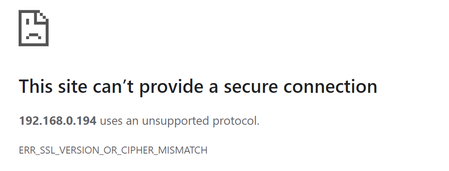
Having issue accessing ReadyNas 6 Pro admin page.... getting.... For that, tried temp disabling fw, ad blockers, etc; Clearing browser cache and try different browsers - Chrome, IE, Fire...
Dabreeze01
May 23, 2022Aspirant
Wow! I was a able to access Frontview once I went through Edge (IE mode) and I applied the add-on you mentioned.
Question: Can I leave it at that/is that sufficient or should I convert to run OS 6 firmware? And if so, how do I do that?...
sorry long thread..i didn't find clear instructions to convert to OS 6...
Thanks so much!! So far... you helped dodge a bullet ...

StephenB
May 24, 2022Guru - Experienced User
Dabreeze01 wrote:
Can I leave it at that/is that sufficient or should I convert to run OS 6 firmware? And if so, how do I do that?...
Adding TLS 1.2 is enough to let you regain access.
OS-6 is considerably newer, has some additional features - for example, it supports SMB 3. Volumes can be much larger than the 16 TiB limit on the Pro-6. It also is still getting firmware updates (mostly security patches at this point). The software manual is here: https://www.downloads.netgear.com/files/GDC/READYNAS-100/READYNAS_OS_6_SM_EN.pdf
FWIW, I've converted my own Pro 6. The process requires a factory default, so all data has to be off-loaded first, and restored after the process is finished.
If you do decide to convert the Pro 6, then you should also increase the RAM. Shipping OS-6 NAS have at least 2 GB of RAM, your Pro only has 1 GB. It might be enough, but some have run into out-of-memory issues. Upgrading to 2x2GB is inexpensive, and is simple to do.
The steps are
(Optionally) make sure the latest BIOS is installed before you do the conversion. To do this you install http://www.readynas.com/download/addons/x86/4.2/BIOS_Update_Package_0.5-x86.bin as an add-on and reboot the NAS. Do this after you backup the NAS. This isn't necessary, but if you so want to update the bios it is easiest to do it prior to conversion
Basic instructions for the conversion itself are
- BACKUP, BACKUP, BACKUP
- Upload PREPR4TOR6_0.1-x86.bin as an add-on using the ReadyNAS web gui, but do not reboot afterwards (avoids the need to do manual factory resets)
- Upload R4toR6_6.9.5.bin using the ReadyNAS web gui firmware update
- After you upload the addon+firmware and reboot, it will update the firmware and start a factory default.
- Go through the setup process on the converted NAS
- Update the NAS to the current OS 6 (check for updates will work).
- Restore files from the backup.
Netgear won't provide paid support on a converted NAS, so that is one consideration. There is a small risk that the process could fail, and if that were to happen it might not be possible to get the NAS running again.
Note it is possible to reverse the process if you want to go back to 4.2.x again. That is also destructive.
Related Content
NETGEAR Academy

Boost your skills with the Netgear Academy - Get trained, certified and stay ahead with the latest Netgear technology!
Join Us!
