NETGEAR is aware of a growing number of phone and online scams. To learn how to stay safe click here.
Forum Discussion

Royalblue
Mar 13, 2024Tutor
Can I read a readynas drive on my PC?
Hi, I have a readynas 104 with 4 x 1tb drives inside. I have been having problems with booting the readynas after getting a no ip address error which I couldn't resolve. Is there any way ...

StephenB
Mar 15, 2024Guru - Experienced User
Royalblue wrote:
I can access the admin page without any problems.
I get the following error message on the Admin page:
remove inactive volumes to read the disk# 1,2,3,4 (With 4 red disks in the volumes tab)
Which means that the volume is still not mounted (despite what you are seeing in windows file explorer)
Disk 3 (serial number 54NWT7MNS) isn't doing that well - it has 16 ATA errors, and a very high spin retry count of 65536. Disk 4 (Serial number 54NS1YJNS) also has 28 ATA errors. ATA errors are issues with the SATA bus - so it's hard to tell if they are caused by the drive reporting them, or by something else. But we are seeing errors in dmesg.log
[Fri Mar 15 11:17:22 2024] ata3.00: exception Emask 0x0 SAct 0x0 SErr 0x400000 action 0x6 frozen
[Fri Mar 15 11:17:22 2024] ata3: SError: { Handshk }
[Fri Mar 15 11:17:22 2024] ata3.00: failed command: WRITE DMA EXT
[Fri Mar 15 11:17:22 2024] ata3.00: cmd 35/00:00:40:60:1a/00:08:00:00:00/e0 tag 4 dma 1048576 out
         res 40/00:01:00:00:00/00:00:00:00:00/00 Emask 0x4 (timeout)
[Fri Mar 15 11:17:22 2024] ata3.00: status: { DRDY }

and

[Fri Mar 15 11:19:14 2024] ata2: SError: { Handshk }
[Fri Mar 15 11:19:14 2024] ata2.00: failed command: WRITE DMA EXT
[Fri Mar 15 11:19:14 2024] ata2.00: cmd 35/00:40:00:28:80/00:05:00:00:00/e0 tag 17 dma 688128 out
         res 40/00:00:00:00:00/00:00:00:00:00/00 Emask 0x4 (timeout)
[Fri Mar 15 11:19:14 2024] ata2.00: status: { DRDY }
You also have a very full OS partition
Mar 15 11:16:50 Dardang readynasd[2539]: System volume root's usage is 83%. This condition should not occur under normal conditions. Contact technical support.Unfortunately there is no technical support for ReadyNAS anymore, so you cannot follow the advice in the error message.
Although the OS partition needs attention at some point, the problem really seems to be the errors coming from two different disks. Unfortunately RAID can't deal with 2 failing drives.
I think the next step is to power down the NAS and test these disks in a Windows PC (connecting with SATA or a USB adapter/dock). Normally I recommend vendor tools (WDC's dashboard or Seagate's Seatools). I don't use Toshiba drives myself, so I don't know the best tool to use. You could try this one:
Royalblue
Mar 15, 2024Tutor
Thank you Stephen.
I shall make that my next step.
- RoyalblueMar 17, 2024Tutor
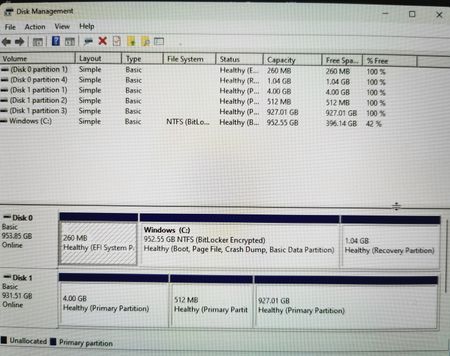
Ok I checked all the disks in a 3rd part software and all came up clean. The Toshiba software didn't find the disk.
I am trying now to boot in read only but only get the 'Normal' option when clicking the backup button? Normal boots up but......my password to the admin page doesn't seem to be working and the password recovery option just brings up a spinning square without going any further?
Seems to be adding problems as I go along! Any ideas?
Many thanks.
- RoyalblueMar 17, 2024Tutor
Yes, holding reset in, power on but when I press backup to scroll through the options the only option that shows is Normal.
- SandsharkMar 18, 2024Sensei
That would tend to point to a corrupted U-boot, for which a USB recovery is sometimes the solution. But we have seen cases here where it wasn't, most of which have not been resolved.
Just to get an idea of exactly what is going on, perhaps you should try removing all the drives and putting in just one spare one that contains nothing you want to retain. Then see if the NAS can create a valid volume on it and boot properly from it.
- RoyalblueMar 18, 2024Tutor
Thank you I'll try that, coincidentally I just found an old empty drive in a drawer so that will work perfectly to try and create a valid volume.
- RoyalblueMar 18, 2024Tutor
Using a clean drive worked, I was able to create a new volume and it booted fine.
I tried to access the boot menu with the reset button held in but again I only got the Normal option?
- StephenBMar 18, 2024Guru - Experienced User
Royalblue wrote:
Using a clean drive worked, I was able to create a new volume and it booted fine.
I tried to access the boot menu with the reset button held in but again I only got the Normal option?
So you have two sets of issues. One is the failure of the reset button, the other is that the volume won't mount.
Earlier (post 16) I posted the ATA and disk spin-up issues that are in your logs. In post 17, you replied saying that when you tested the disks they passed. And the single disk appears to be working ok.
That suggests that the disk issues might be due to inadequate power. That could be an issue in the chassis, or it could just be a failing power adapter. So that could be something to explore.
However, I think the main issue now is to try to get the files off the existing disks. Since we can't get the NAS into tech support mode, your options are limited. Options include
- Purchase ReclaiMe and enough enclosure(s) to allow you to connect all the disks to a Windows PC
- Contract with a data recovery service, and have them offload the files for you.
- Try a USB recovery with the new disk in place, in hopes that it will fix the reset button problem. If that works, then try tech support mode.
- Purchase a replacement ReadyNAS (used), so you can boot up in tech support mode
Options 3 and 4 can be risky, especially for folks with no experience with the linux command line interface.
- SandsharkMar 18, 2024Sensei
There is another possible recovery method. I just posted this update: Mounting-ReadyNAS-drives-in-a-virtual-NAS-for-data-access-and=recovery
Given the ATA errors, I recommend going the drive image route.
- StephenBMar 18, 2024Guru - Experienced User
Sandshark wrote:
There is another possible recovery method. I just posted this update: Mounting-ReadyNAS-drives-in-a-virtual-NAS-for-data-access-and=recovery
Given the ATA errors, I recommend going the drive image route.
The volume is almost certainly out of sync, so this would also require use of ssh.
- RoyalblueMar 19, 2024Tutor
Thank you.
I'll try a new power adaptor first that's pan easy option to start with. 🙂
- SandsharkMar 19, 2024Sensei
StephenB wrote:The volume is almost certainly out of sync, so this would also require use of ssh.
Actually, if you use a VBox VM, it doesn't. You still need to use the Linux command line, but VBox opens up a console window that, with the OS6 version, can be used for that. So if SSH has not been enabled and cannot be, it's still a potential part of a solution.
I've also provided a method of getting into Tech Support mode without the use of the (non-existent on a VM) reset button for units that won't fully boot but where the real NAS reset button menu is non-functional.
- StephenBMar 19, 2024Guru - Experienced User
Sandshark wrote:
StephenB wrote:
The volume is almost certainly out of sync, so this would also require use of ssh.
... You still need to use the Linux command line,
FWIW, when I talked about ssh in this thread, I was really focused on the linux command line.
On related subject, have you ever installed WSL (Windows Subsystem for Linux)? It looks like that should also be an alternative to using a generic linux VM on the PC. It's on my "to do" list to explore, but I haven't gotten to it yet.
- SandsharkMar 19, 2024Sensei
StephenB wrote:On related subject, have you ever installed WSL (Windows Subsystem for Linux)? It looks like that should also be an alternative to using a generic linux VM on the PC. It's on my "to do" list to explore, but I haven't gotten to it yet.
Not since a long time ago when it wasn't capable of mounting the drives. The server I bought to run such experiments on (with 4 easy to load drive bays) quit on me and I have never taken the time to find out why since it's also not Windows 11 capable. I think I just screwed something up with my set-up that allowed me to dual boot to Windows or Linux or even run the same Linux instance as a VBox VM under Windows.
I've used VirtualBox for so long for Linux, older Windows versions, and even MS-DOS that checking out WSL is not a priority for me.
- RoyalblueMar 21, 2024Tutor
Hi Stephen, Sandshark,
I tried a new power adapter but that didn't make any difference.
Stephen in Option 3 post 24 you suggested
Try a USB recovery with the new disk in place, in hopes that it will fix the reset button problem. If that works, then try tech support mode.
Or should I try the method highlighted by Sandshark and mount in a virtual NAS?
Many thanks.
- StephenBMar 21, 2024Guru - Experienced User
Royalblue wrote:
Or should I try the method highlighted by Sandshark and mount in a virtual NAS?
If you can create images of the drives on your PC, then Sandshark's method would be the safest path - because you would be leaving the drives themselves intact. So even if you made a mistake, you wouldn't be risking your data.
After the data is offloaded, we can shift back to the reset issue.
Royalblue wrote:
I tried a new power adapter but that didn't make any difference.
FWIW, I was thinking that might resolve the ATA errors. But I did not expect the volume to mount, as the RAID is almost certainly out of sync. If you send me a fresh set of logs, I can see if the ATA errors are still happening with the new adapter.
- RoyalblueMar 24, 2024Tutor
Hi,
<<<<<FWIW, I was thinking that might resolve the ATA errors. But I did not expect the volume to mount, as the RAID is almost certainly out of sync. If you send me a fresh set of logs, I can see if the ATA errors are still happening with the new adapter>>>>
Just tried to get a fresh set of logs but RAIDar didn't find the NAS for some reason. I may give that a go again later, although I did get a alert from my Gmail which said:
'Detected increasing ATA error count: [52] on disk 2 (Internal) [TOSHIBA DT01ACA100, 54NW90MNS] 14 times in the past 30 days. This condition often indicates an impending failure. Be prepared to replace this disk to maintain data redundancy.'
So maybe the new adaptor didn't help?

Related Content
NETGEAR Academy

Boost your skills with the Netgear Academy - Get trained, certified and stay ahead with the latest Netgear technology!
Join Us!
