NETGEAR is aware of a growing number of phone and online scams. To learn how to stay safe click here.
Forum Discussion

StehpenT
Mar 05, 2019Star
ReadyCloud - Web Link Email Link on File Name
Hello,
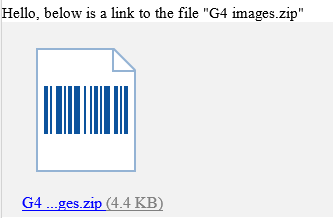
ReadyCloud is creating link for certinain type of file (such as .zip) in the Web Link email. The link is inside the quote of the file name (the first link in the screenshot). Many users click on the first link and think it is not working. How can we avoid/fix this? Please kindly advise. Thanks.
Stephen
9 Replies
Replies have been turned off for this discussion
- schumakuGuru - Experienced User
One link is for a direct open of the file in the browser (ie. html or image formats) while zip can't be opened in the browser, the second one is for the download, isn't it?
Hello schumaku
It does not look like that is the case. Please se the screenshot below. There is no link in the file name.
Stephen
- schumakuGuru - Experienced User
Gee Stpehen, you know how it works with the screenshots here. Spammers can post any garbage links, and the old and active members in-line image are still under mandatory moderation, even with thousands of posts....
I'll create a share link with a ZIP and compare. Allow me some time please.
- Marc_VNETGEAR Employee Retired
Hi StehpenT
I tried sending an Email link with images.zip as a file name but it's not making any link

Not really sure but I think this is something that your browser or email app is doing. I have tried several file types (docx, pdf, txt) but no link is being created on the message part and I even made the name similar
I'm using Outlook and Chrome.What are you using? is your NAS up to date?
Regards
Hello Marc_V
Thanks for checking on this. We are using Outlook , Firefox. The NAS model is ReadyNAS 4312, firmware 6.9.5. We will test using Chrome to create the Web Link and see if it still showing the link on the filename.
Stephen
- schumakuGuru - Experienced User
The code genrated looks like this - both the icon and the file name (size) come with valid links
<p>Hello, below is a link to the file "test.zip"</p> <table> <tr> <td align="center"> <div style="padding: 20px; text-align: center;"> <table align="left"> <tr> <td style="padding: 0 15px"> <p><a href="https://readycloud.netgear.com/client/dllink.html#t=sniiiiiiiiiiiiiip/test.zip"><img src="cid:sniiiiiiiiiiiiiip"></a></p> <p style="text-align: center;"><a href="https://readycloud.netgear.com/client/dllink.html#t=sniiiiiiiiiiiiiip/test.zip">test.zip <span style="color: #808080">(78.8 KB)</span></a> </p> </td> </tr> </table> </div> </td> </tr> </table>
Who or whatever is interfering with that (in my opinion valid) HTML mail ... comes in perfect in Gmail/Gsuite.
Hi Marc_V
We have just tested Email as Link using Chrome. There are still link on the filename (see screenshot below)
Stephen


Related Content
NETGEAR Academy

Boost your skills with the Netgear Academy - Get trained, certified and stay ahead with the latest Netgear technology!
Join Us!
