NETGEAR is aware of a growing number of phone and online scams. To learn how to stay safe click here.
Forum Discussion

kentd
May 09, 2017Tutor
ReadyNAS 516 just upgraded to 6.7.1 and data volume has not loaded
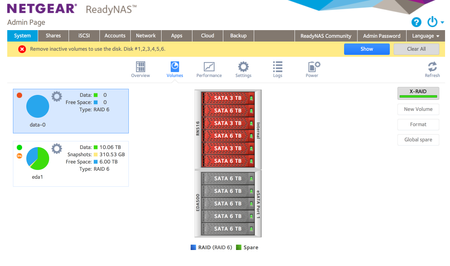
Hi, I just installed 6.7.1 and on re-boot the primary data volume has not loaded - and suggests removing the inactive volume. I have two volumes, one of 6 drives in the RN516, this was a raid 6 vol...
 May 16, 2017
/data-0/.timemachine was a subvolume, so a regular deletion didn't work. I removed the subvolume and directory, and now everything is mounted normally.
kentd
May 10, 2017Tutor
Done

jak0lantash
May 10, 2017Mentor
Did you use the mount command given by StephenB?
mount --bind / /mnt
Then look inside it:
cd /mnt
du -d1 -h
It will tell you which is the biggest folder, then cd into it and re-run:
cd <big_folder>
du -d1 -h
Repeat the operation until there is no more big folder, only the total is big, which means it's big file(s) in the current directory, then:
ls -lhS
When you're finished cleaning up the big files, unmount the temporary bind:
cd
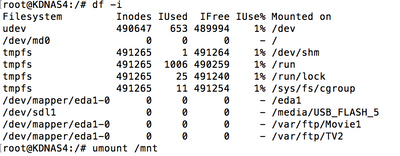
umount /mnt
- kentdMay 10, 2017Tutor
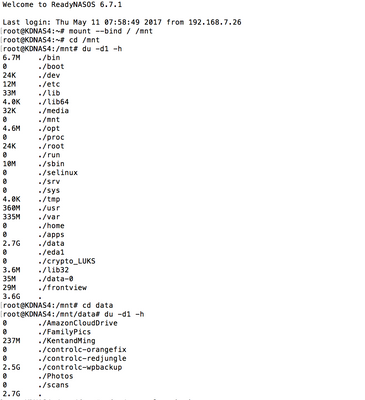
ok, here is the big folder ./controlc-wpbackup - this must have been written to here by an internal backup job rather than the data volume.
Last login: Thu May 11 07:58:49 2017 from 192.168.7.26
root@KDNAS4:~# mount --bind / /mnt
root@KDNAS4:~# cd /mnt
root@KDNAS4:/mnt# du -d1 -h
6.7M ./bin
0 ./boot
24K ./dev
12M ./etc
33M ./lib
4.0K ./lib64
32K ./media
0 ./mnt
4.6M ./opt
0 ./proc
24K ./root
0 ./run
10M ./sbin
0 ./selinux
0 ./srv
0 ./sys
4.0K ./tmp
360M ./usr
335M ./var
0 ./home
0 ./apps
2.7G ./data
0 ./eda1
0 ./crypto_LUKS
3.6M ./lib32
35M ./data-0
29M ./frontview
3.6G .
root@KDNAS4:/mnt# cd data
root@KDNAS4:/mnt/data# du -d1 -h
0 ./AmazonCloudDrive
0 ./FamilyPics
237M ./KentandMing
0 ./controlc-orangefix
0 ./controlc-redjungle
2.5G ./controlc-wpbackup
0 ./Photos
0 ./scans
2.7G .
how do i just delete it? - its only a wordpress site backup and can go.
- StephenBMay 10, 2017Guru - Experienced User
You shouldn't have anything in /mnt/data since it is a mount point.
First check ./KentandMing - that also should be deleted, but you might first need to copy it somewhere.
When you are sure there is nothing you want, then this should remove everything in it.
cd /mnt/data
rm -rf *
Just be careful that you are in the right folder!
- kentdMay 10, 2017Tutor
ok, have removed all from mnt/data - the data in there was readynas backup jobs that were directed to the volume on the EDA, no idea why that happened.
Related Content
NETGEAR Academy

Boost your skills with the Netgear Academy - Get trained, certified and stay ahead with the latest Netgear technology!
Join Us!
