NETGEAR is aware of a growing number of phone and online scams. To learn how to stay safe click here.
Forum Discussion

Sambat
Jan 06, 2017Aspirant
RN104 connection to APC BE700G
Hi, I have purchased an APC BE700G-UK UPS to protect my Netgear ReadyNAS 104 and I am bit confused on the instructions provided concerning the powerchute software. Does powerchute control the UPS vi...
Sambat
Jan 09, 2017Aspirant
Hi, thanks for the link.
My software was slightly different, however I have only now plugged the NAS into the UPS and it has shown up in the ReadyNAS software/web page. It has been set as on Auto so should be ok.
I just need to test now to see if it performs a graceful shutdown.
If you think I need to change or add any settings do let me know.
Thank you for your help.

mdgm-ntgr
Jan 09, 2017NETGEAR Employee Retired
Firstly the NAS doesn't use PowerChute. It uses NUT (Network UPS Tools). With a USB UPS all you should need to do is connect the USB cable (and obviously connect the NAS power cable to the UPS as well).
You can directly connect the UPS to your NAS using the USB cable. Note the UPS must have a USB port. Serial-to-USB cables are not supported by our NAS units.
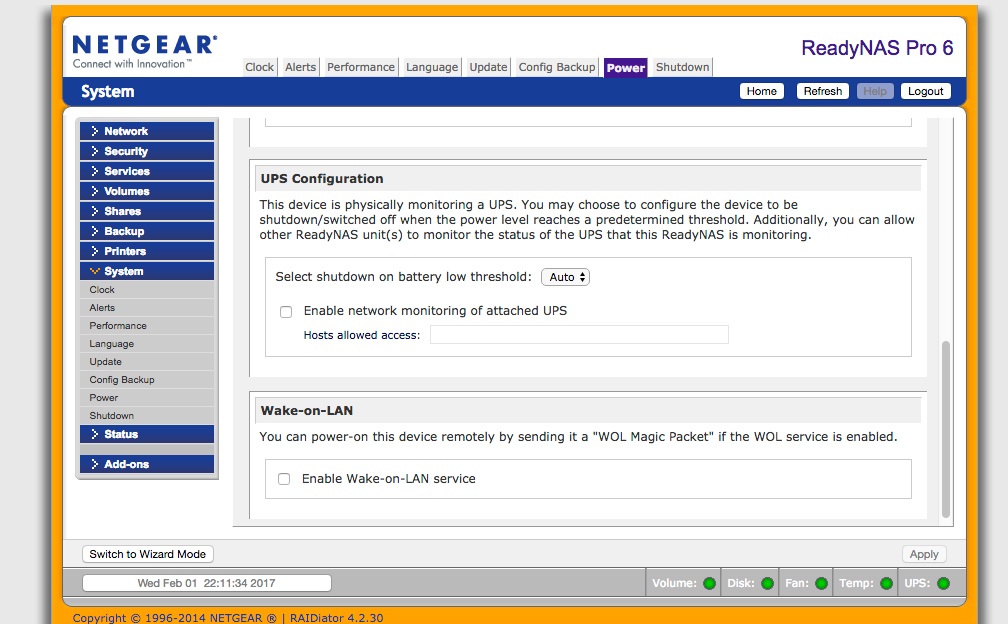
The system will shutdown gracefully. With APC units you can set the shutdown threshold. There is an automatic level of battery left on the UPS which you can use or you can set a different threshold as you wish.
"Enable Network Monitoring of attached UPS" allows you to share the UPS with other devices (e.g. ReadyNAS units) on your network. They obviously need to have their power supplies connected to the UPS too. So you can shutdown multiple devices safely using the UPS rather than just one). Obviously you'd need the router/switch power plugged into the UPS too for this to work. Routers/switches can be left to turn off whe the UPS battery runs out but devices such as NAS units should be shutdown safely.
- derekcaJan 31, 2017Aspirant
Hi mdgm,
RE: "You can directly connect the UPS to your NAS using the USB cable. Note the UPS must have a USB port. Serial-to-USB cables are not supported by our NAS units. The system will shutdown gracefully. With APC units you can set the shutdown threshold. There is an automatic level of battery left on the UPS which you can use or you can set a different threshold as you wish."
Response: Well not on my ReadyNASPro6. Does it work that way on the newer RN214? The ReadyNAS wanted an IP address and my Cyberpower UPS is connected only via USB, so there is no way for the ReadyNAS to "know" that a UPS is connected even though it is. At least its not informing me of that fact.
I'm looking to upgrade from a ProNAS6 to a RN214. Do you have to get a UPS with a serial [heaven forbid] or RJ45 Network port for SNMP [MIB] reporting? Is there a HQL of those units, which I'm sure are considerably more expensive. Just curious if it is or is not possible to have a USB connection to the UPS for a Netgear NAS to work. Based on what I've just ready, apparently not.
Thanks!
 StephenBFeb 01, 2017Guru - Experienced User
derekca wrote:
Response: Well not on my ReadyNASPro6. Does it work that way on the newer RN214? The ReadyNAS wanted an IP address and my Cyberpower UPS is connected only via USB, so there is no way for the ReadyNAS to "know" that a UPS is connected even though it is. At least its not informing me of that fact.
My Pro-6 is connected via USB to my CyberPower UPS, and that works fine. No configuration is needed. The NAS only asks for an IP address if you use one of the two remote monitoring choices.
All models of ReadyNAS support UPS over USB using NUT
- derekcaFeb 01, 2017Aspirant
Thank you so much for the prompt reply. I re-checked my connection and I had a flaky USB cable. Should have been more diligent before posting! Sure enough the green LED on Frontview lit up when the UPS was recognized. I have two question. If I want the my Cyberpower 1350PFCLCD UPS to monitor my mac tower AND the ReadyNAS, will there be any issues putting the USB port of the Cyberpower on a hub and connecting my Mac tower AND the NAS to it? [I already have a hub on the Mac tower for other USB 'stuff'. I won't both to be shut down gracefully in the event of a power failure. Which brings me to the UPS setup page for the NAS. Do I just leave it at "Auto". If i move the USB over to just the Mac tower I believe my setting is to shutdown after being on UPS for 2 mins. If putting both devices, e.g. Mac Tower and ReadyNASPro6 on a USB hub, I'm not sure there would be any sort of "race" problem where one event [Mac wanting to shutdonw] woould occurs before the other OR if NUT takes care of being a traffic cop so to speak such that both devices would be shut down properly. Thank you!!
Related Content
NETGEAR Academy

Boost your skills with the Netgear Academy - Get trained, certified and stay ahead with the latest Netgear technology!
Join Us!
