NETGEAR is aware of a growing number of phone and online scams. To learn how to stay safe click here.
Forum Discussion

Kardano
Nov 18, 2016Luminary
RN204 - volume lost?
I need help. My RN204 refused all writes. After reboot no data volume. NAS writes: REMOVE INACTIVE VOLUMES to use disk. Dosk #1,2,3,4. I downloaded logs, i see admin page. Tried reboot a...

FramerV
Nov 19, 2016NETGEAR Employee Retired
Hi Kardano,
We do not know how severe the issue is so I am unsure also if what you are requesting can be done. Let us wait for the support to respond to you, they might be able to tell if what you want is possible or not at this point.
Regards,

Biteit
Nov 20, 2016Aspirant
Hi... A have same problem 2016-11-19 So now a must contact support on monday so support fix this.. A have google this problem and a find many have same problem on 2016-11/ Day 18-19 So it must by system problem But a have "4 disk" is not online and a can not get 4 online "is red"... Is says only remove inaktive disk.. A whas on my company work when this happend and hole life is in this nas
- FramerVNov 20, 2016NETGEAR Employee Retired
Hi Biteit,
Yes, please continue or get the per-incident support. A remote access to your ReadyNAS would be needed for it.
Regards,
- BiteitNov 21, 2016Aspirant
Hi..A call today but a must wait up to 36 hour :( and this is emergency then a have company too..All info is on this NAS...
Only a have start is amazon cloud sync. Then this happend under 1 day. A have save logs to computer för secure reson...
Disk is green but all disk "volymes" is inactive now webinterface says...All this happend after a eneble amazon cloud drive... And a see snapshot was enable on all disk after a enable Amazone junk app...
So how can a enable volumes again? This nas has 7TB information a MUST have out and X-raid was enable too=== df -h ===
Filesystem Size Used Avail Use% Mounted on
udev 10M 4.0K 10M 1% /dev
/dev/md0 3.7G 3.7G 0 100% /
tmpfs 249M 44K 249M 1% /dev/shm
tmpfs 249M 660K 248M 1% /run
tmpfs 125M 0 125M 0% /run/lock
tmpfs 249M 0 249M 0% /sys/fs/cgroup
=== df -i ===
Filesystem Inodes IUsed IFree IUse% Mounted on
udev 63155 463 62692 1% /dev
/dev/md0 1048576 22363 1026213 3% /
tmpfs 63590 2 63588 1% /dev/shm
tmpfs 63590 650 62940 2% /run
tmpfs 63590 3 63587 1% /run/lock
tmpfs 63590 9 63581 1% /sys/fs/cgroup=== maintenance history ===
device operation start_time end_time result details
---------- ---------- ------------------- ------------------- ---------- ----------
data resilver 2016-06-02 13:40:25 2016-06-03 21:15:48 completed
data resilver 2016-06-21 00:39:48 2016-06-22 05:41:00 completed
data resilver 2016-06-22 11:47:20 2016-06-24 01:50:47 completed
data scrub 2016-07-18 01:52:15 2016-07-20 02:46:32 pass
data resilver 2016-07-22 12:49:53 2016-07-23 21:56:04 completedThis happend after a
 KardanoNov 21, 2016Luminary
Hi,
It seems, that your OS partition is full:
Filesystem Size Used Avail Use% Mounted on
udev 10M 4.0K 10M 1% /dev
/dev/md0 3.7G 3.7G 0 100% /
tmpfs 249M 44K 249M 1% /dev/shm
tmpfs 249M 660K 248M 1% /run
tmpfs 125M 0 125M 0% /run/lock
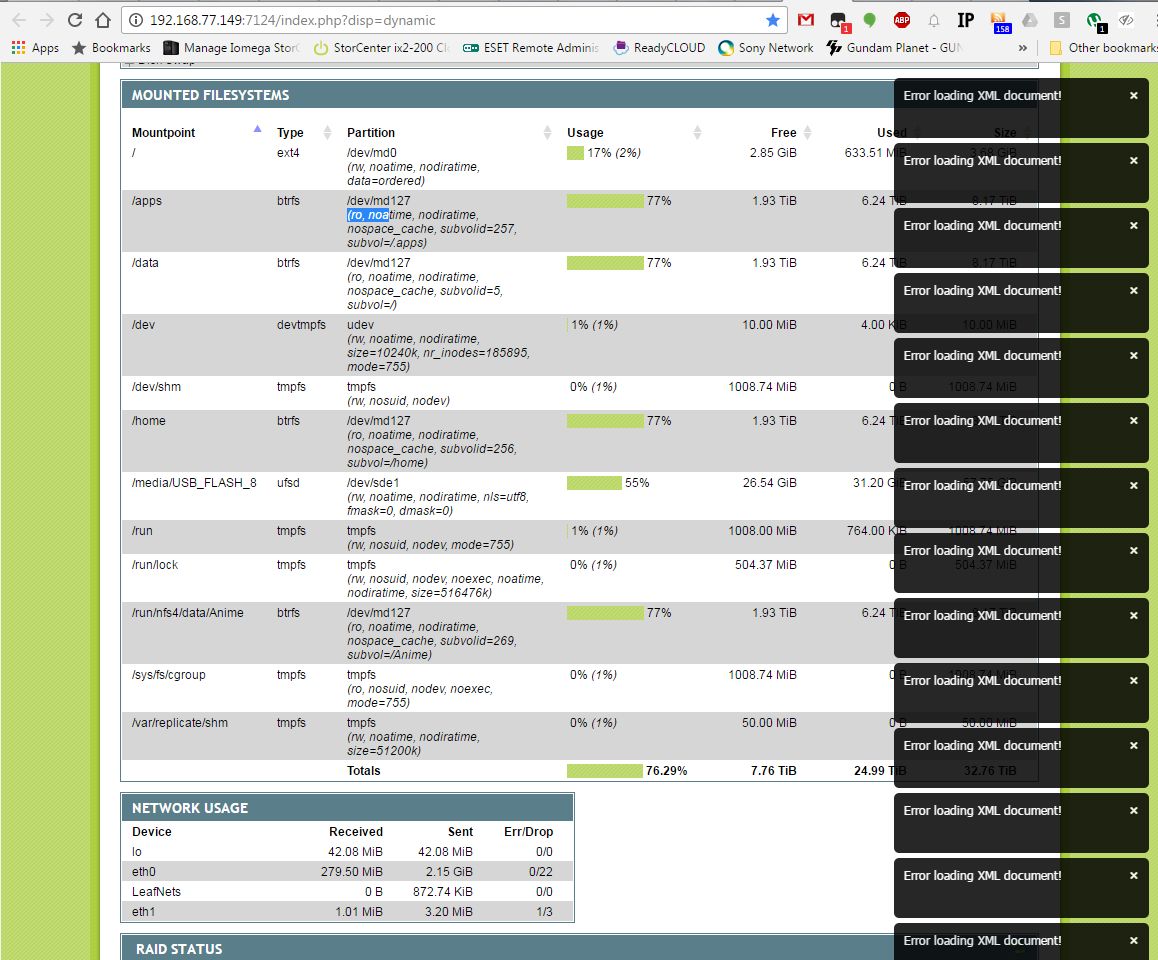
tmpfs 249M 0 249M 0% /sys/fs/cgroupMy NAS have another problem. Data partition (md127) is corrupted. (OS partition md0 is OK)
I Still waiting for support to respons to my case. My NAS is in Remotes support mode.
before restart my data partiton was in ro mode (not rw) after restart is data volume inactive
this is screenshot from PHPSysinfo before restart :
Related Content
NETGEAR Academy

Boost your skills with the Netgear Academy - Get trained, certified and stay ahead with the latest Netgear technology!
Join Us!
