NETGEAR is aware of a growing number of phone and online scams. To learn how to stay safe click here.
Forum Discussion

R_W
Apr 05, 2019Aspirant
RN214 Healthy XRAID Drives Degrade After Every Restart
RN214 system goes to a data degraded state each and every time the system is shutdown and restarted. After the data is resynced, which takes the better part of a day, the system will once again repo...

Hopchen
Apr 11, 2019Prodigy
Yup, you can download logs and attach to a Google link or similar and then PM me the link. I will be happy to take a look at them.
Cheers

Sandshark
Apr 11, 2019Sensei
That's usually caused by one of the drives not spining up fast enough. The slow one is marked dead, but then seen as alive and re-sync is started. Both your drives are 7200RPM, so it's not a speed mismatch that's causng it. Too heavy a load on the power supply.maybe?
- Retired_MemberApr 12, 2019
Sandshark wrote: "Too heavy a load on the power supply.maybe?"
...or lots of dirt/dust? Why not trying to cleanup the box? With the nas shutdown remove the disks keeping in mind which one belongs to which bay. Carefully do your cleanup and re-insert the disks into their dedicated bays. Reboot the nas and hope for the better.
Kind regards
 StephenBApr 13, 2019Guru - Experienced User
Retired_Member wrote:
...or lots of dirt/dust? Why not trying to cleanup the box?
While there might be dust inside the bays, it's more common for dust to be inside the chassis.
You do need to be careful here, as you can damage the fans if you do this incorrectly. Also removing the case can void the warranty.
- R_WApr 17, 2019Aspirant
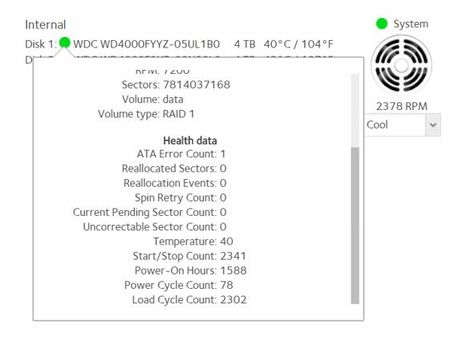
Your thought is interesting. I've noticed that the last drive I installed, in the second slot, isn't usually recognized the first or sometimes second time I start the system after a normal power shutdown. After 2-3 restarts through the menu option, the drive will appear and then the resync process fully engages. That drive interestingly, reports to be without any errors, while the first drive installed always has an ATA error value of "1". What would happen if I removed drive 1 and restarted the system with only drive two installed? To test if drive two would get recognized right from the start in this one drive scenario.
- StephenBApr 17, 2019Guru - Experienced User
R_W wrote:
What would happen if I removed drive 1 and restarted the system with only drive two installed? To test if drive two would get recognized right from the start in this one drive scenario.
The system should boot with slot 1 empty.
Though if you have a spare disk, it might be safer to do an install with only the spare disk (in slot 1), then power down the NAS and move the spare to slot 2.
- R_WApr 17, 2019Aspirant
Does the NAS retain identifying data for a drive that was removed so that upon the reinstall of the drive, the NAS box would know which slot the drive was previously installed in?
- R_WApr 17, 2019Aspirant
Forgot to add... only the RN214 is plugged into the backup ups.
Related Content
NETGEAR Academy

Boost your skills with the Netgear Academy - Get trained, certified and stay ahead with the latest Netgear technology!
Join Us!
