NETGEAR is aware of a growing number of phone and online scams. To learn how to stay safe click here.
Forum Discussion

Kimius
Jul 02, 2011Aspirant
Which drives to get for new ReadyNas?
So I need a new NAS. This is going to be expensive... TL:DR at bottom of post A bit of background info first. I have an NVX Business edition that I've had for a little over 2 years. I got it wit...

PapaBear1
Jul 16, 2011Apprentice
I thought you were trying to back up NAS1 to NAS2.
A while back I was playing with setting up a back up job from my Win 7 desktop to my NV+ to help another member. Here is what I did that worked:
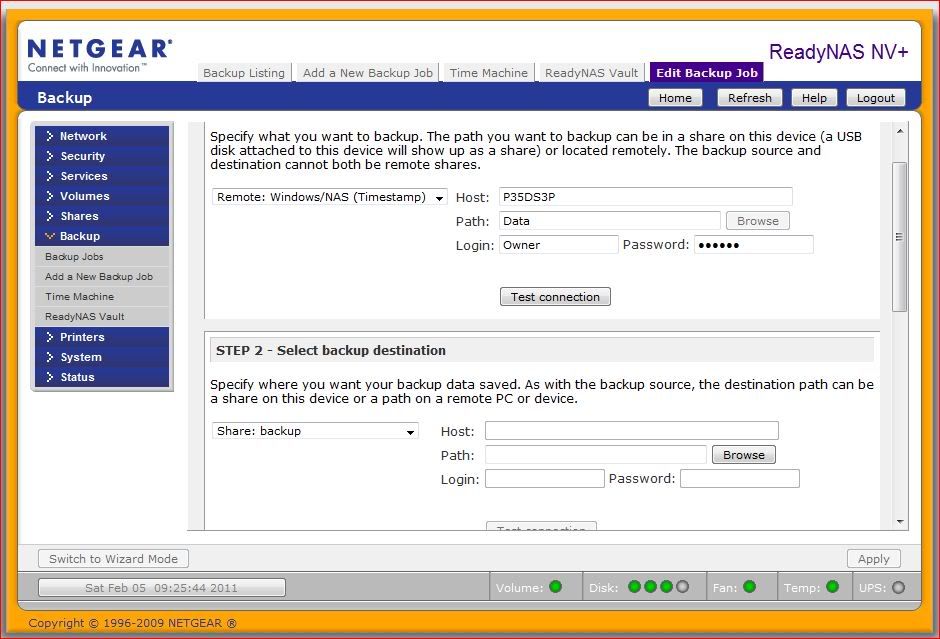
Now, my normal login is two words (first and last name) separated by a space. This works fine in Windows, but not in Linux apparently, so I used my admin login "owner" and it's password. When you use the name of folder/share and the name of the device, you do not use slashes. The fact that when you got the error message, it added the slashes, is a clue.
Note also that when backing up from or to a PC, the system is going to assume C:\. So for example when I entered P35DS3P as the host, that is the name of my computer and when I entered Data as the path, that is a first level folder off of C: (It is also an old folder that was deleted a few days after the screen shot was made).
If you are doing a one time backup of the NV+ to a drive attached to the PC which is not the boot/system drive, I would recommend you simply use Windows copy/paste of the files. It won't be much slower and far easier to set up. The backup jobs are set up to pull data from a PC and backup to or from another NAS, but backing up from an NAS to a PC is not normally done.
Here is the setup for one of my backup jobs pulling data from my NAS2 (NVX) to my NAS3 (NV+). There are 3 jobs that run daily starting at noon. My primary NAS1 (NVX) runs four backup jobs to NAS2 starting at midnight.
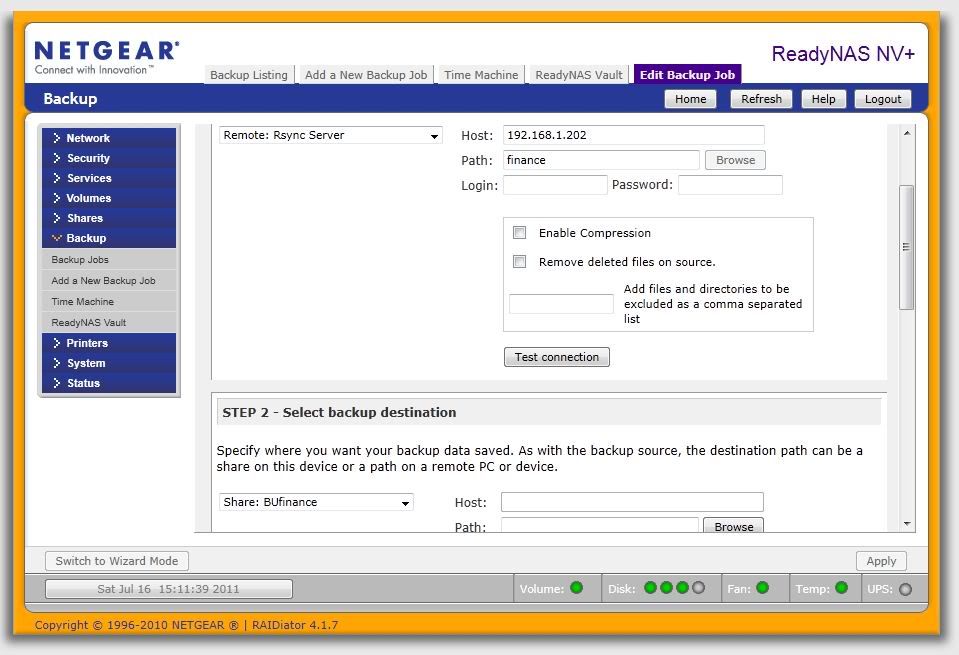
If you really want to push data from the NV+ to your PC, I can play around a bit, but I could never Frontview backup to recognize any drive other than C:\.
A while back I was playing with setting up a back up job from my Win 7 desktop to my NV+ to help another member. Here is what I did that worked:
Now, my normal login is two words (first and last name) separated by a space. This works fine in Windows, but not in Linux apparently, so I used my admin login "owner" and it's password. When you use the name of folder/share and the name of the device, you do not use slashes. The fact that when you got the error message, it added the slashes, is a clue.
Note also that when backing up from or to a PC, the system is going to assume C:\. So for example when I entered P35DS3P as the host, that is the name of my computer and when I entered Data as the path, that is a first level folder off of C: (It is also an old folder that was deleted a few days after the screen shot was made).
If you are doing a one time backup of the NV+ to a drive attached to the PC which is not the boot/system drive, I would recommend you simply use Windows copy/paste of the files. It won't be much slower and far easier to set up. The backup jobs are set up to pull data from a PC and backup to or from another NAS, but backing up from an NAS to a PC is not normally done.
Here is the setup for one of my backup jobs pulling data from my NAS2 (NVX) to my NAS3 (NV+). There are 3 jobs that run daily starting at noon. My primary NAS1 (NVX) runs four backup jobs to NAS2 starting at midnight.
If you really want to push data from the NV+ to your PC, I can play around a bit, but I could never Frontview backup to recognize any drive other than C:\.
Related Content
NETGEAR Academy

Boost your skills with the Netgear Academy - Get trained, certified and stay ahead with the latest Netgear technology!
Join Us!
