NETGEAR is aware of a growing number of phone and online scams. To learn how to stay safe click here.
Forum Discussion

Vincefr34
Mar 05, 2022Aspirant
access to Readynas admin page impossible, one disk looks dead
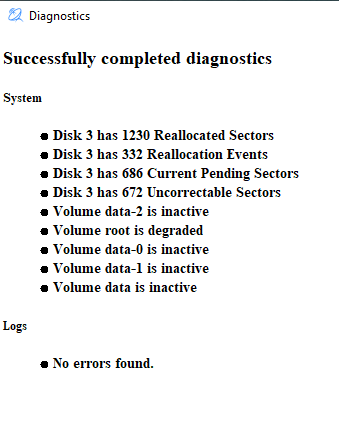
Hi all, since few days, I'm not able to access to my readynas admin page from a web browser. I'm not able to access to the shared directories. The readynas seems to be (too) busy. After some sea...
Vincefr34
Mar 05, 2022Aspirant
Thanks a lot Stephen, I will try this and let you know if not working.

Sandshark
Mar 06, 2022Sensei
It is not normal that it's showing volumes data, data-0, date-1 and data-2 as inactive. In fact data-0 through data-2 shouldn't be visible at all. Some thing else is going on.
- Vincefr34Mar 06, 2022Aspirant
As suggested, I removed the 3rd disk.
Now I can access to the admin page, but there is no volume mounted. The other 3 disks are visible with no error.
Any chance I can get accees to may dat again ?
 StephenBMar 07, 2022Guru - Experienced User
Vincefr34 wrote:
Any chance I can get accees to my data again ?
I suggest contacting Netgear support. There's a reasonable chance that they can remount your volume. Not sure if they will need a data recovery contract or not - data recovery is quite expensive. https://kb.netgear.com/69/ReadyNAS-Data-Recovery-Diagnostics-Scope-of-Service
 rn_enthusiastApr 26, 2022Virtuoso
Hi Vincefr34
This does not look like a filesystem side issue. Hence you running the "btrfs rescue zero-log" command would not fix this. That is also what you reported in the PM to me, as you tried this on your own accord. It fails to actually run the command because the filesystem complains about a missing device.
root@SERVEUR:~# btrfs rescue zero-log /dev/md126
warning, device 1 is missing
Looking at the dmesg log it can be seen that md127 tries to start with sda3 and sdb3 but that fails due to not enough partitions to start the raid.
[Sat Apr 23 17:55:52 2022] md/raid:md127: not enough operational devices (2/4 failed)
[Sat Apr 23 17:55:52 2022] RAID conf printout:
[Sat Apr 23 17:55:52 2022] --- level:5 rd:4 wd:2
[Sat Apr 23 17:55:52 2022] disk 0, o:1, dev:sda3
[Sat Apr 23 17:55:52 2022] disk 2, o:1, dev:sdb3
[Sat Apr 23 17:55:52 2022] md/raid:md127: failed to run raid set.
It reports that md127 only see 2/4 partitions, but the RAID5 would require 3/4 partitions. Due to different sized disks, you have multiple raid instanced which the filesystem "glues" together. It appears that you have 3 different raid instances for the data. One of these raids can't start and that causes the entire data volume to be inaccessible.
You have enough disks in the box to start these raids and the disks are healthy. I very much suspect the issue is that the partition table on sdc (Disk 1) is messed up. It is missing partitions... definitely missing sdc3 and possibly sdc4 as well. But the lack of sdc3 is the reason that the raid fails to assemble.
8 16 7814026584 sdb
8 17 4194304 sdb1
8 18 524288 sdb2
8 19 3902297912 sdb3
8 20 976754027 sdb4
8 21 2930255992 sdb5
8 32 7814026584 sdc
8 37 2930255992 sdc5
We have seen before that partitions goes missing, for unknown reasons. I cannot see any health issues on the remaining disks and the logs don't immediately indicate why this happened. The solution would be to copy the correct partition layout (likely from disk 2 - sdb), to disk 1 (sdc). That should allow the raids to assemble properly.However, one should look at the md-superblocks to ensure this is done correctly. Netgear should assist with this, realistically. I agree with StephenB on that. They used to offer some data recovery service, and I think they still do. Not sure how you would go about making a ticket these days. Perhaps StephenB knows (or maybe we need to tag the forums mods?)
Cheers
Related Content
NETGEAR Academy

Boost your skills with the Netgear Academy - Get trained, certified and stay ahead with the latest Netgear technology!
Join Us!
