NETGEAR is aware of a growing number of phone and online scams. To learn how to stay safe click here.
Forum Discussion

Vincefr34
Mar 05, 2022Aspirant
access to Readynas admin page impossible, one disk looks dead
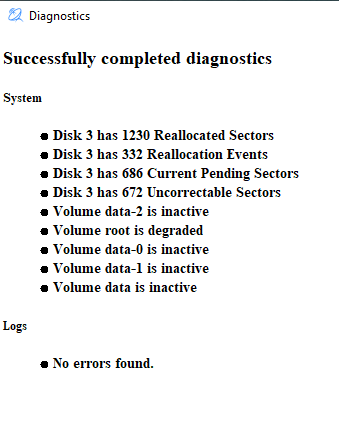
Hi all, since few days, I'm not able to access to my readynas admin page from a web browser. I'm not able to access to the shared directories. The readynas seems to be (too) busy. After some sea...

StephenB
Apr 26, 2022Guru - Experienced User
rn_enthusiast wrote:
Netgear should assist with this, realistically. I agree with StephenB on that. They used to offer some data recovery service, and I think they still do. Not sure how you would go about making a ticket these days. Perhaps StephenB knows (or maybe we need to tag the forums mods?)

rn_enthusiast
Apr 26, 2022Virtuoso
Thanks StephenB
Vincefr34I would not advise to try this on your own. Logs don't contain everything and I am conjecturing that you just need a fix to the sdc (disk 1) partition table but it is important to point out that one should examine md-superblocks and look at the md-logs to determine/confirm that this is the correct action to take. Doing this incorrectly or taking the wrong action can cause even more issues. Letting Netgear Level 3 support assess the situation, is the best at this point.
- Vincefr34Apr 27, 2022Aspirant
thanks to all for the help and to put me in touch with L3.
Very much appreciated.
Vincent
- rn_enthusiastApr 28, 2022Virtuoso
Hi JeraldM
You sent your PM to me, instead of Vincefr34
By mistake, I assume.
Please PM Vincefr34 instead.
Thanks

Related Content
NETGEAR Academy

Boost your skills with the Netgear Academy - Get trained, certified and stay ahead with the latest Netgear technology!
Join Us!
