NETGEAR is aware of a growing number of phone and online scams. To learn how to stay safe click here.
Forum Discussion

NesporBellisRM
Jul 14, 2017Tutor
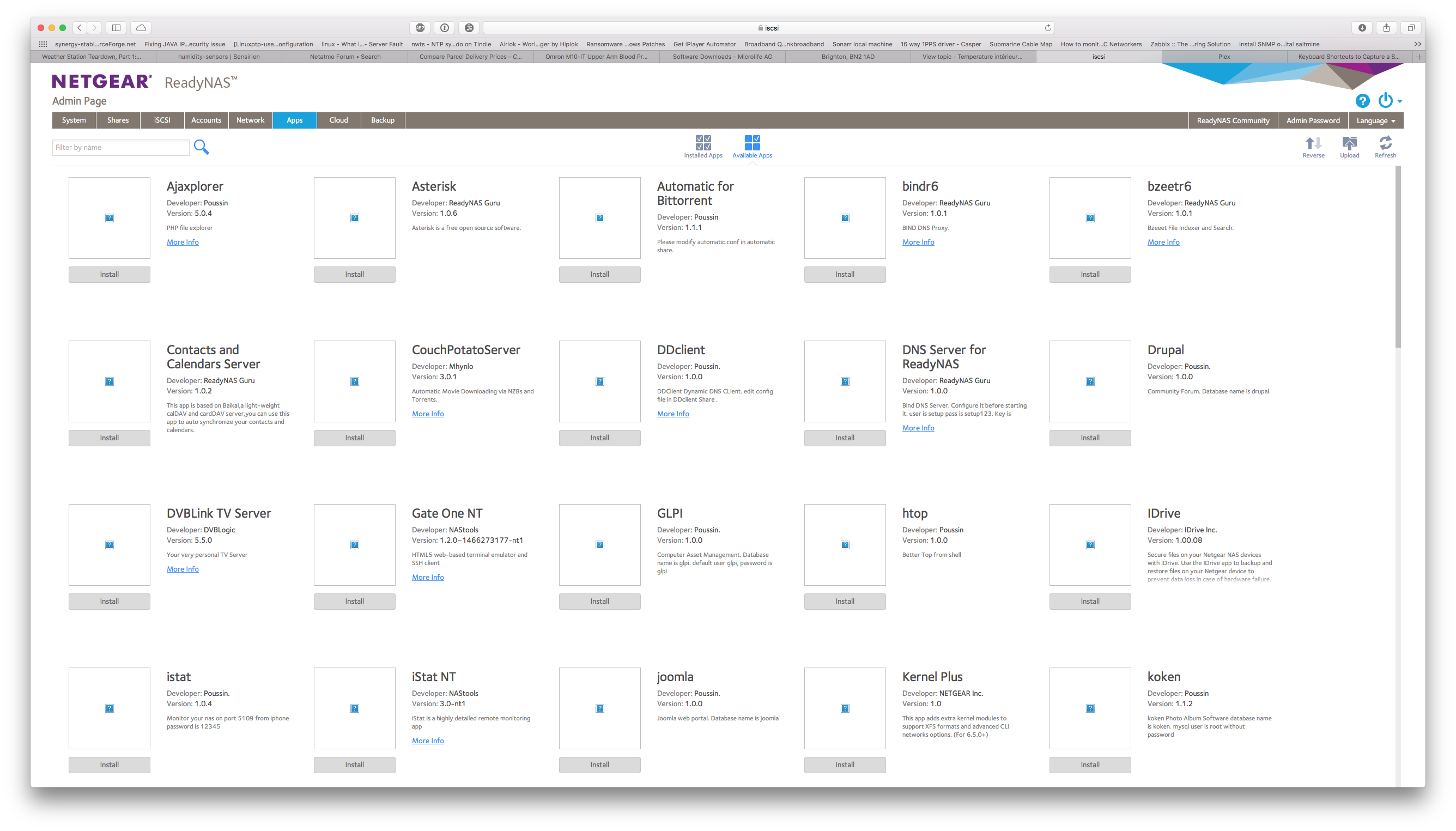
App icons in web interface broken
really as per the subject - in the web interface all the app icons show as broken It's been broken through the last few releases ( was hoping a new release would fix the issue but.. ) ReadNAS...
 Nov 14, 2017
I know this is from several months ago but this same "app icons missing or broken" issue has plagued my 316 for more than a year.
I finally solved the issue.
It turns out that my apache2 webserver was always booting into "safe" mode. If you have ssh enabled you can verify by checking the status of apache2 and apache2-safe
systemctl status apache2
systemctl status apache2-safe
In my case, the apache2 status showed "failed", and the reason was because of invalid permissions on the /var/lib/apache2/fastcgi folder. Specifically the error message was:
FastCgiIpcDir /var/lib/apache2/fastcgi: access for server (uid 98, gid 98) failed: write not allowed by group
The reason is because apache2 is run by user admin, but the fastcgi folder is owned by www-data.
I changed the owner of /var/lib/apache2/fastcgi to admin:admin and now apache2 boots fine.
I'm not sure if this was the "right" thing to do, or whether perhaps apache2 should be set to run as www-data instead of admin or whether fastcgi should be disabled entirely.
One final point: In "safe" mode, the web interface consistently rebooted anytime I made any settings changes. I found out that the safe mode was giving this error:
apache2[24533]: [error] server reached MaxClients setting, consider raising the MaxClients setting
So if your apache2 is indeed not starting correctly and reverting to safe mode, it might be a good idea performance-wise to find the root cause and fix it.
NesporBellisRM
Jul 14, 2017Tutor
Hi there,
yes, I get the same on multiple machines and multiple OS ( and IE, Chrome, Safari ) - https only / no http interface allowed.
Thanks for the how to attach image - see attached :)
Rgds,
R.

JennC
Jul 14, 2017NETGEAR Employee Retired
Hello NesporBellisRM,
How about rebooting your ReadyNAS?
Or reloading the firmware manually on the admin page?
Regards,
- NesporBellisRMJul 14, 2017Tutor
Hi,
already multiple reboots, and as said firmware upgrades etc.
Is there perhaps somewhere better/more appropriate I should post this?
Rgds,
R.
- JennCJul 24, 2017NETGEAR Employee Retired
Hello NesporBellisRM,
Sorry I've been away for a week. Are you still getting the same problem on loading the available apps icons?
Regards,
Related Content
NETGEAR Academy

Boost your skills with the Netgear Academy - Get trained, certified and stay ahead with the latest Netgear technology!
Join Us!
