NETGEAR is aware of a growing number of phone and online scams. To learn how to stay safe click here.
Forum Discussion

michaelsammler
Jan 10, 2022Aspirant
Boot up gets stuck on same file, tried booting into read only and stuck on different file.
Hello. There was an update, then I had a drive fail. I hot swapped it and everything seemed to work fine. Later when the nas shut down it would not boot up again.
Raid X
Netgear RAIDar shows my nas.
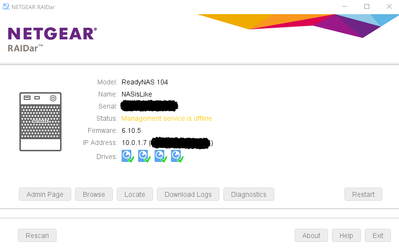
Boot up gets hung on a file called upnp.httpd.service everytime. Sometimes it is %90, sometimes %98 booted when it gets stuck.Left it on for a few days and no change. Tried a few times with same result. Tried to boot into readonly and boot gets hung on another file.
NAS is several years old and when I try to use the single service option for help it says "Not in my country". I am in USA.
I tried the OS instal boot, and it instals the os, then same boot issue of hung on unpn.httpd.service file.
I have not tried the USB method yet.
I can do a factory reset. I don't need old backups, just need to start backing up again. I am hesitant though, because I have a lot movies (with needed language subtitles) that will take a lot of time to put together again. So that is a final option after a week of trying things or so.
Suggestions? Can I provide more info?
Michael Sammler
7 Replies
Replies have been turned off for this discussion
- JeraldMNETGEAR Employee Retired
Welcome to the community!
I removed the dropbox link for your system logs since it contains risk of information leakage.
Upon checking disk_info.log, it seems that sdd (S/N: S301F6ZB) wasn't added to the RAID 5 and sda (S/N: S301EEYH) also has a high count of reallocated sectors despite being replaced couple months ago.
What we can do for now is to check the affected disks using their diagnostic tools.
Regards,JeraldM
NETGEAR Community Team
 michaelsammlerAspirant
Hello,
I have used the built in TEST DISK boot menu option and all the disks have shown no issues.
Are you suggesting a seagate test?
Michael StephenBGuru - Experienced User
michaelsammler wrote:
Are you suggesting a seagate test?Sounds like he is suggesting Seatools.
michaelsammler wrote:I have used the built in TEST DISK boot menu option and all the disks have shown no issues.
Netgear's threshold for bad sectors is higher than mine - I suggest also downloading the log zip file, and looking in disk-info.log.

Related Content
NETGEAR Academy

Boost your skills with the Netgear Academy - Get trained, certified and stay ahead with the latest Netgear technology!
Join Us!
