NETGEAR is aware of a growing number of phone and online scams. To learn how to stay safe click here.
Forum Discussion

chopin70
Jul 15, 2017Virtuoso
Bug FW 6.7.5 Final: Balance ends immeadiately
Hi,
I manually startedcBalance, and it immeadiately completed:
Log messages:
| Sat Jul 15 2017 23:25:22 | Volume: Balance complete for volume data. | |
| Sat Jul 15 2017 23:25:17 | Volume: Balance started for volume data. |
5 seconds seems too short for a balance on a volume
This is on 524X with lates 6.7.5 FW
Any fix ?
Yup, you can see by the dmesg output that the NAS balanced a few chunks and thus it was not failing. At the same time your NAS is perfectly well balanced already, so it is no suprise then that a balance only takes a few seconds to run on your system.
Balance is not the same as say, a defrag or scrub. If there is hardly anything to balance - it will be super fast. But that is good that you have a well balanced volume!
7 Replies
Replies have been turned off for this discussion
 HopchenProdigy
Hi,
Seems the balance fails to run. It could be due to chunk allocation on the filesystem. Would you mind logging in over SSH and run the below commands and post the output here:
btrfs fi sh /data
btrfs fi df /data
Then run the balance again and then run this command right after it finishes (fails).
dmesg | tail -n20
Thanks
- mdgm-ntgrNETGEAR Employee Retired
If you'd rather not use SSH you could download the logs and post the output of btrfs.log then run the balance then download the logs again and post the relevant contents of dmesg.log (though obviously they won't be right at the end as there will be entries relating to downloading the logs).
 chopin70Virtuoso
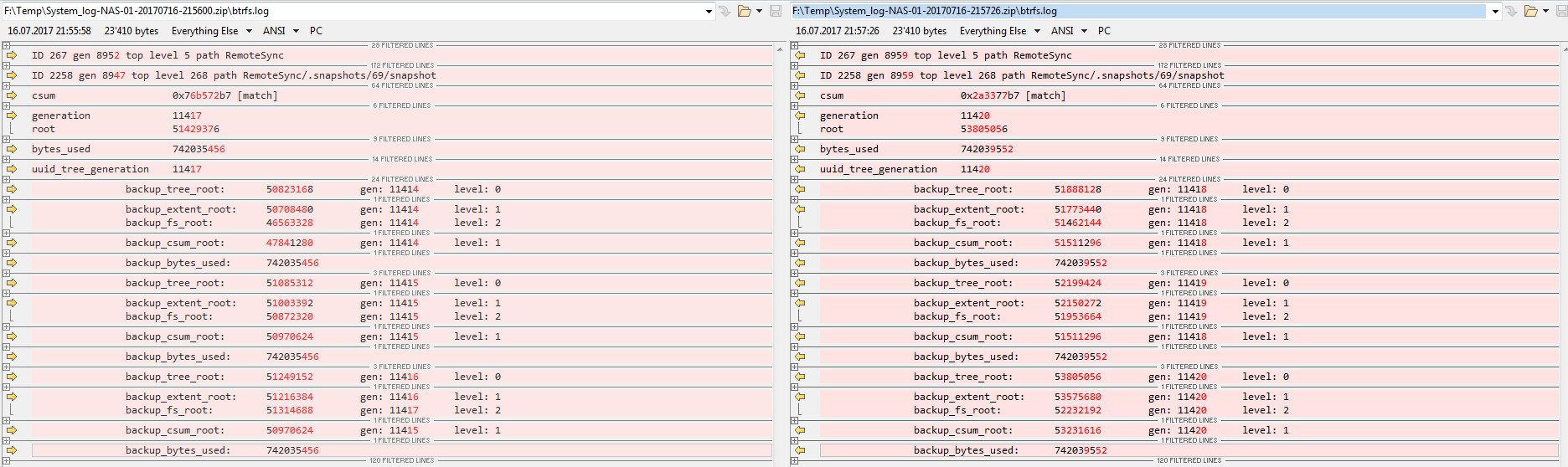
btrfs.log contents:
- before balance: https://pastebin.com/zFeft5HM
- after balance: https://pastebin.com/VAzP90CL
- diff between before/after balance:
dmsg diff: insertions after balance:
[Sun Jul 16 21:56:02 2017] nr_pdflush_threads exported in /proc is scheduled for removal
[Sun Jul 16 21:56:56 2017] BTRFS info (device dm-0): relocating block group 1949474750464 flags data
[Sun Jul 16 21:56:59 2017] BTRFS info (device dm-0): found 52 extents
[Sun Jul 16 21:57:03 2017] BTRFS info (device dm-0): found 52 extents
[Sun Jul 16 21:57:03 2017] BTRFS info (device dm-0): relocating block group 1948937879552 flags metadata|dup
[Sun Jul 16 21:57:04 2017] BTRFS info (device dm-0): relocating block group 1948904325120 flags system|dup
[Sun Jul 16 21:57:04 2017] BTRFS info (device dm-0): found 7 extents
SSH commands output:
root@NAS-01:/# btrfs fi sh /data
Label: '0a433d7a:data'  uuid: 964b1ba9-7b0b-487c-bcb5-0e2ed0ac348c
        Total devices 1 FS bytes used 1.77TiB
        devid    1 size 3.63TiB used 1.77TiB path /dev/mapper/data-0


root@NAS-01:/# btrfs fi df /data
Data, single: total=1.77TiB, used=1.77TiB
System, DUP: total=32.00MiB, used=224.00KiB
Metadata, DUP: total=3.50GiB, used=2.70GiB
GlobalReserve, single: total=512.00MiB, used=0.00B
Hope this can help you fix my issue with balance broken

Related Content
NETGEAR Academy

Boost your skills with the Netgear Academy - Get trained, certified and stay ahead with the latest Netgear technology!
Join Us!
