NETGEAR is aware of a growing number of phone and online scams. To learn how to stay safe click here.
Forum Discussion

LaszloFolgerts
Aug 21, 2015Aspirant
Cannot move files on share / cannot activate HTTP on RN102
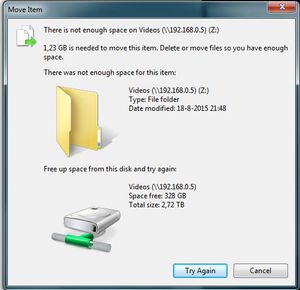
Hardware: RN102, firmware 6.2.5 PC: Win7 X64 Ok, so as of late, I'm having trouble moving files within the same share (drag 'n drop in Win7 X64), which was never a problem before. When I try to ...
 Aug 25, 2015
of course it's
# df -h /data
I figured that out, eventally ;) but thanks!
I kinda just followed this thread: https://community.netgear.com/t5/Using-your-ReadyNAS/No-available-diskspace-but-admin-page-reports-1-tb-free/td-p/942637
after correcting some typos, it worked. After running the balance, I now have double the amount of totally allotted metadata space, yay! :)
EskenderNG: hah, goog thing I didn't go through with it, then ;)
EskenderNG, StephenB, vandermerwe: Thank you guys so much for responding to my questions; I wouldn't have otherwise been able to solve it! :)

vandermerwe
Aug 22, 2015Master
I see something similar when trying to write to windows network drives. It always responds to remounting the network drive. The other method to try is to open the share via windows Network, your nas should be displayed there and you should be able to open up the relevant share. Try the move like that without using the Z drive .
In the nas settings is http on as a service?
LaszloFolgerts
Aug 23, 2015Aspirant
Hi, thanks for the reply.
I have no trouble accessing the share, either via the web UI or via the network. I have trouble moving files within the share.
I can't seem to get HTTP turned on. Every time I toggle HTTP on via the web UI, I hit apply or save and then the aforementioned pop-up appears, thus telling me it failed to turn on HTTP.
I can't download anything anymore either. When I upload a NZB file to SABnzbd, I get the warning: ERROR: Failed making (/data/Videos/SABnzbd/filename)
- vandermerweAug 23, 2015Master
Do you have ssh access?
- LaszloFolgertsAug 23, 2015Aspirant
Just tried it; simple login, reboot via SSH, all works.
- LaszloFolgertsAug 23, 2015Aspirant
To be clear: HTTP is turned on at System>settings. But when I go to the share, it's turned off and I can't switch it on. I also found out that I can't reset permissions. First it tells me that it successfully reset permissions for the share, after which it tells me that it failed to do so.
Related Content
NETGEAR Academy

Boost your skills with the Netgear Academy - Get trained, certified and stay ahead with the latest Netgear technology!
Join Us!
