NETGEAR is aware of a growing number of phone and online scams. To learn how to stay safe click here.
Forum Discussion

LaszloFolgerts
Aug 21, 2015Aspirant
Cannot move files on share / cannot activate HTTP on RN102
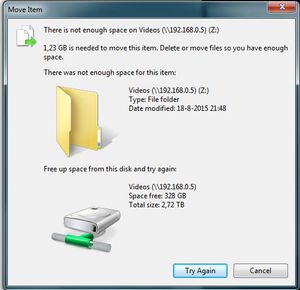
Hardware: RN102, firmware 6.2.5 PC: Win7 X64 Ok, so as of late, I'm having trouble moving files within the same share (drag 'n drop in Win7 X64), which was never a problem before. When I try to ...
 Aug 25, 2015
of course it's
# df -h /data
I figured that out, eventally ;) but thanks!
I kinda just followed this thread: https://community.netgear.com/t5/Using-your-ReadyNAS/No-available-diskspace-but-admin-page-reports-1-tb-free/td-p/942637
after correcting some typos, it worked. After running the balance, I now have double the amount of totally allotted metadata space, yay! :)
EskenderNG: hah, goog thing I didn't go through with it, then ;)
EskenderNG, StephenB, vandermerwe: Thank you guys so much for responding to my questions; I wouldn't have otherwise been able to solve it! :)
LaszloFolgerts
Aug 23, 2015Aspirant
Hi, thanks for the reply.
I have no trouble accessing the share, either via the web UI or via the network. I have trouble moving files within the share.
I can't seem to get HTTP turned on. Every time I toggle HTTP on via the web UI, I hit apply or save and then the aforementioned pop-up appears, thus telling me it failed to turn on HTTP.
I can't download anything anymore either. When I upload a NZB file to SABnzbd, I get the warning: ERROR: Failed making (/data/Videos/SABnzbd/filename)

vandermerwe
Aug 23, 2015Master
Do you have ssh access?
- LaszloFolgertsAug 23, 2015Aspirant
Just tried it; simple login, reboot via SSH, all works.
- LaszloFolgertsAug 23, 2015Aspirant
To be clear: HTTP is turned on at System>settings. But when I go to the share, it's turned off and I can't switch it on. I also found out that I can't reset permissions. First it tells me that it successfully reset permissions for the share, after which it tells me that it failed to do so.
- LaszloFolgertsAug 23, 2015Aspirant
Still pulling my hair out on this one. For a while, I was able to move and add files and folders again, after I'd deleted some snapshots. Not shure if that had anything to do with it though, because they were only a few and had already deleted a lot more snapshots earlier. However, now I get the stupid pop-ups again and I can't move or add files and/or folders. Every now and then I can create a new folder, but when I want to change the folder name, I get the pop-up again that there's not enough space and then I can't add new folders anymore either.
As for now, I can't download anything or move any files around on my shares.
Related Content
NETGEAR Academy

Boost your skills with the Netgear Academy - Get trained, certified and stay ahead with the latest Netgear technology!
Join Us!
