NETGEAR is aware of a growing number of phone and online scams. To learn how to stay safe click here.
Forum Discussion

LaszloFolgerts
Aug 21, 2015Aspirant
Cannot move files on share / cannot activate HTTP on RN102
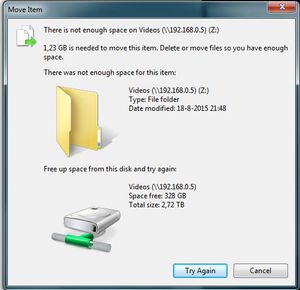
Hardware: RN102, firmware 6.2.5 PC: Win7 X64 Ok, so as of late, I'm having trouble moving files within the same share (drag 'n drop in Win7 X64), which was never a problem before. When I try to ...
 Aug 25, 2015
of course it's
# df -h /data
I figured that out, eventally ;) but thanks!
I kinda just followed this thread: https://community.netgear.com/t5/Using-your-ReadyNAS/No-available-diskspace-but-admin-page-reports-1-tb-free/td-p/942637
after correcting some typos, it worked. After running the balance, I now have double the amount of totally allotted metadata space, yay! :)
EskenderNG: hah, goog thing I didn't go through with it, then ;)
EskenderNG, StephenB, vandermerwe: Thank you guys so much for responding to my questions; I wouldn't have otherwise been able to solve it! :)

EskenderNG
Aug 24, 2015NETGEAR Employee Retired
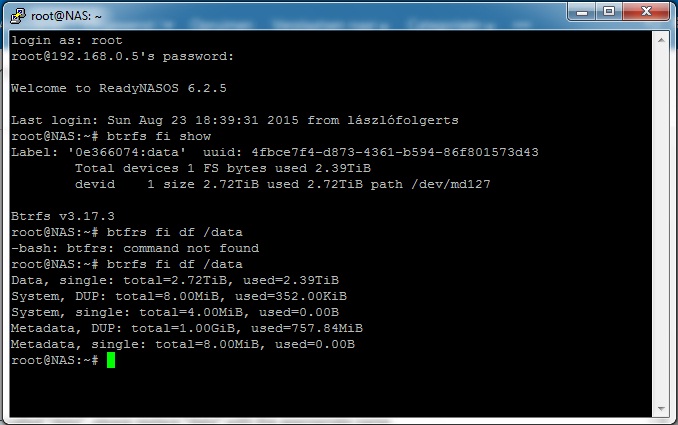
Using SSH please try to run the following commands:
btrfs fi show
and
btrfs fi df /data
and post the output here. In case your volume is not called "data", please replace "data" with the appropriate name.
Bye,
Eskender
- LaszloFolgertsAug 24, 2015Aspirant
For reasons unbeknownst to me, I am now able to add and move files again. I've had the NAS off for a while, but I'm not sure that had anything to do with it, because that's happened before and it didn't do anything then, so I'm not sure how long this will last.
Anyway, here's the screenshot:
I hope I did it right ;)
Thanks for the help anyway!
Cheers,
Laszlo
Related Content
NETGEAR Academy

Boost your skills with the Netgear Academy - Get trained, certified and stay ahead with the latest Netgear technology!
Join Us!
