NETGEAR is aware of a growing number of phone and online scams. To learn how to stay safe click here.
Forum Discussion

LaszloFolgerts
Aug 21, 2015Aspirant
Cannot move files on share / cannot activate HTTP on RN102
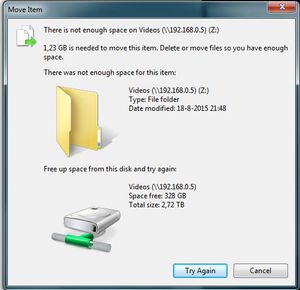
Hardware: RN102, firmware 6.2.5 PC: Win7 X64 Ok, so as of late, I'm having trouble moving files within the same share (drag 'n drop in Win7 X64), which was never a problem before. When I try to ...
 Aug 25, 2015
of course it's
# df -h /data
I figured that out, eventally ;) but thanks!
I kinda just followed this thread: https://community.netgear.com/t5/Using-your-ReadyNAS/No-available-diskspace-but-admin-page-reports-1-tb-free/td-p/942637
after correcting some typos, it worked. After running the balance, I now have double the amount of totally allotted metadata space, yay! :)
EskenderNG: hah, goog thing I didn't go through with it, then ;)
EskenderNG, StephenB, vandermerwe: Thank you guys so much for responding to my questions; I wouldn't have otherwise been able to solve it! :)
LaszloFolgerts
Aug 24, 2015Aspirant
I see, so the data I freed from the snapshots would then only be available again for snapshots or other meta-data related things?
And by running a "balance", I can re-allocate that freed up space from meta-data to regular data?
Just checking if I understand correctly.
Thanks,
Laszlo

EskenderNG
Aug 24, 2015NETGEAR Employee Retired
Almost. Metadata has nothing to do with snapshots. Snapshots are basically just pointers pointing to data blocks. If deleting snapshots gives you an increased amount of free space then the files the snapshots were made of were already deleted before. If any of the two still exists, the file or the snapshot of a file, the space will not be freed upon deletion of the other. So, by deleting the snapshots you have finally released the space formerly occupied by the data (that is space for metadata and space for data).
As mentioned before this free space is only returned in a "used" state. So, since I am guessing that you were running out of meta data space before you gained some new meta data space from the data the snapshots was pointing to.
What you want to do now is the opposite of what you mentioned. You actually want to free up data allocated space so it can be used for metadata by running a balance.
Bye,
Eskender
- LaszloFolgertsAug 24, 2015Aspirant
Ok, thanks for the clarification. So in this particular case, deleting the snapshots is a bit like emptying the trash bin in windows.
But then do you think the lack of meta data space was the reason for not being able to move or add files on the shares, despite there being at least 300GB of free space?
Forgive my ignorance (I'm still quite a n00b) but what exactly is meta data for, then?
Thanks,
Laszlo
 StephenBAug 24, 2015Guru - Experienced User
Literally "metadata" is "data about data".
In the context of BTRFS, the metadata includes the data structures associated with the file. That is, where it lives on the disk, etc.
- EskenderNGAug 24, 2015NETGEAR Employee Retired
Hi no problem,
I would first wait and see if the balance yields the desired result. Maybe I was on the wrong path altogether.
This is my interpretation of the command results you posted. The first line of btrfs fi show tells me that your system is reporting roughly 400 GB of free space. However, looking at the second line one can see that this free space has been fully allocated before. To see what it has been allocated for the next command btrfs fi df /data is useful. There you can see that almost everything (the difference between total and used on the line Data, single) has been allocated for data. The other relevant line Metadata, DUP shows that only 250 MB of this space has been allocated for metadata.
I really do not have good knowledge of what minimum amount of space is required but this seems to be very little left. In fact, you might already run into problems as I remember vaguely that a balance requires around 500 MB of metadata space to work.
I would still try it but it might take a very long time. Unless someone else on the forum objects.
Bye,
Eskender
Related Content
NETGEAR Academy

Boost your skills with the Netgear Academy - Get trained, certified and stay ahead with the latest Netgear technology!
Join Us!
