NETGEAR is aware of a growing number of phone and online scams. To learn how to stay safe click here.
Forum Discussion

LaszloFolgerts
Aug 21, 2015Aspirant
Cannot move files on share / cannot activate HTTP on RN102
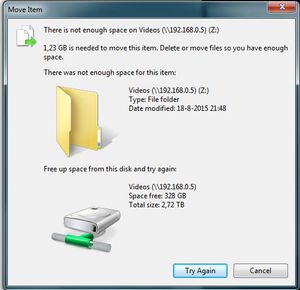
Hardware: RN102, firmware 6.2.5 PC: Win7 X64 Ok, so as of late, I'm having trouble moving files within the same share (drag 'n drop in Win7 X64), which was never a problem before. When I try to ...
 Aug 25, 2015
of course it's
# df -h /data
I figured that out, eventally ;) but thanks!
I kinda just followed this thread: https://community.netgear.com/t5/Using-your-ReadyNAS/No-available-diskspace-but-admin-page-reports-1-tb-free/td-p/942637
after correcting some typos, it worked. After running the balance, I now have double the amount of totally allotted metadata space, yay! :)
EskenderNG: hah, goog thing I didn't go through with it, then ;)
EskenderNG, StephenB, vandermerwe: Thank you guys so much for responding to my questions; I wouldn't have otherwise been able to solve it! :)

EskenderNG
Aug 25, 2015NETGEAR Employee Retired
Preferably try to free more space before running the balance. There was just another user running into problems because of balancing with too little space left. The advice was to increase free space to 80 - 85%.
Eskender
LaszloFolgerts
Aug 25, 2015Aspirant
Ok, after working ok again for a while, its gone into "no more disk space available" mode again.
I ran a balance, but it didn't free up any meta data space. Here's what putty said:
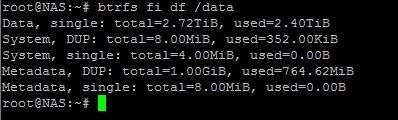
What I also don't understand is that I was able to add/move files around when there was far less space available on the disks. Way before I deleted a bunch of files and snapshots.
And I don't really feel like emptying my drives for 80-85% That means losing allmost all of my data.
Thanks,
Laszlo
- LaszloFolgertsAug 25, 2015Aspirant
Going through the log files, it shows that the balance was ended as soon as it started, which leads me to suspect that he balance didn't really run at all
I saw somewhere that you can run a balance through putty as well, but the how-to was a bit confusing to me.
# df -h data
gives me: "no such file or directory"
Thanks,
Laszlo
 StephenBAug 25, 2015Guru - Experienced User
LaszloFolgerts wrote:
Going through the log files, it shows that the balance was ended as soon as it started, which leads me to suspect that he balance didn't really run at all
I saw somewhere that you can run a balance through putty as well, but the how-to was a bit confusing to me.
# df -h data
gives me: "no such file or directory"
of course it's
# df -h /data
On manually running balance,
btrfs balance /data
should work.
- LaszloFolgertsAug 25, 2015Aspirant
of course it's
# df -h /data
I figured that out, eventally ;) but thanks!
I kinda just followed this thread: https://community.netgear.com/t5/Using-your-ReadyNAS/No-available-diskspace-but-admin-page-reports-1-tb-free/td-p/942637
after correcting some typos, it worked. After running the balance, I now have double the amount of totally allotted metadata space, yay! :)
EskenderNG: hah, goog thing I didn't go through with it, then ;)
EskenderNG, StephenB, vandermerwe: Thank you guys so much for responding to my questions; I wouldn't have otherwise been able to solve it! :)
- EskenderNGAug 25, 2015NETGEAR Employee Retired
Sorry, I meant 15 % free space, 85 % occupied space.
Eskender

Related Content
NETGEAR Academy

Boost your skills with the Netgear Academy - Get trained, certified and stay ahead with the latest Netgear technology!
Join Us!
