NETGEAR is aware of a growing number of phone and online scams. To learn how to stay safe click here.
Forum Discussion

Monteverde
Jan 29, 2016Aspirant
Duo v1 hangs during sync and losses network
Hi, I have a ReadyNas Duo v1 with two 2 TB disks in RAID configuration (don't remember which), The 2TB disk space is almost full, ~95%. Maximum memory. I also have a UPS connected to the NA...

StephenB
Jan 29, 2016Guru - Experienced User
Disk 2 has an OS partition but no data partition. Data is mirrored there none the less.
It sounds like you must have RAID-1, but that could be either xraid or flexraid. What tool did you use to extract the data on the PC? With xraid, I suggest linux reader ( http://www.diskinternals.com/linux-reader/ )
When you can access via ssh, did you check OS partition fullness?
df . -h
df . -i
Note you can also remove disk 2 and boot the NAS w/o it. Then it can't sync. It might still lock up.
Be careful not to insert a disk with the NAS running right now though - it will format it, and that is not what you want.
 MonteverdeJan 29, 2016Aspirant
Hi,
Yes, I used the linux-reader tool from diskinternals.com as recommmend in other threads in this forum.
I definitly think I use X-RAID and not Flex-RAID.
Removed disk2 when nas was down and start up. Logged in with ssh and checked the proposed commands, see below:
Filesystem            Size  Used Avail Use% Mounted on
/dev/hdc1             1.9G  608M  1.3G  31% /
nas-76-26-27:/# df . -i
Filesystem            Inodes   IUsed   IFree IUse% Mounted on
/dev/hdc1             128000   12157  115843   10% /
Should I have had disk2 inserted?
I only find the following log files updated in the system, see below. Shouldn't other logfiles have updates?
nas-76-26-27:/# cat /var/log/frontview/memory.log
SZ: 1024
AT: 2.5-3-3-7
ID: 7f98000000000000
PN: 4b0000000000000000000000000000000000
RV: 0000
DT: 0921
SN: a1147869

nas-76-26-27:/# cat /var/log/frontview/enclosure.log
fan!!1!!status=ok::descr=1744RPM
ups!!1!!status=fail::descr=APC Back-UPS CS 350 Battery charge: 100%, 77 min
volume!!1!!status=ok::descr=Volume C: RAID Level X, Redundant; 1751 GB (94%) of 1853 GB used
disk!!1!!status=ok::descr=Channel 1: SAMSUNG HD204UI 1863 GB, 34C/93F
disk!!2!!status=ok::descr=Channel 2: SAMSUNG HD204UI 1863 GB, 31C/87F
model!!0!!mode=home::descr=ReadyNAS Duo::arch=nsp
Boot!!FS_CHECK!! 53%

nas-76-26-27:/# cat /tmp/fsck.log
***** File system check performed at Fri Jan 29 23:57:15 CET 2016 *****
fsck 1.40.11 (17-June-2008)
e2fsck 1.40.11 (17-June-2008)
c was not cleanly unmounted, check forced.
Pass 1: Checking inodes, blocks, and sizes
It locked again at ~70% into the file checking
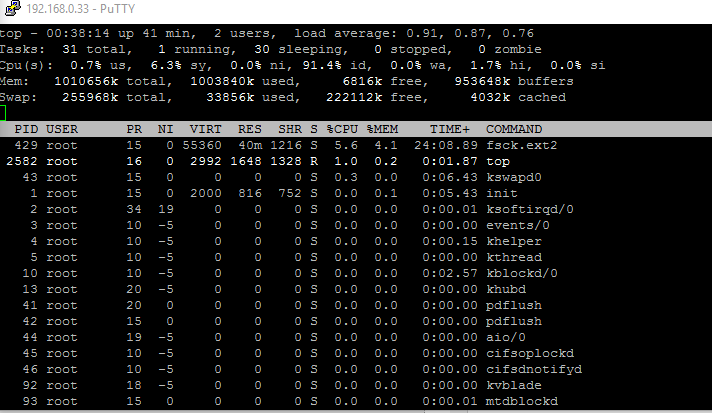
I ran the top command just to see if there were any resources were low, but I don't think it looks strange
Any ideas?
- StephenBJan 30, 2016Guru - Experienced User
Your OS partition is fine. You must be using xraid, because linux reader wouldn't see the files if you were using flexraid.
I think you have a corrupt file system (and that the lockup is in fsck, not raid resync). Though I can't rule out a failing disk.
You could shut down, and insert disk 2 alone (in the second slot) and see if you get the same behavior. My guess is that you will, but it is worth a try.
It is also worth testing the disks with vendor diags in a PC (seatools for seagate, lifeguard for western digital).
Assuming the lockup happens with only disk 2 installed, the options are to
(a) attempt to repair the file system yourself
(b) contract with Netgear for data recovery
(c) accept the data loss - do a factory reset on the NAS, reconfigure it, and restore the data from a backup.
No matter what option you pick, create a backup on your PC first - using linux reader (copying the files linux reader sees to a USB disk or an NTFS internal disk).
- MonteverdeJan 30, 2016Aspirant
Tried to boot up with only disk 2 plugged in.
The system came up after finishing the file checks, i.e. no hanging during fsck phase as with both disks or only disk 1 in.
So problem seems to be related to disk 1.
FrontView access, shares etc came up.
Did a controlled shutdown since I have to go away for a while.
Will try to backup to external disks from NAS during later tonight.
Related Content
NETGEAR Academy

Boost your skills with the Netgear Academy - Get trained, certified and stay ahead with the latest Netgear technology!
Join Us!
