NETGEAR is aware of a growing number of phone and online scams. To learn how to stay safe click here.
Forum Discussion

Monteverde
Jan 29, 2016Aspirant
Duo v1 hangs during sync and losses network
Hi, I have a ReadyNas Duo v1 with two 2 TB disks in RAID configuration (don't remember which), The 2TB disk space is almost full, ~95%. Maximum memory. I also have a UPS connected to the NA...

StephenB
Jan 29, 2016Guru - Experienced User
Disk 2 has an OS partition but no data partition. Data is mirrored there none the less.
It sounds like you must have RAID-1, but that could be either xraid or flexraid. What tool did you use to extract the data on the PC? With xraid, I suggest linux reader ( http://www.diskinternals.com/linux-reader/ )
When you can access via ssh, did you check OS partition fullness?
df . -h
df . -i
Note you can also remove disk 2 and boot the NAS w/o it. Then it can't sync. It might still lock up.
Be careful not to insert a disk with the NAS running right now though - it will format it, and that is not what you want.

Monteverde
Jan 29, 2016Aspirant
Hi,
Yes, I used the linux-reader tool from diskinternals.com as recommmend in other threads in this forum.
I definitly think I use X-RAID and not Flex-RAID.
Removed disk2 when nas was down and start up. Logged in with ssh and checked the proposed commands, see below:
Filesystem            Size  Used Avail Use% Mounted on
/dev/hdc1             1.9G  608M  1.3G  31% /
nas-76-26-27:/# df . -i
Filesystem            Inodes   IUsed   IFree IUse% Mounted on
/dev/hdc1             128000   12157  115843   10% /
Should I have had disk2 inserted?
I only find the following log files updated in the system, see below. Shouldn't other logfiles have updates?
nas-76-26-27:/# cat /var/log/frontview/memory.log
SZ: 1024
AT: 2.5-3-3-7
ID: 7f98000000000000
PN: 4b0000000000000000000000000000000000
RV: 0000
DT: 0921
SN: a1147869

nas-76-26-27:/# cat /var/log/frontview/enclosure.log
fan!!1!!status=ok::descr=1744RPM
ups!!1!!status=fail::descr=APC Back-UPS CS 350 Battery charge: 100%, 77 min
volume!!1!!status=ok::descr=Volume C: RAID Level X, Redundant; 1751 GB (94%) of 1853 GB used
disk!!1!!status=ok::descr=Channel 1: SAMSUNG HD204UI 1863 GB, 34C/93F
disk!!2!!status=ok::descr=Channel 2: SAMSUNG HD204UI 1863 GB, 31C/87F
model!!0!!mode=home::descr=ReadyNAS Duo::arch=nsp
Boot!!FS_CHECK!! 53%

nas-76-26-27:/# cat /tmp/fsck.log
***** File system check performed at Fri Jan 29 23:57:15 CET 2016 *****
fsck 1.40.11 (17-June-2008)
e2fsck 1.40.11 (17-June-2008)
c was not cleanly unmounted, check forced.
Pass 1: Checking inodes, blocks, and sizes
It locked again at ~70% into the file checking
I ran the top command just to see if there were any resources were low, but I don't think it looks strange
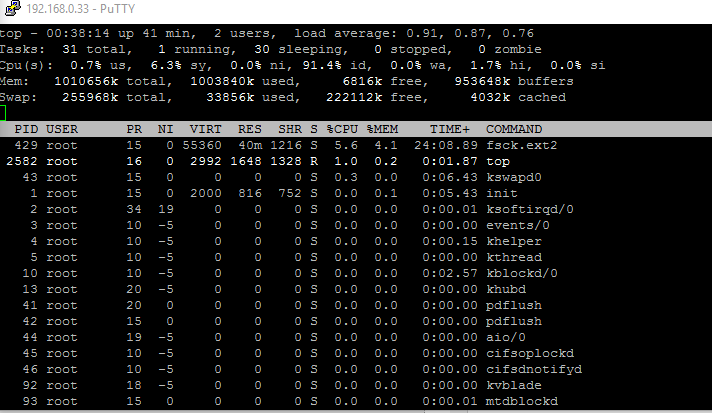
Any ideas?
- StephenBJan 30, 2016Guru - Experienced User
Your OS partition is fine. You must be using xraid, because linux reader wouldn't see the files if you were using flexraid.
I think you have a corrupt file system (and that the lockup is in fsck, not raid resync). Though I can't rule out a failing disk.
You could shut down, and insert disk 2 alone (in the second slot) and see if you get the same behavior. My guess is that you will, but it is worth a try.
It is also worth testing the disks with vendor diags in a PC (seatools for seagate, lifeguard for western digital).
Assuming the lockup happens with only disk 2 installed, the options are to
(a) attempt to repair the file system yourself
(b) contract with Netgear for data recovery
(c) accept the data loss - do a factory reset on the NAS, reconfigure it, and restore the data from a backup.
No matter what option you pick, create a backup on your PC first - using linux reader (copying the files linux reader sees to a USB disk or an NTFS internal disk).
- MonteverdeJan 30, 2016Aspirant
Tried to boot up with only disk 2 plugged in.
The system came up after finishing the file checks, i.e. no hanging during fsck phase as with both disks or only disk 1 in.
So problem seems to be related to disk 1.
FrontView access, shares etc came up.
Did a controlled shutdown since I have to go away for a while.
Will try to backup to external disks from NAS during later tonight.
- StephenBJan 30, 2016Guru - Experienced User
Monteverde wrote:
Will try to backup to external disks from NAS during later tonight.
Great. That simplifies the next steps (and you should have all your data).
The fastest way to back up your data is to attach the external disk to your PC and back up over a wired ethernet network. That is a lot faster than attaching the USB drives directly to the NAS. I like to use robocopy or teracopy, and not windows drag and drop. Teracopy has a verify option, which is probably worth using (though it will take longer).
Once that is done, install the replacement disk for disk 1. I like to test it with vendor diags in a PC first. Don't format it- just hot-insert it into the NAS unformatted. Keep in mind that your duo has a size limit of 2 TB or less. I recommend WDC Red drives (wd20efrx or wd10efrx). If you prefer seagate, use a drive from their VN line (not a DM drive).
The compatibility list for the duo is stale, so it isn't very useful anymore.
Obviously one lesson here is that RAID isn't enough to keep your data safe, so you should set yourself a regular backup schedule once everything is running again.
Related Content
NETGEAR Academy

Boost your skills with the Netgear Academy - Get trained, certified and stay ahead with the latest Netgear technology!
Join Us!
