NETGEAR is aware of a growing number of phone and online scams. To learn how to stay safe click here.
Forum Discussion

sectoid
Sep 30, 2014Aspirant
Easiest RAID configuration to recover data if ReadyNAS fails
Hello,
I have a ReadyNAS 104 and am not able to buy another quickly if mine fails someday (the NAS, not the drives), because I live in Brazil and hardware of this type here is prohibitely expensive. Sometimes they cost 10x the value or more. I've not yet put my data into it. A smaller part of my data I don't want to lose and this will be backed up automatically to another RAID 1 set. The rest I can lose but would rather not of course, so I want to have some redundancy.
After researching I see that my best options for the ReadyNAS are RAID 10 or RAID 6 (using 4 x 3TB drives) and, considering the backup for the essential data, both would be OK for me. However, I don't know if either of these options are easily recoverable on a PC (preferably on windows) should the ReadyNAS itself fail.
Another option would be to set it up as 2 RAID 1 arrays. Using this configuration, if the ReadyNAS failed but the drives did not, would I be able to simply install the drives on my PC and use them normally? I've read that the ReadyNAS 104 uses ext4 so in theory that would be possible, right? (using linuxreader from diskinternals, for example, or a linux machine)
If someone could clarify this for me, I would be thankful. I'm sorry if this has already been answered before.
I have a ReadyNAS 104 and am not able to buy another quickly if mine fails someday (the NAS, not the drives), because I live in Brazil and hardware of this type here is prohibitely expensive. Sometimes they cost 10x the value or more. I've not yet put my data into it. A smaller part of my data I don't want to lose and this will be backed up automatically to another RAID 1 set. The rest I can lose but would rather not of course, so I want to have some redundancy.
After researching I see that my best options for the ReadyNAS are RAID 10 or RAID 6 (using 4 x 3TB drives) and, considering the backup for the essential data, both would be OK for me. However, I don't know if either of these options are easily recoverable on a PC (preferably on windows) should the ReadyNAS itself fail.
Another option would be to set it up as 2 RAID 1 arrays. Using this configuration, if the ReadyNAS failed but the drives did not, would I be able to simply install the drives on my PC and use them normally? I've read that the ReadyNAS 104 uses ext4 so in theory that would be possible, right? (using linuxreader from diskinternals, for example, or a linux machine)
If someone could clarify this for me, I would be thankful. I'm sorry if this has already been answered before.
32 Replies
Replies have been turned off for this discussion
 sectoidAspirantHello,
I've found a 2.5" 320gb hdd here and completed the test with success ending up with a RAID 6 array (although total size is ~585Gb using 2x320Gb + 2x3Tb, and that's strange. If the 2x3TB failed, I think not all data would be recoverable).
One final question: is there a way to know if the data is evenly spread accross the hdds and if I really have safety for up to 2 hdd failures? StephenBGuru - Experienced UserYour volume size is exactly right. The rule for estimated volume size on RAID-6 is (a) sum up the disks (b) subtract off the two largest. You are basically wasting 5.4 TB of space. Keep in mind that the NAS reports TiB, not TB, and that there is some filesystem overhead. That's why you aren't seeing a 640 GB size.
The data is distributed so that the system can reconstruct the data on any pair of disks. Though you can test this be removing two drives, generally I wouldn't recommend it. The array would be rebuilt when you reinsert them (though the data is maintained).- sectoidAspirantThank you for the explanation StephenB. Of course it's right and will be enough, I was thinking of a 320gb space but there would still be two drives so it amounts to 640gb (minus overhead), my bad.
I asked about the data being evenly distributed because I've read about Windows's Storage Spaces and one of the complaints in some articles was that it doesn't rearrange the data when you insert more disks and that could become a problem later on. As you said, the ReadyNAS rebuilds the array when you insert new disks so that should be OK.
I'll now proceed to make my NAS useful with the 4x3tb drives. Thank you (and mdgm) for all the help! - StephenBGuru - Experienced UserThere's some more detail on the data organization used in RAID-6 here: http://simple.wikipedia.org/wiki/RAID
Here's a 5 disk example.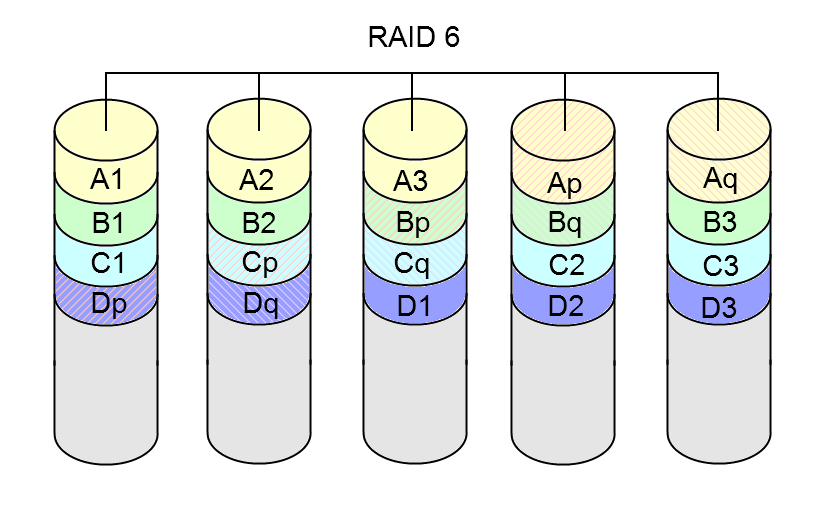
A1, A2, A3, B1, B2, B3 are data blocks; Ap ,Aq, Bp, Bq, ... are the parity blocks. You can see that sequence is rotated, so that the parity blocks are distributed across all the drives.
Ap and Aq are computed from the data blocks in different ways. if two blocks are unknown, you end up with 2 equations with 2 unknowns, which are solved to reconstruct the two missing blocks.
The file system (in this case linux ext) is layered on top of this level. Even if the data blocks aren't used by the file system the parity blocks are still computed. That's why it takes as long to resync an empty volume as it does a full one. - sectoidAspirantGreat explanation, thanks! So, i should expect a looooong time to build this array using the method we talked about before, with 3tb drives :P
- mdgm-ntgrNETGEAR Employee RetiredYes
- sectoidAspirantHi, I just made a mistake. I finally put the last 3TB hdd in (hot-inserted), but forgot to disable X-RAID first. What will happen now? Can I still go to a RAID 6 array? It was previously a RAID-5 with X-RAID on and 3x3TB hdds. I currently have backups for the important data, but no backups for things like videos that take a lot of space. I know what I did won't make me lose anything but if the only solution is to rebuild the array from scratch, I don't have enough space in other hdds to make backups of it all.
That's what I get for doing these things tired and late at night... =/ - mdgm-ntgrNETGEAR Employee RetiredWith all drive bays full the only way to convert is to backup your data and do a factory default (wipes all data, settings, everything) then restore data from backup.
- sectoidAspirantDamn. With X-RAID on which RAID setting is being used? RAID 5? I can't see it because the device is unresponsive since I plugged in the hdd. It did the same thing for a while when I put the 3rd hdd in, before rebuilding.
edit: If it's RAID 5, in theory I could remove one hdd, use it to backup all data (it's currently less than 2TB), rebuild the array and start from scratch, right? - mdgm-ntgrNETGEAR Employee RetiredThat should be possible yes.
X-RAID uses RAID-5, yes.

Related Content
NETGEAR Academy

Boost your skills with the Netgear Academy - Get trained, certified and stay ahead with the latest Netgear technology!
Join Us!
