NETGEAR is aware of a growing number of phone and online scams. To learn how to stay safe click here.
Forum Discussion

Paul_Thomas
Dec 26, 2016Aspirant
Error using MS Edge browser
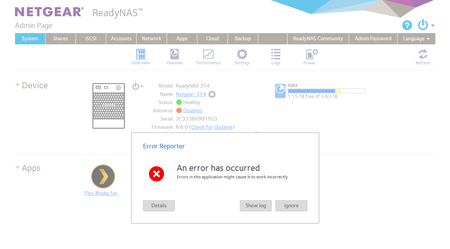
I recieve the error below when I connevt to the nas admin page when using the edge browser. Other browsers seem fine. All firmware/software is upto date. I think this started following the windo...

StephenB
Dec 26, 2016Guru - Experienced User
I'm not seeing that, though I am using 6.6.1 beta.
Do you have any apps installed? Do you see this error also with Chrome?
- Paul_ThomasDec 27, 2016Aspirant
Hi,
It works fine with chrome, firefox & IE. I anly have the Plex app installed.
I've just tried the connection from another PC (using edge) and that works fine too, so it looks like an issue with Edge on my laptop, Not sure if its related, but I can't follow links from gmail using edge on the same laptop.
- JennCDec 27, 2016NETGEAR Employee Retired
Hello Paul_Thomas,
Mine is also working with MS Edge on Win10. Have you checked if you get the same results when you try to open your router's admin page?
Welcome to the community!
Regards,
- Paul_ThomasDec 28, 2016Aspirant
Hi,
I think I've found the issue. It would appear the lastpass password manager plugin causes the problem. If you sign out of lastpass or turn it off, the problem goes away. I discovered this while reseatching the problem with gmail links not working, and this was down to last pass.
I'm not sure if the problem is with lastpass or the netgear web app, but guess its something to do with the pop up login dialogue box and how it interacts with lastpass. I've not had the same issue with my routers (BT hubs 3,4,5&6) or netgear switch (JGS524Ev2) however they dont have the same type of logon dialogue box.
Thanks
Paul

Related Content
NETGEAR Academy

Boost your skills with the Netgear Academy - Get trained, certified and stay ahead with the latest Netgear technology!
Join Us!
