Forum Discussion

lobbie1978
Aug 10, 2018Tutor
OneDrive sync set up but nothing is syncing
Hi Guys,
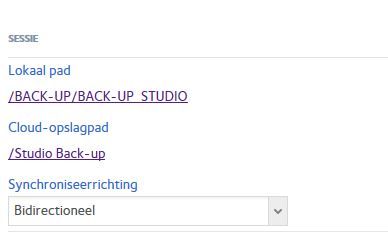
I have a ReadyNAS 102 running firmware 6.9.3 connected to a EDA500 Expansion Chassis and I setup OneDrive sync for my Cloud back-ups.
As far as I can tell, I setup everything correct...
- Aug 29, 2018
The problem support was referring to is clearly on the BACK-UP volume.
You have a BACK-UP_STUDIO_PROJECTS share but you moved that subvolume under BACK-UP_STUDIO. Similarly for BACK-UP_ACAPELLAS and BACK-UP_SAMPLES. That's where you went wrong.
The snapshots subvolume isn't the issue.
You could do e.g. (note don't copy the #, that's just to prevent blind copy and paste, always think about the commands you're entering):
# mv /BACK-UP/BACK-UP_STUDIO/BACK-UP_STUDIO_PROJECTS /BACK-UP/BACK-UP_STUDIO_PROJECTS


JohnCM_S
Aug 10, 2018NETGEAR Employee Retired
Hi lobbie1978,
Please download the NAS system logs and then provide it to us. We will check if the logs will show why it is not syncing. You may check this link on how you can send it.
Regards,

lobbie1978
Aug 11, 2018Tutor
Hi John,
Thanks for the reply. Here is a Dropbox link to the logs: <removed link>
I'm curious as to what you can find regarding the syncing problem.
Thanks in advance.
- Rob
Related Content
NETGEAR Academy

Boost your skills with the Netgear Academy - Get trained, certified and stay ahead with the latest Netgear technology!
Join Us!
