NETGEAR is aware of a growing number of phone and online scams. To learn how to stay safe click here.
Forum Discussion

CBCC
Apr 05, 2014Aspirant
Permissions over Network
Hello,
I am having trouble with my ReadyNAS Duo V2. I can do anything I want to from the WinXP computer that originally put the files on it, but not with other computers on my network. The ReadyNAS is a RND2150-100NAS. It is connect to a Netgear FVS338 ProSafe VPN Firewall Router.
On other computers, I cannot do things like rename or move, or delete the Recycle Bin files.
For example, on another WinXP computer, if I try to move this file, I get this error . . .
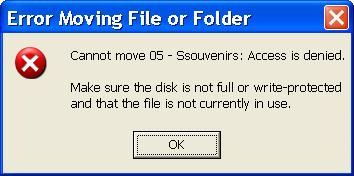
If I try to rename it to Souvenirs.mp3, I get the same error saying it cannot rename it instead of cannot move it.
When trying to rename the same file to Souvenirs.mp3 on a Win7 computer, I get this error . . .
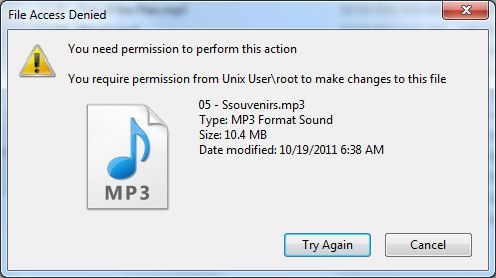
Plus, if I go to rename a file on the original XP computer, I have to do it twice... it doesn’t take the first time.
On the original XP PC, I have always uploaded and made any changes with Windows Explorer. I cannot do this on other PCs.
I have RAIDar 4.1.5 on the original XP PC, but no RAIDar on the others. I have RAIDar 4.1.6 and 4.3.4 downloaded, but not installed anywhere. I also downloaded RAIDiator and ReadyNAS Remote, but never used them.
I’d like to know what can be done to gain full access and control of all of my ReadyNAS files from all connected PCs. I'd like to be able to add, rename, move, and delete from all computers. I figured I could format the ReadyNAS drives and rebuild from Win7, but then I’d have permission problems from WinXP PCs, and I likely won’t be getting rid of them soon. I can access files on other PCs to play them, but I cannot manipulate them. I am not beyond formatting the drives to do whatever will help.
Any advice will be appreciated. Thank you in advance. :)
Craig
I am having trouble with my ReadyNAS Duo V2. I can do anything I want to from the WinXP computer that originally put the files on it, but not with other computers on my network. The ReadyNAS is a RND2150-100NAS. It is connect to a Netgear FVS338 ProSafe VPN Firewall Router.
On other computers, I cannot do things like rename or move, or delete the Recycle Bin files.
For example, on another WinXP computer, if I try to move this file, I get this error . . .
If I try to rename it to Souvenirs.mp3, I get the same error saying it cannot rename it instead of cannot move it.
When trying to rename the same file to Souvenirs.mp3 on a Win7 computer, I get this error . . .
Plus, if I go to rename a file on the original XP computer, I have to do it twice... it doesn’t take the first time.
On the original XP PC, I have always uploaded and made any changes with Windows Explorer. I cannot do this on other PCs.
I have RAIDar 4.1.5 on the original XP PC, but no RAIDar on the others. I have RAIDar 4.1.6 and 4.3.4 downloaded, but not installed anywhere. I also downloaded RAIDiator and ReadyNAS Remote, but never used them.
I’d like to know what can be done to gain full access and control of all of my ReadyNAS files from all connected PCs. I'd like to be able to add, rename, move, and delete from all computers. I figured I could format the ReadyNAS drives and rebuild from Win7, but then I’d have permission problems from WinXP PCs, and I likely won’t be getting rid of them soon. I can access files on other PCs to play them, but I cannot manipulate them. I am not beyond formatting the drives to do whatever will help.
Any advice will be appreciated. Thank you in advance. :)
Craig
39 Replies
Replies have been turned off for this discussion
 StephenBGuru - Experienced UserYes, READYNAS. Case shouldn't matter for this, but there is no harm in matching it.
 CBCCAspirantThanks, Stephen. :D
You are the best and have lived up to Netgear's reputation as far as I'm concerned!!! :thumbsup: I knew I could find the help I needed here. :mrgreen:
I am not an authorized Netgear reseller, but I have been with Netgear for years now, and always recommend Netgear to my customers. I go with them to Best Buy and/or Office Depot to help them select the Netgear products they need. I'm just not that much into the finer details of Networking in my little business, concentrating more on computer repair and helping folks get the best PC for their money when they need a new one.
I'm all set now :woot: and I appreciate everything you've done for me! :worship:
Thanks again,
CBCC (Craig)- CBCCAspirant
StephenB wrote: CBCC, your volume is getting full. You should consider getting larger disks for the duo. (Your model needs 2 TB or smaller). After you get through this issue, perhaps post back on that.
Hello again,
My ReadyNAS had been working perfectly after all the Help I got here. I had to take the Hard Drive Upgrade advice in steps.
I installed a 1TB Drive in Bay #2 so that everything from the 500GB in Bay #1 could copy over to it. It took a very long time to copy everything over, but that went well and I used it that way for a while. Once I was able to get another 1TB, I moved the 1TB that was in Bay #2 to Bay #1 and installed the 2nd in Bay #2... I think I had the unit Off for this. It took a while, but I never got 1TB in total... it was still stuck showing as a 500GB that was nearly full. I left it like that for a while and got back to it last night.
I Hot-Swapped the two, but still didn't get 1TB. So you know, I have not changed the RAID configuration, so I should have attained 1TB. Then some very weird things started happening. I was getting emails about errors, and now the Power Button LED and all 4 of the little Green LEDs flash in sequences. The Power Button LED flashes On with all 4 of the little Green LEDs Off, then the Power Button LED is Off with all 4 of the little Green LEDs On, and they don't stop flashing.
I have tried turning the ReadyNAS Off and back On, and pressing the Reset Button with it On, and pressing the Reset Button while turning it On, but nothing has helped. It even does this without a Hard Drive installed, though it seems that the flashing patterns vary with things installed in different ways (two drives, one in either bay, or nothing installed). And there were no more emails from the ReadyNAS after the LEDs started flashing.
Any thoughts on getting this ReadyNAS working properly again? If all Data has to be wiped on the two 1TB Hard Drives, that would be OK, as I should still have it on the two 500GB that were removed; though I'll have to check to see if it was lost on one of them. I could probably copy everything to the ReadyNAS with one of those 500GB Hard Drives mounted in a PC. I haven't tried mounting one yet to see if a PC can read that Data. I may need some help with that, too, after this thing is working again.
I received and email the other day saying that there is a new version of Firmware available. I had the latest until this. Do you think this might help? Then again, I don't think I'll have access to the ReadyNAS until this issue has been resolved. - StephenBGuru - Experienced UserI don't think the new firmware would solve your expansion issue. I'm not sure why you felt you had to move the first 1 TB drive to bay 2 either.
What did the emails about errors say? If the two disks are installed, what status does RAIDar give you? - CBCCAspirant
StephenB wrote: I don't think the new firmware would solve your expansion issue. I'm not sure why you felt you had to move the first 1 TB drive to bay 2 either.
What did the emails about errors say? If the two disks are installed, what status does RAIDar give you?
I was trying to attain 1TB. That’s all. I didn’t know what to do.
RAIDar cannot find or log in to the ReadyNAS with the LEDs flashing as they are, so there is no Status to be read, but I never changed the configuration. And I was a bit wrong about the LED flashing pattern. The Blue Power LED dims out and slowly back on, without any reference (or Sync) to the Green LEDs. The Green LEDs were blinking 3 times fast then 3 times slow, 3 times fast then 3 times slow, repeatedly, as I recall from the last time I looked last night.
The emails . . .
1. Hotplug: Disk remove event occurred on SATA channel 2.
2. Hotplug: Disk fail event occurred on SATA channel 2.
If the failed disk is used in a RAID level 1, 5, or X-RAID volume, please note that volume is now unprotected, and an additional disk failure may render that volume dead.
3. Resync recommended: A SATA reset has been performed on one or more of your disks that may have affected the RAID parity integrity. It is recommended that you perform a RAID volume resync from the RAID Settings tab ( accessible in the Volumes page => Volume tab in FrontView ). The resync process will run in the background, and you can continue to use the ReadyNAS in the meantime.
--- I did try #3, but it didn't seem like anything was happening. ---
4. Hotplug: Disk remove event occurred on SATA channel 1.
5. Hotplug: Disk add event occurred on SATA channel 2.
6. RAID Event: Disk initialization successfully finished.
7. RAID Event: The disk attached to channel 2 could not be used. The most common reasons are RAID resync in progress, faulty drives, and disks that are too small to be added to the array.
8. RAID Event: The disk attached to channel 2 could not be initialized. The most common reasons are RAID resync in progress, faulty drives, and disks that are too small to be added to the array.
9. Hotplug: Disk remove event occurred on SATA channel 2.
10. Hotplug: Disk remove event occurred on SATA channel 2.
11. Hotplug: Disk remove event occurred on SATA channel 1.
12. Hotplug: Disk add event occurred on SATA channel 2.
13. Hotplug: Disk add event occurred on SATA channel 2.
14. Hotplug: Disk remove event occurred on SATA channel 1.
15. RAID Event: The disk attached to channel 2 could not be used. The most common reasons are RAID resync in progress, faulty drives, and disks that are too small to be added to the array.
16. RAID Event: Disk initialization successfully finished.
17. RAID Event: The disk attached to channel 2 could not be used. The most common reasons are RAID resync in progress, faulty drives, and disks that are too small to be added to the array.
18. RAID Event: The disk attached to channel 2 could not be initialized. The most common reasons are RAID resync in progress, faulty drives, and disks that are too small to be added to the array.
19. Hotplug: Disk remove event occurred on SATA channel 2.
Of course, I didn’t read most of them as they came in. I didn’t know about them. That’s all the emails.
There have been 4 Hard Drives in this ReadyNAS. One of the 500GB is Unallocated now, but Win7 Disc Management can see it. I guess that was due to me hitting the Reset button. The other one is OK and seems to have all the Data. Win7 can read the Hard Drive, display the Data, and I can open files from it.
One of the 1TB Drives is a single 931.51GB Partition that is Empty. Win7 Windows Explorer can see it. I don't think this one ever copied from a 500GB in the ReadyNAS, because it is the one I put in a good while back.
The other 1TB shows this under Disc Management...
1.95GB Primary - Healthy
250MB Primary – Healthy
929.11GB Primary – Healthy
210MB - Unallocated
None of these Partitions show up in Windows Explorer or in the Computer folder. I got a message in Disc Management yesterday saying that "something" had to be done for the Drive to be readable. I clicked OK, but I don't remember the wording. That message didn't come up today. But I can't right-click on any of the Partitions there to Format them, either.
So whaddaya think? - StephenBGuru - Experienced User-The decoder ring for the LED patterns is here: http://home.bott.ca/webserver/?p=324 It sounds like it could be a problem on the disks, though it is important to check that you are not seeing "Bad flash". The NAS will not boot with no disks btw.
-The drive with the single empty partition wasn't used. I suggest testing that one (in Windows) with vendor tools (seatools for seagate, lifeguard for western digital). The error emails suggest that perhaps there is something wrong (or incompatible) with that drive.
What model drives are you using?
-Attempting to do anything with the other 1 TB drive (but look) with windows disk management windows will certainly destroy your data.
One good next step is to install linux reader on the PC (http://www.diskinternals.com/linux-reader/). This is freeware, and should let you see the data on the drive that was used (when connected to windows), and copy it off. If your data isn't there, try doing it again with the 500 GB drives. One of those will not have the ~500GB data partition - that is normal, and if you don't see it, then just skip that one.
An alternative (perhaps riskier) is to try booting up the NAS with only one disk at a time - trying both 500 GB drives, and the properly partitioned 1 TB. Power down the NAS and cold-insert the drive you want to try. It's a bit riskier because the NAS will do a volume scan/repair on boot up - which could result in data loss. There is a boot menu option to skip that scan, but it is a bit tricky on a duo, since it doesn't have an LCD display.
Once you have the data all back, then use Windows Disk Manager to delete all the partitions on both 1 TB drives. That will restore them to an unformatted state. Then install them both in the NAS (powered down) and boot it up. That should initiate a full factory install, so you will need to set up the NAS again (create shares, etc), and reload the data from the backup. - CBCCAspirantHi, and thanks for your prompt replies!
I figured I'd need a way to read Linux Partitions.
My Hard Drives are:
Seagate Barracuda ST3500320AS 500GB (Has Data)
Western Digital WD500ABYS 500GB (Unallocated)
Seagate Barracuda ST31000524AS 1TB (Empty)
Western Digital Blue WD10EZEX 1TB (Multiple Partitions)
What do you mean by "it is important to check that you are not seeing 'Bad flash'."? My flash pattern is 3 – Bad contents on root partition of disks with the Seagate Barracuda ST31000524AS 1TB (Empty) in Bay #1 and nothing in Bay #2. I don't think this is saying the ReadyNAS is bad. And since I want to Delete those Volumes anyway on the two 1TB, that part doesn't matter. However, I'm not sure of the flash pattern when each Drive is installed in Bay #1 by itself. Should I do that first?
I don't think any of them work by themselves in Bay #1 in the ReadyNAS now, but the flash pattern may be different.
One last question for this time. Will testing the Drives with Vendor's Tools destroy the Data on my 500GB? You suggest testing the Drives first, and I think that's an important step to take. - StephenBGuru - Experienced UserBad flash would be pattern 4. That says that the ReadyNAS flash memory has issues, not the the hard drives. It seems unlikely, but I wanted to confirm the LED pattern (since you didn't sound certain).
The idea about booting with one drive at a time is simply because sometimes a failed drive will prevent the NAS from booting. This was an alternative to linux reader, so if you get your data off with that you don't really need to do it. However, some of them should boot by themselves (the ST31000524AS should result in a factory install).
The vendor tools warn you if you try to run a destructive test (and you shouldn't tun those destructive tests before you get the data back). - CBCCAspirantHello again,
I used the Vendor Tools on both 1TB Hard Drives (Seagate's and WD's respectively). I used Windows Disc Management to make both of them totally Unallocated before testing. Everything on both tested fine... SMART, Short and Long Tests are OK. Seagate had me make the Boot CD for the Long Test, but it Passed. Mounted both back into the ReadyNAS and I still get the same Green LED flash pattern: #3.
The Vendor Tools have the ability to write all Zeros. Do you think that would help? Or maybe there is something else the Tools can do.
This seems to have started after I added the WD 1TB Drive, but then again, the Seagate was never written to. Anyway, I tried the ReadyNAS with only the Seagate 1TB in Bay #1 again, after all this testing, and I get the same Green LED code... #3. So I tried the WD alone in Bay #1... same thing. Is there a Reset procedure that may help?
Maybe these Hard Drives are not on the Compatibility List. - StephenBGuru - Experienced UserIf you deleted the partitions via windows disk manager, the NAS should have done a factory install. Zeroing does no harm, and sometimes it does uncover drive issues.
Did you try putting a drive in slot 2, and leaving slot 1 empty?
The HCL is here: http://kb.netgear.com/app/answers/detail/a_id/20641 The ST31000524AS is on the HCL, the WD10EZEX is not. That doesn't necessarily mean the EZEX won't work, Netgear hasn't updated the list much since the NAS went end-of-life. There's one poster who reported success with the EZEX in their NV+ here: viewtopic.php?f=23&t=75635
Related Content
NETGEAR Academy

Boost your skills with the Netgear Academy - Get trained, certified and stay ahead with the latest Netgear technology!
Join Us!
