NETGEAR is aware of a growing number of phone and online scams. To learn how to stay safe click here.
Forum Discussion

CBCC
Apr 05, 2014Aspirant
Permissions over Network
Hello,
I am having trouble with my ReadyNAS Duo V2. I can do anything I want to from the WinXP computer that originally put the files on it, but not with other computers on my network. The ReadyNAS is a RND2150-100NAS. It is connect to a Netgear FVS338 ProSafe VPN Firewall Router.
On other computers, I cannot do things like rename or move, or delete the Recycle Bin files.
For example, on another WinXP computer, if I try to move this file, I get this error . . .
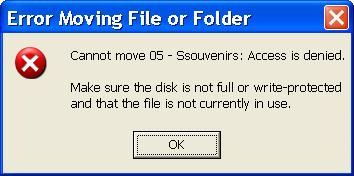
If I try to rename it to Souvenirs.mp3, I get the same error saying it cannot rename it instead of cannot move it.
When trying to rename the same file to Souvenirs.mp3 on a Win7 computer, I get this error . . .
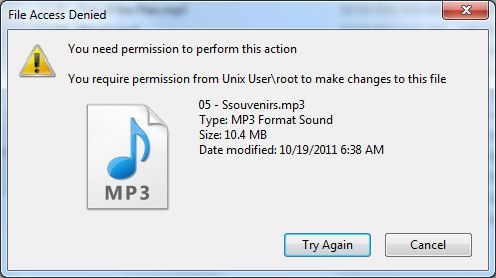
Plus, if I go to rename a file on the original XP computer, I have to do it twice... it doesn’t take the first time.
On the original XP PC, I have always uploaded and made any changes with Windows Explorer. I cannot do this on other PCs.
I have RAIDar 4.1.5 on the original XP PC, but no RAIDar on the others. I have RAIDar 4.1.6 and 4.3.4 downloaded, but not installed anywhere. I also downloaded RAIDiator and ReadyNAS Remote, but never used them.
I’d like to know what can be done to gain full access and control of all of my ReadyNAS files from all connected PCs. I'd like to be able to add, rename, move, and delete from all computers. I figured I could format the ReadyNAS drives and rebuild from Win7, but then I’d have permission problems from WinXP PCs, and I likely won’t be getting rid of them soon. I can access files on other PCs to play them, but I cannot manipulate them. I am not beyond formatting the drives to do whatever will help.
Any advice will be appreciated. Thank you in advance. :)
Craig
I am having trouble with my ReadyNAS Duo V2. I can do anything I want to from the WinXP computer that originally put the files on it, but not with other computers on my network. The ReadyNAS is a RND2150-100NAS. It is connect to a Netgear FVS338 ProSafe VPN Firewall Router.
On other computers, I cannot do things like rename or move, or delete the Recycle Bin files.
For example, on another WinXP computer, if I try to move this file, I get this error . . .
If I try to rename it to Souvenirs.mp3, I get the same error saying it cannot rename it instead of cannot move it.
When trying to rename the same file to Souvenirs.mp3 on a Win7 computer, I get this error . . .
Plus, if I go to rename a file on the original XP computer, I have to do it twice... it doesn’t take the first time.
On the original XP PC, I have always uploaded and made any changes with Windows Explorer. I cannot do this on other PCs.
I have RAIDar 4.1.5 on the original XP PC, but no RAIDar on the others. I have RAIDar 4.1.6 and 4.3.4 downloaded, but not installed anywhere. I also downloaded RAIDiator and ReadyNAS Remote, but never used them.
I’d like to know what can be done to gain full access and control of all of my ReadyNAS files from all connected PCs. I'd like to be able to add, rename, move, and delete from all computers. I figured I could format the ReadyNAS drives and rebuild from Win7, but then I’d have permission problems from WinXP PCs, and I likely won’t be getting rid of them soon. I can access files on other PCs to play them, but I cannot manipulate them. I am not beyond formatting the drives to do whatever will help.
Any advice will be appreciated. Thank you in advance. :)
Craig
39 Replies
Replies have been turned off for this discussion
 CBCCAspirantJust tried the Seagate in Bay #2 by itself... same thing. I'll try writing Zeros to that one and see if it helps. If not, I'll format it in Windows and do a CHKDSK, looking for Bad Sectors. Glad to know that at least this Seagate is on the HCL. Will keep you informed. Thanks for your help.
 StephenBGuru - Experienced UserSeatools should have looked for bad sectors, and the write-zeros test also should also find them.
- CBCCAspirant
StephenB wrote: Seatools should have looked for bad sectors, and the write-zeros test also should also find them.
I don't know what Seatools did and didn't do before, but when I ran its Full Erase, I think now that may have fixed it. I wasn't sure if that was the same as writing Zeros, so I ran WD's after that, because they call it Write Zeros. When it ran, it asked me if I wanted to Quick Erase or Full Erase, so the two seem to be the same thing. I did Full Erase from both and the Seagate worked in Bay #1.
I got the new RAIDiator Firmware through the ReadyNAS when it Powered Up, too. I am Zeroing the WD EZEX now, and have recreated the only Share I use on the ReadyNAS. The Seagate shows in Windows (via the ReadyNAS) as 542MB Used with 921GB Free.
To test the WD EZEX, I'm going to install it in Bay #1 by itself so there's no chance of it messing up the Seagate. After that, if it's good, I'll Power Down before 10 seconds and try it by itself in Bay #2. Then, I'd like to know if the proper procedure would be to put the Seagate in Bay #1 and the WD in Bay #2. Do I have the Seagate in Bay #1 Cold, Power ON, and install the WD Hot, or what? I'd like to have the ReadyNAS recreate my Share folder that's on the Seagate to the WD. There is nothing in that Share folder yet. After both Drives are working (or only the Seagate), I'll copy the Data over from the 500GB with the Linux Reader you told me about.
In the case that the Seagate is the only working Drive, the procedure to follow when adding a 2nd in Bay #2 will still be needed. I think it's as simple as make sure it is Zeroed and put it in Bay #2. Right? But Hot or Cold is the question for the Safest procedure.
It seems that my problems with these Drives was that neither of them had been Zeroed, and the ReadyNAS didn't Format them properly. The Seagate was used. The WD was new, but had been installed in an older PC that could not access all of a HDD that big. I think the BIOS had a 500GB limit, but that's why it had 4 Partitions.
Another question is, if I want to have the ReadyNAS run tests on these Drives to search for things like Bad Sectors and whatever else it can do, how do I do that? The Seagate Passed Full Erase with no errors, and I'm still waiting on the WD, but I think this would be good to do before I copy Data over. I know the ReadyNAS will send me an email in the future, but I'd like to do this before I proceed with copying Data. I think this is in the Shutdown area, but I'd appreciate that info.
Thanks. :) - StephenBGuru - Experienced UserThe safest procedure for adding disks is the hot-insert. That's because the NAS can detect that the disk was inserted. So when the time comes, install the Seagate in slot 1 with the NAS powered down. Then boot it up, and hot-insert the WZEX.
Seagate's full-erase is essentially the same as write-zeros. If you are connecting with SATA, then it will use a full-erase ATA command (instead of writing zeros to every block). That does much the same thing though.
Quick erase in Lifeguard writes zeros to the beginning and the end of the drive, leaving the middle alone. That's enough to destroy the partition tables and file system. - CBCCAspirantThe Dell Precision T7400 I was using has SAS and it is turned On, but I started connecting these two via SATA. It seemed I got better results that way. Maybe Seagate's Tool did say Zero before. Anyway, it's done now.
I couldn't turn the ReadyNAS OFF in time to keep it from formatting the WD EZEX, but it worked in Bay #1 without a Green LED flash pattern. I turned the ReadyNAS Off and put it in Bay #2, and it worked there as well. I didn't run RAIDar, so it shows as Zero Capacity in Windows under Computer, but the backup and media folders are there. So both drives seem to be working now. I'll do the Quick Erase on it again (just to be sure) and follow your procedure to have both 1TB Drives installed. Then it's on to copying Data. I don't anticipate any further problems, but it's nice to know you are here if I do.
I'll come back with a follow-up to let you know how everything went. If the EZEX works well, I'll let you know so maybe it can be added to the Compatibility List. I guess the only way to know for sure is to copy the Data with both Drives installed, then remove the Seagate and see if the Data can still be accessed on the WD. Does that sound about right? Would it matter which Bay the WD is in for that? - StephenBGuru - Experienced UserIt doesn't matter what bay the WD is in, it should boot either way. Your procedure should work - I suggest pulling drive 1 with the NAS powered down, being very careful not to write to the data volume when you test. Then power down again, and re-install drive 1.
If there's any chance that the data was written during the test you will need to hot-insert drive 1, which will rebuild the array.
I don't expect Netgear to make a lot of changes to the HCL, but user reports that on how well various drives work are helpful to the community of posters. - CBCCAspirant
StephenB wrote: It doesn't matter what bay the WD is in, it should boot either way. Your procedure should work - I suggest pulling drive 1 with the NAS powered down, being very careful not to write to the data volume when you test. Then power down again, and re-install drive 1.
If there's any chance that the data was written during the test you will need to hot-insert drive 1, which will rebuild the array.
I don't expect Netgear to make a lot of changes to the HCL, but user reports that on how well various drives work are helpful to the community of posters.
I got 3 emails from the ReadyNAS during the process of installing the WD EZEX 1TB in Bay #2, with the Seagate 1TB in Bay #1, saying:
[Wed Jan 21 18:00:30 CST 2015] Disk initialization successfully finished.
[Wed Jan 21 18:00:29 CST 2015] RAID sync started on volume C.
[Wed Jan 21 22:46:45 CST 2015] RAID sync finished on volume C. The volume is now fully redundant.
I used the Linux Reader on the WD 500GB to copy all that I could to the ReadyNAS. However, I didn't see the Recycle Bin Folders. :sad: There was one, but it was empty. Not that it really matters... nothing in there I would want back. Just seems weird, is all.
With that said, if I delete files on the ReadyNAS, then empty the Recycle Bin, is there a way (or need) to do a Defrag? Since I know it's a Linux Format now, I don't know if I could access the ReadyNAS with Windows and Defrag it under Windows... or even if this is necessary.
I lost about 45 music files. Do you think DiskInternals Linux Recovery 4.3 (Free) could recover the lost/damaged files on the 500GB? http://www.diskinternals.com/linux-recovery/ Nothing has been written to the ReadyNAS in a long time that might have overwriten that space... only a few files were deleted the last time I used it, and it would seem that only the WD 500GB had anything on it.
Or a different Recovery program from here: http://www.diskinternals.com/download/
Or could the ReadyNAS recover them with the 500GB installed by itself?
Just thought I'd ask. I'm looking for the best procedure, as I'm not familiar with Linux Formatting.
I have not removed the Seagate to be sure the WD has everything yet, but I intend to do that. I'll follow your quoted procedure above when I do. I'll check many of the files and let you know after that, whether or not the WD EZEX seems to be fully compatible. It's not an Enterprise Drive, but I'll be OK with it if it works.
Thanks again for everything! :worship: - StephenBGuru - Experienced UserThere should be no need to defrag (and you can't do it from windows).
I don't know if the recovery software would find anything, but if it is free there is no harm in trying. If the music is commercially sold, then it's probably cheaper to rebuy than to invest in paid recovery software. (If you purchased it from itunes you should be able to re-download it, not sure about other music store policies). - CBCCAspirantHi Stephen,
Sorry to be so long getting back here. DiskInternals' Linux Recovery software didn't find a single MP3 that had been lost, but it did find tons and tons of files of all kinds of types from an old Windows installation. I found this very odd because that 500GB was nearly full with Linux-formatted ReadyNAS files. I thought all that space would have been overwritten. I guess the lesson here is to do a Full Wipe with something like DBAN, and then write Zeros with the manufacturer's tools before putting a used hard drive in a ReadyNAS.
The Western Digital Blue WD10EZEX 1TB worked perfectly. I didn't do extensive testing of files, but when installed by itself, everything seems to be there, and the movies and music I played worked fine.
Thank you for everything.
Related Content
NETGEAR Academy

Boost your skills with the Netgear Academy - Get trained, certified and stay ahead with the latest Netgear technology!
Join Us!
