NETGEAR is aware of a growing number of phone and online scams. To learn how to stay safe click here.
Forum Discussion

Vez
Jul 22, 2016Aspirant
Poor read performance - 6.5.0 On Ultra 4 Plus
I upgraded to 6.5.0 a while ago, mainly to get the new plex updates, and have read of a slight performance hit, and I expectedthat. However write performance is exceptional, able to write at 100M...
 Oct 04, 2016
Might have found a solution:
https://community.spiceworks.com/topic/1581799-readynas-516-extremely-slow-nfs-performance
Will test a little later.
Vez
Jul 22, 2016Aspirant
Right, single VM, 2 NFS threads, and SMB file transfers are ~30mb. Turn the VM off and I get 100Mb again from SMB.

StephenB
Jul 22, 2016Guru - Experienced User
Vez wrote:
Right, single VM, 2 NFS threads, and SMB file transfers are ~30mb. Turn the VM off and I get 100Mb again from SMB.
Do you have any way to gauge how much I/O the VM is doing?
- VezJul 22, 2016Aspirant
Its a 2012 domain controller sat there only serving DNS - with zero accounts on so no authentication. I will check the vsphere logs later after spining it up again.
- VezJul 23, 2016Aspirant
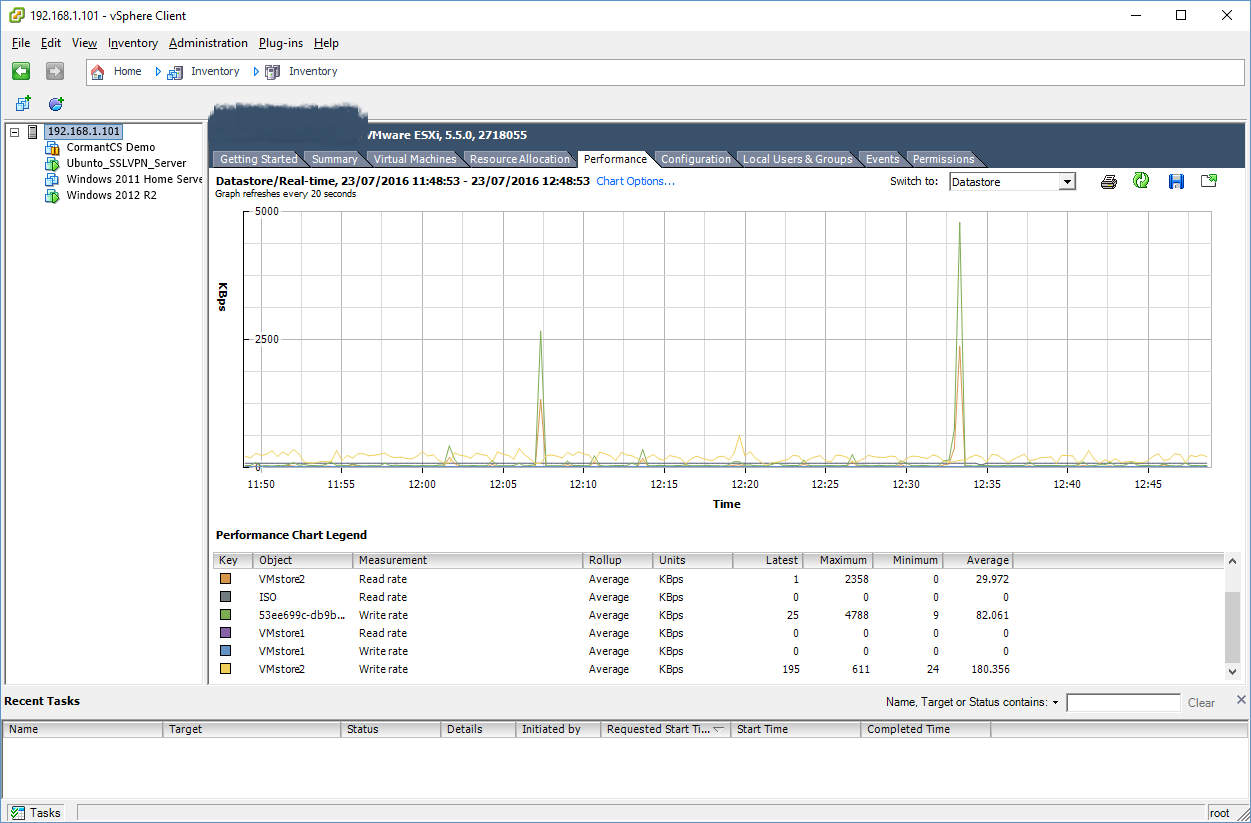
I will have a full graph within an hour, however with 2 VM's running a single ESXi host (the other has zero VM's running at this time for this test) are utilising a Datastore @:
Average Read: 239.65kbps
Average Write 101.022kbps
First VM is an Ubunto server (VPN server with no conections) - the Virtual disc is cached entirely on the host on SSD - so very little if any NFS usuage.
Second VM is 2012R2 - presently doiong windows updates. All it does is server DNS for my home network (25% of the disc sits on SSD Cache).
SMB performance whist almost nothing is going on: an average of ~35Mbs.
This is with 2 NFS threads. Something appears distictly wrong with prioritisation here. This was never an issue before changing to 6.
Thoughts? (Graph still compiling).
- VezSep 26, 2016Aspirant
Revisiting this as I have finally resolved the dropbox issue:
I/O graph:
So as you can see, its sat doing literally nothing, yet renders down the SMB file transfer to circa 35 mbs.
This is particularly ponient again, as I am just creating a couple of new VM's (one at a time I may add) and now am back at 30mbs read spead from my windows workstation! (Graph taken from the time of original issue).
Could this be a memory related constraint?
Related Content
NETGEAR Academy

Boost your skills with the Netgear Academy - Get trained, certified and stay ahead with the latest Netgear technology!
Join Us!
