NETGEAR is aware of a growing number of phone and online scams. To learn how to stay safe click here.
Forum Discussion

Nico76
Jul 13, 2016Aspirant
Problems expanding ReadyNas 104
Hi All, I seem to be having no end of problems with my Readynas 104 since purchasing over a year ago. After multiple replacement parts from Netgear, my most recent issue has been expanding the NA...
Nico76
Jul 15, 2016Aspirant
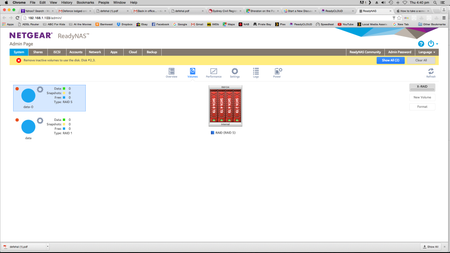
It still says X-Raid on right hand side of Admin page??
Have I lost my data?
Any suggestions to get this working as it should be?

StephenB
Jul 15, 2016Guru - Experienced User
Nico76 wrote:
It still says X-Raid on right hand side of Admin page??
That is a control, and is always shown. If the X-Raid control has a green stripe through it, then X-RAID is enabled, otherwise it isn't. See page 26 here: http://www.downloads.netgear.com/files/GDC/READYNAS-100/READYNAS_OS_6_SM_EN.pdf
Nico76 wrote:
Have I lost my data?
Perhaps. I suggest contacting netgear support (though they will charge). Per-incident support might be all you need to re-mount the volume, if the data is actually gone then you'd need data recovery.
Though I don't want to rub salt in an open wound, RAID is not enough to keep data safe.
- Nico76Jul 15, 2016Aspirant
I've already contacted netgear support and the directed me to the forum. Not sure why I shoudl pay for support while the unit is still under warranty...?!
I've looked at page 26 of the attached - how to switch between X-raid / flex raid. I now get the following error when attempting this...
I also have the following errors...
- StephenBJul 16, 2016Guru - Experienced User
If you have a backup, then the easiest way for you to proceed is to do a factory default, rebuild the NAS in XRAID and restore the data from the backup.
If you don't have a backup, then you either (a) lose the data (b) try to recover it on your own or (c) pay netgear (or someone else) to try to recover it for you.
(a) might be painful, (c) could be expensive and might fail. If you don't know what you are doing, then (b) is not a good path.
Nico76 wrote:
I've already contacted netgear support and the directed me to the forum.
Well, this is not a support forum; this is a community forum. We'll give advice, but that's it. Occassionally a netgear person might offer to access your system remotely, but I don't work for Netgear and that's not something I will do.
Support likely directed you here because you refused to pay.
Nico76 wrote:
Not sure why I shoudl pay for support while the unit is still under warranty...?!
Netgear warranties the hardware, not the software. And it's not clear to me at this point that its a software issue either. If you feel your local consumer protections apply, then that's something to take up with Netgear, not here.
Nico76 wrote:
I've looked at page 26 of the attached - how to switch between X-raid / flex raid. I now get the following error when attempting this...
It's too late now, but if you were in flexraid, that might explain the expansion problems that started you down this path.
- Nico76Jul 16, 2016Aspirant
Thanks for your time, but none of this helps or offers any potential solution to my problem other than the bleeding obvious - restore from backup or pay for netgear support...
People come onto such forums usually frustrated and looking for an outcome to their solution. I suggest if people do not have the info to support a potential fix - above and beyone that of a lay-mans knowledge - you should remain silent.


Related Content
NETGEAR Academy

Boost your skills with the Netgear Academy - Get trained, certified and stay ahead with the latest Netgear technology!
Join Us!
