NETGEAR is aware of a growing number of phone and online scams. To learn how to stay safe click here.
Forum Discussion

rxmoss
Mar 19, 2023Aspirant
ReadyNAS RN104 Dead Message
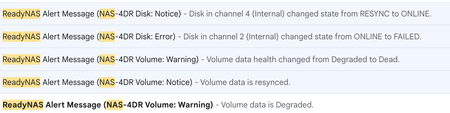
I have had no problems with my ReadyNAS RN104 for 7+ years in RAID 5, when a few days ago I got this message: "Disk in channel 4 (Internal) changed state from ONLINE to FAILED." I had been running wi...

StephenB
Mar 20, 2023Guru - Experienced User
@rxmoss wrote:I am sure I am using the wrong terminology, but yes, when I went into the admin, I could see the various folders (shares?) I created long ago, but some subfolders were empty and void of content.
To clarify the terminology: You had one RAID-5 volume (likely called data) comprised of four disks. You also had shares (folders) on the volume that you created with the NAS admin ui.
Keeping this straight will be helpful as you work to recover the data, as miscommunications could make things even more difficult.
@rxmoss wrote:Is there any reason to believe that this is a hardware and/or power supply problem? Given that the drives seem to be fine, I'm trying to figure out why readynas would have given me a drive 4 error, followed by a drive 2 error.
It's hard to rule out the power supply, but I am thinking there might have been a read error on disk 2. That would have aborted the resync, and let you with a failed volume. I've seen that scenario here before.
That is one rationale for suggesting using the three cloned disks, instead of the original three. I'm suggesting leaving out the new disk 4, because we don't know if the sync actually fully completed on the new drive. Booting read-only will keep the system from changing anything on the volume for now.
It might also be useful to download/install RAIDar on a PC.
rxmoss
Mar 20, 2023Aspirant
I booted my three 6tb cloned drives in read-only mode and I see the following. Am I supposed to do something else or does this indicate bad news?
- StephenBMar 20, 2023Guru - Experienced User
rxmoss wrote:
I booted my three 6tb cloned drives in read-only mode and I see the following. Am I supposed to do something else or does this indicate bad news?
Not good news, but potentially fixable. You definitely don't want to create a new volume.
Try downloading the full log zip file. There's a lot in there - if you want help analyzing it, you can put the full zip into cloud storage (dropbox, google drive, etc), and send me a private message with a download link. Send the PM using the envelope icon in the upper right of the forum page. Don't post the log zip publicly.
Do you have any experience with the linux command line?
I'm asking because there are two main options to pursue:
- try to force the volume to mount in the NAS
- use RAID recovery software with BTRFS support (ex: ReclaiMe) on a Windows PC.
The first option requires technical skills and use of ssh/linux command line, the second option will incur some cost.
- rxmossMar 20, 2023Aspirant
StephenB wrote:
rxmoss wrote:I booted my three 6tb cloned drives in read-only mode and I see the following. Am I supposed to do something else or does this indicate bad news?
Not good news, but potentially fixable. You definitely don't want to create a new volume.
Try downloading the full log zip file. There's a lot in there - if you want help analyzing it, you can put the full zip into cloud storage (dropbox, google drive, etc), and send me a private message with a download link. Send the PM using the envelope icon in the upper right of the forum page. Don't post the log zip publicly.
Do you have any experience with the linux command line?
I'm asking because there are two main options to pursue:
- try to force the volume to mount in the NAS
- use RAID recovery software with BTRFS support (ex: ReclaiMe) on a Windows PC.
The first option requires technical skills and use of ssh/linux command line, the second option will incur some cost.
Thank you--I have PM'd you with a link to the log file.
The NAS was used with a Mac, I have a Mac and have used Terminal to some degree.
I also have access to a Linux PC and have some rudimentary command line experience, but my experience is thin. Considering that I have the original 3 4TB drives (and the 4th) that seemed to have produced error-free copies, I can presumably re-copy them if my linux "experience" does more harm than good to the 3 6TBs I have in the NAS now.
At this point, you don't think there is any use in adding back the 4th drive to the NAS, right? Either the 6tb or the 4tb?
- StephenBMar 20, 2023Guru - Experienced User
rxmoss wrote:At this point, you don't think there is any use in adding back the 4th drive to the NAS, right? Either the 6tb or the 4tb?
First, what I am seeing you your logs.
[Mon Mar 20 05:13:12 2023] md: md127 stopped.
[Mon Mar 20 05:13:12 2023] md: bind sdb3
[Mon Mar 20 05:13:12 2023] md: bind sdc3
[Mon Mar 20 05:13:12 2023] md: bind sda3
[Mon Mar 20 05:13:12 2023] md: kicking non-fresh sdb3 from array!
[Mon Mar 20 05:13:12 2023] md: unbind sdb3
[Mon Mar 20 05:13:12 2023] md: export_rdev(sdb3)
[Mon Mar 20 05:13:12 2023] md/raid:md127: device sda3 operational as raid disk 1
[Mon Mar 20 05:13:12 2023] md/raid:md127: device sdc3 operational as raid disk 3
[Mon Mar 20 05:13:12 2023] md/raid:md127: allocated 4294kB
[Mon Mar 20 05:13:12 2023] md/raid:md127: not enough operational devices (2/4 failed)
RAID maintains event counters on each disk, and if there is much disagreement in those counters, then the disk isn't included in the array. (that is basically detecting cached writes that never were written to the disk). That's happened in your case with disk 2 (sdb).
As you'd expect all disks are healthy (since they are cloned with no errors).
I don't think trying with disk 4 will help, but it wouldn't hurt to try if you boot read-only again. Insert the disk with the NAS powered down. It's not clear which of the four disks is more likely to work.
More likely, you'd need to try forcing disk 2 into the array (with only disks 1-3 inserted). The relevant command would be
mdadm --assemble --really-force /dev/md127 --verbose /dev/sd[abcd]3You'd do this logging in as root, using the NAS admin password. SSH needs to be enabled from system->settings->services. Enablign ssh might fail because you have no volume, and if it does, we'd need to access the NAS via tech support mode. So post back if that is needed.
If md127 is successfully assembled, then just reboot the NAS, and the volume should mount (degraded). You'd then need to try to add the 6 TB drive again (reformatting it in the NAS to start the process).
There could be some corruption in the files (or some folders) since due to the missed writes. If you see much of this, you could still pursue data recovery using the original disks.
Related Content
NETGEAR Academy

Boost your skills with the Netgear Academy - Get trained, certified and stay ahead with the latest Netgear technology!
Join Us!
