NETGEAR is aware of a growing number of phone and online scams. To learn how to stay safe click here.
Forum Discussion

TT_DE
Apr 07, 2017Luminary
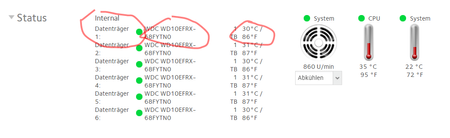
Since 6.7.0 | frontview status hdd drives has a bad layout
Since 6.7.0 the rontview status for hdd drives has a bad layout. What could I do to get back the proper layout?

StephenB
May 01, 2017Guru - Experienced User
BaJohn wrote:
Edge has the problem and Chrome does NOT.
Chrome is my default browser, and my screenshot earlier in the thread was taken from that.
Plus I see the identical layout with Firefox, IE-11, Edge and Safari (iPad).

TT_DE
May 01, 2017Luminary
I am using 6.7.1 and Chrome: still having a bad layout
- StephenBMay 01, 2017Guru - Experienced User
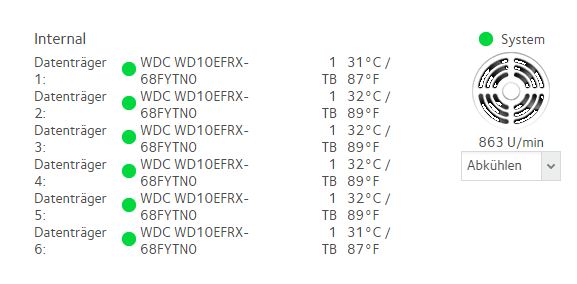
BaJohn wrote:Maybe it is the Windows OS that is different ... My NAS is RN516, but I am running Win 10 Pro (64 bit).
Not in my case. Every browser I've tried on win10, win7, and iOS all show the bad layout.
- jak0lantashMay 01, 2017Mentor
The layout is OK for me.
Chrome on W10_x64, and Chrome on iPad.
 Retired_MemberMay 02, 2017
This smells like a combination of issues from the hardware, operating system and browser. I do not experience this issue. If I would, I'd consider experimenting with the following parameters:
browser: reduce font size
os (win 10): decrease scaling in case you pushed that beyond 100%
hardware: increase screen resolution in case it is currently lower than the screens native resolution
I would start reducing the browser font size and increase complexity of the testing scenario, if necessary.
Oh, before doing any testing make sure you know the parameter settings you started with, should you not see any improvement while conducting this effort.

Related Content
NETGEAR Academy

Boost your skills with the Netgear Academy - Get trained, certified and stay ahead with the latest Netgear technology!
Join Us!
