NETGEAR is aware of a growing number of phone and online scams. To learn how to stay safe click here.
Forum Discussion

Tokin0008
May 04, 2016Initiate
Ready Nas 1500 Raidar / GUI inaccessible
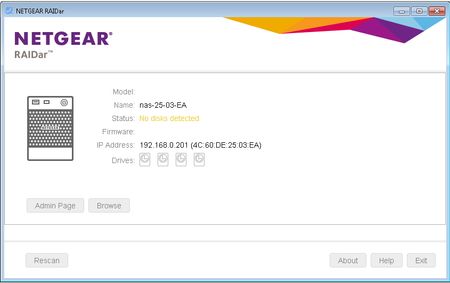
Hi All, New here, i have the above readynas, i can ping the nas but i can't access the webgui and the only time Raidar detect's the nas is when i remove all the disks, i have tried the OS-restore but...
 May 04, 2016
Tokin0008 wrote:
Thanks Stephen, would you have a link for the firmware
I don't have a link, but the information in this (fairly long) thread might help. https://community.netgear.com/t5/ReadyNAS-in-Business/OS6-Data-Recovery-How-to-Mount-BTRFS-Volumes/td-p/895558
Tokin0008 wrote:
Anyone how i could reload the firmware from usb
I doubt that will help, and it might hurt.
Before trying that, perhaps remove all the disks (NAS powered down, and labeling them by slot) and install a scratch disk. Either unformat/zero the scratch disk, or boot up using the factory default option.
If that does a clean install, then reloading from USB won't help.
Tokin0008
May 04, 2016Initiate
Thanks Stephen, would you have a link for the firmware
StephenB
May 04, 2016Guru - Experienced User
Tokin0008 wrote:
Thanks Stephen, would you have a link for the firmware
I don't have a link, but the information in this (fairly long) thread might help. https://community.netgear.com/t5/ReadyNAS-in-Business/OS6-Data-Recovery-How-to-Mount-BTRFS-Volumes/td-p/895558
Tokin0008 wrote:
Anyone how i could reload the firmware from usb
I doubt that will help, and it might hurt.
Before trying that, perhaps remove all the disks (NAS powered down, and labeling them by slot) and install a scratch disk. Either unformat/zero the scratch disk, or boot up using the factory default option.
If that does a clean install, then reloading from USB won't help.
- mdgm-ntgrMay 04, 2016NETGEAR Employee Retired
This is a legacy 32-bit x86 ReadyNAS.
It can only run RAIDiator-x86 4.2.x.
I don't see any indication that there was an attempt to put OS6 (a 64-bit OS) on this system unless I'm missing something?It could be that you have a bad disk.
Have you tried powering down, removing your disks (label order), connecting them up to your PC and testing them using vendor tools (e.g. test SeaGate disks using SeaTools and WD disks using WD Data LifeGuard Diagnostics)?
- Tokin0008May 05, 2016Initiate
Thanks for the help Guys, it appears it may of been a bad disk, The Nas box is now back and running
I removed all the disks in order, installed an unformmated disk and ran the factory defaults option which proved Stephen right in that nothing was wrong with the firmware, as the nas box came online with no problems, i then installed the original disks but had the same issue
So i reinstalled the original factory restored disk and upgraded the firmware to the lastest, put the original 4 disks back in and ran the reinstall OS option which got the box up and running all without losing any data :)
the unit has a failed disk which after reading mdgm's comments leads me to believe the disk failure could of caused the original issue
Thanks again Guys for your help

Related Content
NETGEAR Academy

Boost your skills with the Netgear Academy - Get trained, certified and stay ahead with the latest Netgear technology!
Join Us!
