NETGEAR is aware of a growing number of phone and online scams. To learn how to stay safe click here.
Forum Discussion

Walex
Oct 25, 2015Aspirant
Readynas 102 : Apps not working and root usage 82%
Hello, A few months ago, I contacted Support to help me with my ReadyNAS102 which didn't work (system totally wrong/stucked on my NAS when an update was just installed). Since then, I can do updates...

mdgm-ntgr
Oct 25, 2015NETGEAR Employee Retired
/var/ftp is referring to data on the data volume. data volume usage is a separate issue to root volume usage. 90% usage is higher than what we would recommend. Do you use snapshots?
inodes on your root partition are 82% full. You need to check what is using lots of inodes.
Walex
Oct 27, 2015Aspirant
Hello,
Thanks for your answer.
I saw inode usage, but I don't know more (since I don't know what is md0 and can't access to see...). How could I see it more precisely?
I've disabled all snapshots. Though since the last update 6.4.0, I saw on the admin page that I have some remaining. (188 Go), and when I explore the HDD, I see a folder snapshot (in .share) with much more than 188 Go... I don't really understand but can't delete anything either)
- mdgm-ntgrOct 28, 2015NETGEAR Employee Retired
The df command gave you a rough idea of usage for the various mountpoints. Anything that is not under one of the other mountpoints is probably on the 4GB OS partition.
Which apps are you using?As for the data volume, if a file is contained in a snapshot as well in the current data then deleting the current data will not in itself free up space. You need to delete all the snapshots containing that file if you want to free up the space used by it. Snapshots can be deleted using the web admin UI. Snapshots make efficient use of space.
- WalexOct 28, 2015Aspirant
According to Web UI, I don't have a single folder with snapshots but I have space apparently allocated for that anyway (that I can't find).
Here is a picture of the situation (0 snapshots – I didn't show all of them but it's the same)
Anyway, is the snapshot situation related to root usage? I've tried to delete folder from explorer (because nothing's accessible on Web UI) but it's simply not working. It doesn't even give me an error message about a delete unsucessful :o)
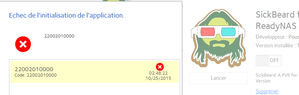
For apps : I'm using Sickbeard/Qbittorrent (a third one is installed but not used often : sabnzbd.Others were installed or not operationnal so I deleted them.
- mdgm-ntgrOct 28, 2015NETGEAR Employee Retired
The snapshot situation is separate to the root usage.

Related Content
NETGEAR Academy

Boost your skills with the Netgear Academy - Get trained, certified and stay ahead with the latest Netgear technology!
Join Us!
