NETGEAR is aware of a growing number of phone and online scams. To learn how to stay safe click here.
Forum Discussion

vtech92
Jun 08, 2021Aspirant
ReadyNAS 104 lost X-RAID volume after degraded disk replacement
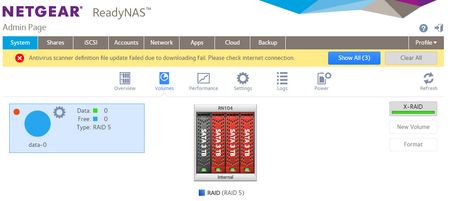
Hi all, my RN104 (6.2.4) reported a failed disk (#3 of 4 3TB disks) with the data degraded msg. I removed the disk and connected to my Win10 PC to check. Disk Management recognized the disk. I del...
vtech92
Jun 09, 2021Aspirant
Thanks for the quick response Stephen.
A couple of questions to help me form my strategy:
- Was the resync of #3 not completed?
- Can I basically use disk 3 as a "fresh" disk and use to clone of #1? Or buy another WD30EFRX CMR. They're not readily avilable but I think I can find one still
So to clarify the sequence of recovery:
- Attempt to clone disk #1, if that does not work,
- Consider Reclaime for recovery. I can connect all to my PC MB via sata ports
It sounds like buying a ProSupport contract is not going to do much more for me. Is that true?
Thanks again

StephenB
Jun 09, 2021Guru - Experienced User
vtech92 wrote:
A couple of questions to help me form my strategy:
- Was the resync of #3 not completed?
Hard to say from your log. One more thing you could try is to power down, remove disk 1, and then reboot (read-only from the boot menu), and see if that works. Again, if it does you need to back up as much as you can w/o delay - since disk 3 is suspect.
vtech92 wrote:
- Can I basically use disk 3 as a "fresh" disk and use to clone of #1?
I don't recommend that, as it might still be useful in recovery as it is.
vtech92 wrote:It sounds like buying a ProSupport contract is not going to do much more for me.
It doesn't cover data recovery, so I don't think it will help.
- vtech92Jun 23, 2021Aspirant
Hi, an update on my data recovery journey. After a few weeks of trying different things, I finally have recovered my data using ReclaiMe.
For your and others information, here is the sequence of events:
- Clone/copy disk #1 using hardware
- Using a 2-bay disk duplicator, attempted to clone disk 1 to a new 3TB disk. The duplicator would not read disk #1.
- Clone/copy disk 1 using SW
- Connected disk #1 to Win PC via sata
- Attempted to clone or copy disk using a number of applications. None worked.
- They all returned errors, all related to I/O issues
- I swapped sata cables and ports, nothing worked
- I'm quite concerned disk #1 is truly dead....although Win disk management shows it is healthy
- Checked to see if RAID array can be detected
- Used a few applications to check if they recognize the RAID array
- They all did but non-would complete the process. They all seem to stall at some point.
- Decided to use ReclaiMe File Recovery to detect RAID array and find files
- Connected all 4 disks to WIn 10 PC via sata
- ReclaiMe Ui is a bit old school but was actually pretty intuitive
- It began finding files and folder structures
- It stated that when files and folders are found, I can save/recover them while in process
- I decided to activate ReclaiMe File Recovery Ultimate and see if files can actually be recovered
- After multiple days of continuos detection and file recovery, I have recovered the data that matters to me...so it worked.
I think the post mortem validates that while disk #3 was resyncing, disk #1 failed big time. I'm lucky there was enough data integrity and physical life left in the failed drives for ReclaiMe to recover the ~3TB of data.
Going foward, I'll be trying a different RAID approach and of course backing up the data. Thanks for the insight and guidance.
- StephenBJun 23, 2021Guru - Experienced User
I'm glad to hear you recovered your data. Thx for following up.
Related Content
NETGEAR Academy

Boost your skills with the Netgear Academy - Get trained, certified and stay ahead with the latest Netgear technology!
Join Us!
