NETGEAR is aware of a growing number of phone and online scams. To learn how to stay safe click here.
Forum Discussion

Froglet0
Sep 12, 2021Aspirant
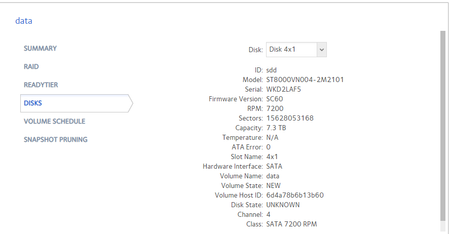
ReadyNAS 214 Volume degraded Replacement disk showing state UNKNOWN
Disk 4 failed. Replaced and started to resynch. Then stopped and said volume degraded. Attempted formatting drive, powering off and on NAS. Somtimes it would re-start a synch and then stop again. Som...
Froglet0
Sep 13, 2021Aspirant
Hi Stephen,
No, I don't have a backup. The NAS is used to backup various home laptops and I don't have anything with similar capacity to back it up to. If I loose the data, it just means I loose a series of old backups.
Bit annoying as I have a couple of ReadyNAS and each has suffered a disk failure and neither has recovered from it properly. Suggests the RAID implementation is poor.
Further problem is that the warranty replacement Seagate IronWolf disk is a refurbished unit and that appears to now be reporting errors.
| Sep 11, 2021 08:17:10 PM | Disk: Detected high command timeouts: [47] on disk 4 (Internal) [ST8000VN004-2M2101, WKD2LAF5]. This condition often indicates an impending failure. Be prepared to replace this disk to maintain data redundancy. |
| Sep 11, 2021 07:46:47 PM | Disk: Detected high command timeouts: [44] on disk 4 (Internal) [ST8000VN004-2M2101, WKD2LAF5]. This condition often indicates an impending failure. Be prepared to replace this disk to maintain data redundancy. |
| Sep 10, 2021 12:36:53 PM | Disk: Detected high command timeouts: [43] on disk 4 (Internal) [ST8000VN004-2M2101, WKD2LAF5]. This condition often indicates an impending failure. Be prepared to replace this disk to maintain data redundancy. |

StephenB
Sep 13, 2021Guru - Experienced User
Froglet0 wrote:
Suggests the RAID implementation is poor.
The RAID implementation is a standard linux tool called MDADM. Though I agree that the actual status doesn't seem to be properly reported in the admin web ui.
Froglet0 wrote:
Further problem is that the warranty replacement Seagate IronWolf disk is a refurbished unit and that appears to now be reporting errors.
Sep 11, 2021 08:17:10 PM Disk: Detected high command timeouts: [47] on disk 4 (Internal) [ST8000VN004-2M2101, WKD2LAF5]. This condition often indicates an impending failure. Be prepared to replace this disk to maintain data redundancy.
Sep 11, 2021 07:46:47 PM Disk: Detected high command timeouts: [44] on disk 4 (Internal) [ST8000VN004-2M2101, WKD2LAF5]. This condition often indicates an impending failure. Be prepared to replace this disk to maintain data redundancy.
Sep 10, 2021 12:36:53 PM Disk: Detected high command timeouts: [43] on disk 4 (Internal) [ST8000VN004-2M2101, WKD2LAF5]. This condition often indicates an impending failure. Be prepared to replace this disk to maintain data redundancy.
I'd contact them and tell them that the replacement disk isn't working correctly. This could well be the actual problem, not a "further problem"
You could try running the disk test from the volume settings wheel. It might also be useful if you could download the full log zip file, and post mdstat.log (copy/paste it into your reply).
- SandsharkSep 13, 2021Sensei
Command time-outs can be due to a problem with the NAS, not the drive. If you were not having any of them with the old drive and now are, it's not likely. But you could power down, swap that drive with another, and power back up, then see if the errors follow the drive or slot.
- Froglet0Sep 16, 2021Aspirant
Sandshark Thanks. Unfortunately I don't have a spare drive of that size, however, since I have just left if alone I have had no disk errors. Only had them whilst it was trying to resynch.
Interestingly I have never been able to do a disk test on the volume. I just get 'Failed to initiate disk test. Disk command failed. Code: 14007010001'
- Froglet0Sep 16, 2021Aspirant
Disk test will not run: I just get 'Failed to initiate disk test. Disk command failed. Code: 14007010001'
mdstat.log
Personalities : [raid0] [raid1] [raid10] [raid6] [raid5] [raid4]
md1 : active raid10 sdd2[3](F) sdc2[2] sdb2[1] sda2[0]
1044480 blocks super 1.2 512K chunks 2 near-copies [4/3] [UUU_]
md127 : active raid5 sdd3[4](F) sda3[0] sdc3[2] sdb3[1]
23427530496 blocks super 1.2 level 5, 64k chunk, algorithm 2 [4/3] [UUU_]
md0 : active raid1 sdd1[5](F) sda1[0] sdc1[4] sdb1[1]
4190208 blocks super 1.2 [4/3] [UUU_]
unused devices: <none>
/dev/md/0:
Version : 1.2
Creation Time : Fri May 8 20:38:36 2020
Raid Level : raid1
Array Size : 4190208 (4.00 GiB 4.29 GB)
Used Dev Size : 4190208 (4.00 GiB 4.29 GB)
Raid Devices : 4
Total Devices : 4
Persistence : Superblock is persistentUpdate Time : Thu Sep 16 08:24:35 2021
State : clean, degraded
Active Devices : 3
Working Devices : 3
Failed Devices : 1
Spare Devices : 0Consistency Policy : unknown
Name : 6db84bfc:0 (local to host 6db84bfc)
UUID : 2480f40f:82e9db61:7bc57b1b:41e45fd9
Events : 151370Number Major Minor RaidDevice State
0 8 1 0 active sync /dev/sda1
1 8 17 1 active sync /dev/sdb1
4 8 33 2 active sync /dev/sdc1
- 0 0 3 removed5 8 49 - faulty /dev/sdd1
/dev/md/data-0:
Version : 1.2
Creation Time : Fri May 8 20:39:04 2020
Raid Level : raid5
Array Size : 23427530496 (22342.23 GiB 23989.79 GB)
Used Dev Size : 7809176832 (7447.41 GiB 7996.60 GB)
Raid Devices : 4
Total Devices : 4
Persistence : Superblock is persistentUpdate Time : Wed Sep 15 21:24:17 2021
State : clean, degraded
Active Devices : 3
Working Devices : 3
Failed Devices : 1
Spare Devices : 0Layout : left-symmetric
Chunk Size : 64KConsistency Policy : unknown
Name : 6db84bfc:data-0 (local to host 6db84bfc)
UUID : 0e0fac41:fdb67d37:7cc01f44:177653a3
Events : 158316Number Major Minor RaidDevice State
0 8 3 0 active sync /dev/sda3
1 8 19 1 active sync /dev/sdb3
2 8 35 2 active sync /dev/sdc3
- 0 0 3 removed4 8 51 - faulty /dev/sdd3
- StephenBSep 16, 2021Guru - Experienced User
What firmware are you running?
Froglet0 wrote:
mdstat.log
Personalities : [raid0] [raid1] [raid10] [raid6] [raid5] [raid4]
md1 : active raid10 sdd2[3](F) sdc2[2] sdb2[1] sda2[0]
1044480 blocks super 1.2 512K chunks 2 near-copies [4/3] [UUU_]
md127 : active raid5 sdd3[4](F) sda3[0] sdc3[2] sdb3[1]
23427530496 blocks super 1.2 level 5, 64k chunk, algorithm 2 [4/3] [UUU_]
md0 : active raid1 sdd1[5](F) sda1[0] sdc1[4] sdb1[1]
4190208 blocks super 1.2 [4/3] [UUU_]This says that despite the normal-looking status for disk 4 on the volume tab, the NAS believes the disk has failed.
While this could be bay 4 that has failed, it is more likely to be the disk. One thing you could try is
- power down the NAS,
- remove disk 4
- shift disks 1-3 to slots 2-4 (leaving slot 1 empty).
- reboot the NAS
If bay 4 has failed, then then you won't have any access to your data volume. If disk 4 has failed, then you will.
After the test, I'd power down again and put disks 1-3 in their original position.
If you can test disk 4 with Seatools in a Windows PC, that would likely confirm the diagnosis. I'd run both the long generic test and (if it passes) the full erase disk test. This will take a while (1-2 days) if they both pass, but I suspect they won't.
Either way, if the first test shows it is the disk, then (assuming the refurbished disk is still under warranty), I'd contact Seagate and tell them to send you another one.
FWIW, I'd also invest in some USB drives and put a backup plan in place for the NAS.
- Froglet0Oct 27, 2021Aspirant
OK, so after a lot of hassle with Seagate support I have eventually got a replacement disk back. Unfortunately I had to pay for the duff drive they sent me to be returned to them. I guess the lesson is don't use Seagate drives in future.
Anyway, plugged the drive in (I got them to send me a new drive rather than a refurbished one). Immediately started to synch. Has now completed synch and all is well again.

Related Content
NETGEAR Academy

Boost your skills with the Netgear Academy - Get trained, certified and stay ahead with the latest Netgear technology!
Join Us!
