NETGEAR is aware of a growing number of phone and online scams. To learn how to stay safe click here.
Forum Discussion

mickle026
Aug 23, 2017Aspirant
ReadyNAS "Admin Page" is offline
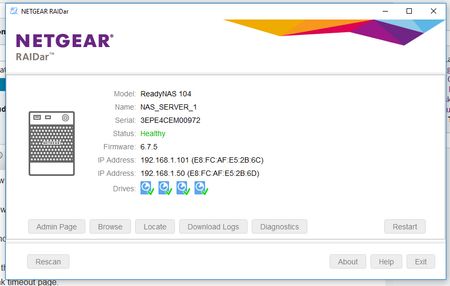
Upgraded to firmware 6.7.5 through the web interface and now the unit is not responing via the browser at all. SMB share is still working Tried Rebooting Tried Reset via reset pin on back...

mickle026
Sep 08, 2017Aspirant
I am aware that I need a backup plan, but Netgear's sloppy upgrade process shouldn't force me in to it.
However all of this crap was because I just impulsively clicked upgrade and I really didn't need to as everything was working just fine.
I chose upgrade to 6.8.0 when it all went wrong, the system ran the upgrade and rebooted. It still says version 6.7.5. on the front of the NAS unit. When I boot in to it with my spare disks installed its still 6.7.5.
I don't have SSH enabled as I don't need it, the NAS is not visible externally to the network it is on.
It didn't work before .. but consitantly trying to flash this has made the password default "password" work again.
I can now access the logs.
My thoughts are if I upgrade on my spare disks to 6.8.0, then put back my original data disks will it upgrade my original data disks firmware or will it just stop working altogether?
If it will upgrade them this may be a good solution, but as I cant find an answer on this I am reluctant to even try it.
mickle026
Sep 08, 2017Aspirant
Sorry previous poster DID say it will upgrade the old disks if I do it with scratch disks.
- SandsharkSep 08, 2017Sensei
Obviously, something went wrong with the upgrade to 6.8.0 where the flash was not even updated. One possibility that could also cause your other issues is a full OS partition. But since you can now get the logs, which needs working space in the OS partition to zip them, that doesn't seem like the problem. If you don't regularly power cycle your NAS, keep in mind that the reboot required for the update may have been the catalyst, not the update per se, especially since the update didn't actually take place. Corruption in certain configuration files can cause something like this, and an OS re-install does not replace all config files. (I know this because I screwed one up editing it via SSH and had similar symptoms.)
If you can't find anything in the logs that seems to indicate the cause, you may want to submit them to a moderator to take a more experienced look at them.
- mickle026Sep 08, 2017Aspirant
AS suggested in post 5
Took out my data disks, put in a scratch disk (spare)
Upgraded the OS to 6.8.0
Rebooted.
OS 6.8.0 is now installed and works well with web interface.
Powered down,
took out the scratch disk
put in my data disks
Powered up - no web interface !!.
6.8.0 boots
No Admin Page - "Admin page is offline"
OK, powered down
Rebooted holding reset, chose re-install OS - hoping 6.8.0 will copy to the HDD
Rebooted - Upgrading FW message - still admin page offline
Looks as though the only solution, because SSH is definately not on is to copy off the data, reformat the disks and start afresh, then copy the data back on.
:(
At least its not dead  StephenBSep 11, 2017Guru - Experienced User
mickle026 wrote:
Sorry previous poster DID say it will upgrade the old disks if I do it with scratch disks.
Yes, it should. When you upgrade firmware it is written to both the flash and the OS partition on the disks.
When you boot an OS 6 NAS, it will compare the firmware in the flash with what is on the disks. If the flash is newer, the OS partition is updated. If the OS partition is newer, then the flash is updated.
- mickle026Sep 12, 2017Aspirant
Hi,
It does re-write to the hard disk, but something it doesn't overwrite must be what is corrupted. I still had the same issues when the data disks were put back in. Its hard to believe a company as big as netgear doesnt have a tool to fix things in this eventuality.
I have now spent a long time copying off my data to backup drives.
I have now installed "clean" 6tb disks
The system has put on the OS, and it works perfectly fine. It logs in and webif works.
Now is the long haul of copying the data back on. I shall not be upgrading it again, I will be sticking with this firmware.
Thanks for all the help, its a shame that none of it worked, but at least it did show that the NAS wasnt ready for the bin - I really thought it was dead beyond repair. Its not! Just corruption of the OS on my disks, and that everything netgear provide to fix it, couldn't fix it.
Thanks again
- mickle026Sep 22, 2017Aspirant
Should not have to pay to fix an update - thats scandalous!! - and anyway the can't fix what they cant connect to!
Anyway the update has issues, im not impressed.
I cannot create a eth pair, round robin, reconnects the admin page as offline with error message on front of NAS something about "namelen+64" (not 100% sure thats exactly what it said, but it was similar if not exact).
Load balanced connects the admin page as offline and gives this on the front oif the NAS
2nd attempt I got same issue but different message "strlen+10"
- mickle026Sep 22, 2017Aspirant
Oh and I forgot to mention, Something is different with Samba. A few non windows machines refused to connect unless I added :445 on the end of the IP, so had to remap these. They worked without it before the upgrade to 6.8.
 Marty_MSep 26, 2017NETGEAR Employee Retired
Hello mickle026,
There is a possibility the NAS was already encountering internal problem and the firmware upgrade might have trigger this current behavior. I believe it is a good idea to have a backup of the data save on the NAS and then perform a factory reset and reconfigure it from scratch since the NAS is showing different errors and behaving really unusual.
Regards,
Marty_M
NETGEAR Community Team
- Marty_MOct 01, 2017NETGEAR Employee Retired
Hello mickle026,
We’d greatly appreciate hearing your feedback letting us know if the information we provided has helped resolve your issue or if you need further assistance. If your issue is now resolved, we encourage you to mark the appropriate reply as the “Accept as Solution” or post what resolved it and mark it as solution so others can be confident in benefiting from the solution.The Netgear community looks forward to hearing from you and being a helpful resource in the future!
Regards,
Marty_M
NETGEAR Community Team - mickle026Oct 01, 2017Aspirant
I had done the factory reset before I was even advised.
The factory reset was done with brand new disks in it. I installed 6.8 on to them and that appeared to work well. I put back my data. Then I realised that I hadn't set my network adapters to work as one.
The error trying to round robin my network cards is AFTER the factory reset. Im not going to try to do it again, sadly when i tried last week (after the reset & data being put back on - which took ages) it caused the crash with strlen+10, then triggered a data resync, which took another 5 days. I then had the 4th disk to put in which also triggers a data resync which took a further 2 days.
So, I have decided to keep the adapters seperate and go with the speed loss. Solely because i dont want it to crash again and go sloooow for 5+ more days.
Otherwise the big "brick" is working again.
The update has left me sore as it has cost me 4 new disks ( close to £800 ) - I can't say Im happy about that :( , still I have my old disks with the corrupt OS on them I can reformat and re-use ...
- Marty_MOct 02, 2017NETGEAR Employee Retired
Hello mickle026,
I do apologize for all the inconvenience, yes the old hard drives can be formatted and can be use in the future.Regards,
Marty_M
NETGEAR Community Team - mickle026Oct 02, 2017Aspirant
Whatever the error was, Im not 100% but I am 99% certain and my insticts are telling me this too - that it was/is network adapter settings related. I would place a bet on these not being updated when an upgrade is applied !
It would have been extremely helpful is there was a USB patch that could correct network adapter settings (just this setting), or at least reset them to default. Maybe even replacing the old files.
Just a thought for you guys at netgear - I personnally believe that that would have fixed this entire issue without the need for shifting data and buying new disks.
- StephenBOct 02, 2017Guru - Experienced User
mickle026 wrote:
It would have been extremely helpful is there was a USB patch that could correct network adapter settings (just this setting), or at least reset them to default. Maybe even replacing the old files.
That is done via the boot menu (OS reinstall). So you did that (per your first post), and it didn't resolve it.
- mickle026Oct 02, 2017Aspirant
Not convinced it is done with OS re-install. If it were done the admin IP would have been accesible, or responded to a ip/port scan - even if the page remained offline.
- StephenBOct 02, 2017Guru - Experienced User
mickle026 wrote:
Not convinced it is done with OS re-install. If it were done the admin IP would have been accesible, or responded to a ip/port scan - even if the page remained offline.
I do understand the frustration here. I was just pointing out that Netgear had already built in the idea you were offering (in a slightly different way). The OS reinstall will reset the network configuration and the admin password. There are other problems that it won't fix - for instance, issues with ill-behaved apps (or packages installed directly from ssh).
We can't diagnose anything now, since you've already done the factory reset.
- mickle026Oct 02, 2017Aspirant
Never had any apps installed, ssh never been used, just using samba and that was still working.
The whole experience was triggered when I upgraded. Maybe something was wrong before I upgraded but it was not evident because everything was working before. Maybe the upgrade couldn't overwrite a file or something, we wont know but its been a huge hassle.
Oh well, learnt an expensive lesson. Don't touch what isn't broke!
- mdgm-ntgrOct 02, 2017NETGEAR Employee Retired
Once the disks have been wiped we can’t investigate what happened.
As StephenB mentioned an OS Re-install resets network settings back to default.
We do recommend updating the firmware over time. It is recommended where possible to make sure you’ve updated your regular backup before installing a firmware update.


Related Content
NETGEAR Academy

Boost your skills with the Netgear Academy - Get trained, certified and stay ahead with the latest Netgear technology!
Join Us!
