NETGEAR is aware of a growing number of phone and online scams. To learn how to stay safe click here.
Forum Discussion

ReflectingMe
Mar 15, 2024Aspirant
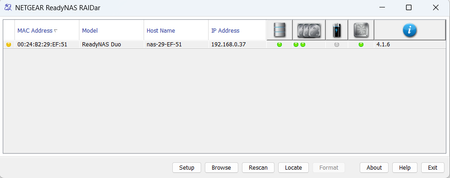
ReadyNAS DUO V1 - issues trying to use RAIDar on Mac or Win11
Hi All - I have kindly been given a ReadyNAS DUO V1, but am experiencing some issues when trying to use RAIDar on my Mac Studio / iMac / Win 10 / Win 11. I have installed 2 * WD RED 4TB drives in th...
- Mar 23, 2024
So the outcome of this is that I have set up the Netgear ReadyNAS in RAID 0 configuration with two new Seagate 2TB drives. It is a very old NAS, and apparently is also very slow, so I decided to put it to use as a scratch / temporary storage drive for unimportant and non essential files.
I have managed to update the ReadyNAS to the latest firmware, but given that SMB1 is not supported by default on Windows10 or Windows11 (which I use via parallels), and is also not supported on any recent MacOS version - this unit is not something I will spend much time using.
For the interim I have purchased a 2 bay WD drive with 2 x 4TB drives configured in RAID 1 while I research the whole NAS market in more detail. In time I will likely purchase a 4 bay QNAP / Netgear or similar.
Thanks to everyone who has replied here with what is superb information. Thank you.
ReflectingMe
Mar 15, 2024Aspirant
Many thanks Sandshark, and Stephen, and yes, despite being a bit of a geek, I am totally new to NAS stuff, learning fast!
So, I used Firefox as instructed, and so doing managed to successfully update the firmware to 4.1.16.
I will have a look through the settings, amend them as required, save, then revert that Firefox setting back to 3 instead of leaving it at 1.
And gotcha re the 4TB drive only showing 2TB. I may purchase two 2TB drives and use those in the ReadyNAS Duo, as well as looking for a 2 drive enclosure to house my two 4TB WD RED's.
Thank you very much both, pretty amazed at this level of support for a long gone legacy Netgear NAS device. I appreciate it is old but it might serve as a simple file store or Time Machine backup device.

StephenB
Mar 15, 2024Guru - Experienced User
ReflectingMe wrote:
I will have a look through the settings, amend them as required, save, then revert that Firefox setting back to 3 instead of leaving it at 1.
You'll either need to leave the setting at 1, or apply the mod to virtual.conf in this thread:
- ReflectingMeMar 15, 2024Aspirant
Yes, appreciate that Stephen. I meant I doubt I'll need to amend them regularly once they're set as I want them, so will revert that setting back to 3 until I need to refine the settings once more.
Also.. earlier I noticed that of the 2 disks, one green LED was on and the other green LED was flashing. Within the settings > Volumes - I noticed that 'Resync' was showing against this drive and I see now that the Volume Settings section, it says Resync 26% complete, then an estimated time before it finishes. Can I ask what is happening here Stephen, please?
I am not concerned, but curious. I thought when I ran the wizard to set X-RAID (which as I understand it, aggregates the drives into one drive) that would have been it, I guess not 🙂
- StephenBMar 15, 2024Guru - Experienced User
ReflectingMe wrote:
I am not concerned, but curious. I thought when I ran the wizard to set X-RAID (which as I understand it, aggregates the drives into one drive) that would have been it, I guess not 🙂
After you set up the RAID mode (which turns into RAID-1 with a Duo), the NAS starts the mirroring process - which can take a while.
BTW, you want drives that are NOT SMR. WD Red Plus or Seagate Ironwolf are fine, but not WD Red. Also, most desktop drives in the 2-6 TB size range are SMR.
- ReflectingMeMar 15, 2024Aspirant
Sorry to ask... SMR...?
Related Content
NETGEAR Academy

Boost your skills with the Netgear Academy - Get trained, certified and stay ahead with the latest Netgear technology!
Join Us!
