NETGEAR is aware of a growing number of phone and online scams. To learn how to stay safe click here.
Forum Discussion

ReflectingMe
Mar 15, 2024Aspirant
ReadyNAS DUO V1 - issues trying to use RAIDar on Mac or Win11
Hi All - I have kindly been given a ReadyNAS DUO V1, but am experiencing some issues when trying to use RAIDar on my Mac Studio / iMac / Win 10 / Win 11. I have installed 2 * WD RED 4TB drives in th...
- Mar 23, 2024
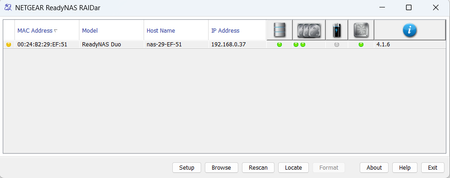
So the outcome of this is that I have set up the Netgear ReadyNAS in RAID 0 configuration with two new Seagate 2TB drives. It is a very old NAS, and apparently is also very slow, so I decided to put it to use as a scratch / temporary storage drive for unimportant and non essential files.
I have managed to update the ReadyNAS to the latest firmware, but given that SMB1 is not supported by default on Windows10 or Windows11 (which I use via parallels), and is also not supported on any recent MacOS version - this unit is not something I will spend much time using.
For the interim I have purchased a 2 bay WD drive with 2 x 4TB drives configured in RAID 1 while I research the whole NAS market in more detail. In time I will likely purchase a 4 bay QNAP / Netgear or similar.
Thanks to everyone who has replied here with what is superb information. Thank you.
ReflectingMe
Mar 23, 2024Aspirant
Yep, APF is enabled, as per screenshot below (may need admin approval). Should I disable the other two services and just leave AFP?

StephenB
Mar 23, 2024Guru - Experienced User
ReflectingMe wrote:
Yep, APF is enabled, as per screenshot below (may need admin approval). Should I disable the other two services and just leave AFP?
You are seeing admin, C, and home with SMB only because you are are using admin credentials So that is expected. The puzzle is why NetgearNAS is only shown with SMB..
The questions are
- Whether NetgearNAS is a share or not???
- If it is a share, whether AFP is enabled for the NetgearNAS share or not.
FYI, I can approve screenshots, so no problems there.
- ReflectingMeMar 23, 2024Aspirant
Thanks for your ongoing help, really appreciated. And ok with the image approval.
Yes, NetgearNAS is set up as a share, and I believe the AFP is enabled for this share. Should I disable CIFS for the share?
- StephenBMar 24, 2024Guru - Experienced User
ReflectingMe wrote:
Yes, NetgearNAS is set up as a share, and I believe the AFP is enabled for this share. Should I disable CIFS for the share?
CIFS is SMB 1, so if you disable it you won't see the share in Windows.
I'm not a Mac user, so I can't offer much advice on AFP.
You aren't using admin credentials with AFP on the Mac - if you were, you'd see admin listed as a share with AFP. So that is one thing you could try. You could also enable AFP guest access for the share (if you click on the AFP icon for the share, you will see access settings).
Related Content
NETGEAR Academy

Boost your skills with the Netgear Academy - Get trained, certified and stay ahead with the latest Netgear technology!
Join Us!
