NETGEAR is aware of a growing number of phone and online scams. To learn how to stay safe click here.
Forum Discussion

soapbox55
May 25, 2017Guide
RN-102 User account cannot access shares over SMB.
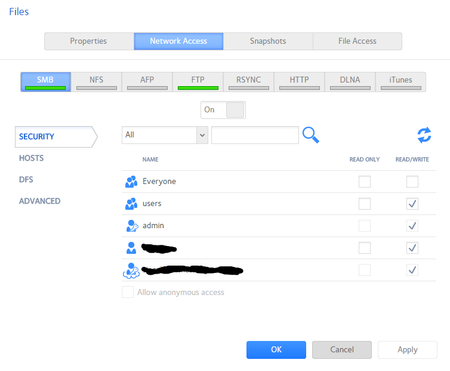
I have a ReadyNAS 102 that has a share on it called "Files". The permissions of "Files" are set to allow read/write access to everyone in the user group, the admin account, my local user account (on ...
soapbox55
May 25, 2017Guide
They are both on the same default workgroup, "WORKGROUP".
I tried net use * /delete and it returned:
"There are no entries in the list".
I tried the second command and got:
System error 5 has occurred.
Access is denied.

StephenB
May 25, 2017Guru - Experienced User
soapbox55 wrote:
I tried net use * /delete and it returned:
"There are no entries in the list".
That is not a problem, it just means there were no open SMB connections.
soapbox55 wrote:
They are both on the same default workgroup, "WORKGROUP".
The NAS also?
soapbox55 wrote:
I tried the second command and got:
System error 5 has occurred.
Access is denied.
Does this also happen when you use "admin" for the username (and of course the NAS admin password)?
Also, check to see that the system time on the NAS and the PCs are syncd.
What version of windows are you running?
- soapbox55May 25, 2017Guide
The NAS and computers are all on "WORKGROUP".
When I run that command with the admin account (and also the cloud user account) it returns:
The command completed successfully.
I can log in through windows explorer as admin as well. I just cannot log in using my local user account that I created on the NAS. The account I use on my computer and the account on the NAS have the same username and password, so it should accept that login.
The system time on my computers and NAS are in sync.
Windows versions are:
Desktop with Windows 10 Pro Ver.1703 Build.15063.296
Laptop with Windows 10 Home Ver.1607 Build.14393.1198
Laptop with Windows 7 Home SP1 Ver.6.1 Build.7601
- StephenBMay 25, 2017Guru - Experienced User
soapbox55 wrote:
When I run that command with the admin account (and also the cloud user account) it returns:
The command completed successfully.
Ok. So SMB itself is working.
Is there something unusual about that account name or password?
Also, does the account name match one of the share names (or the data volume name)?
- soapbox55May 25, 2017Guide
Both are in simple plaintext. Nothing unusual.
User/Password
The account name does not match any share name.
I attempted to create a new account to test logging in with and it worked with that. Should I attempt to delete my account and re-add it with the same user/pass?
Related Content
- Apr 16, 2020Retired_Member
NETGEAR Academy

Boost your skills with the Netgear Academy - Get trained, certified and stay ahead with the latest Netgear technology!
Join Us!
