NETGEAR is aware of a growing number of phone and online scams. To learn how to stay safe click here.
Forum Discussion

XAffi
Nov 05, 2021Aspirant
RN104 degraded, but no prorgess
Hi all. I am using my RN104 as a backup device sonce a very, very long time w/o any issues... Cool thing, not high performance, but good it works :-). I changed in my RN104 one of the 4 harddriv...
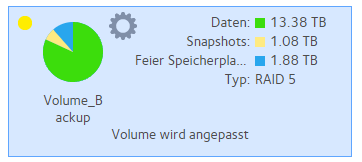
- Nov 06, 2021
I agree it doesn't look like it's expanding. First, make sure a 4th partition was created: fdisk -l /dev/sdd. You can also compare the size of the 4th partition to another drive's: fdisk -l /dev/sdc. If the partition is there and the right size, then the following should add it or give you an error message as to why it won't: mdadm /dev/md127 --add /dev/sdd4 --verbose.
If the partition isn't there, don't try to use fdisk to create it, it'll refuse to start it in the right place. I recommend you install and use parted for that.


StephenB
Nov 05, 2021Guru - Experienced User
The array is degraded because you replaced a drive. It will remain degraded until the resync completes.
"Degraded" means that there is no RAID redundancy, so if one of the original disks fails the volume will be lost.
XAffi wrote:
2x WD60EFAX;
The WD60EFAX drives use SMR technology. Several folks here have found they misbehave in OS-6 ReadyNAS. SMR drives have variable write speeds (sustained writes can result in glacial speeds).
Generally I don't recommend them for any NAS - not saying you should replace them, but I do suggest keeping an eye out for problems.
 XAffiNov 06, 2021Aspirant
Hi Stephan.
Thanks for your reply.
1. "SMR-Drives"--- I have them since almost 2 years now and yes, I am in the progress of replacing them step-by-step - the one I replaced was also an "SMR".
2. Is resync really running? Usually I see it in the /proc/mdstat. Any proposal where I can see if resync is running if it is not shown on the readynas itself, the web-interface or in the /proc/mdstat file?
- StephenBNov 06, 2021Guru - Experienced User
XAffi wrote:
2. Is resync really running? Usually I see it in the /proc/mdstat. Any proposal where I can see if resync is running if it is not shown on the readynas itself, the web-interface or in the /proc/mdstat file?
That's a good question. Usually it is shown on the volume page. Your mdstat post shows sdd is missing from md127 (but it is in the md126 raid group).
What drive did you recently replace?
- XAffiNov 06, 2021Aspirant
I replaced 1x WD60EFAX with 1x WD80EFBX...
And yes, I know the difference between md126 and m127...Any idea?
- SandsharkNov 06, 2021Sensei
I agree it doesn't look like it's expanding. First, make sure a 4th partition was created: fdisk -l /dev/sdd. You can also compare the size of the 4th partition to another drive's: fdisk -l /dev/sdc. If the partition is there and the right size, then the following should add it or give you an error message as to why it won't: mdadm /dev/md127 --add /dev/sdd4 --verbose.
If the partition isn't there, don't try to use fdisk to create it, it'll refuse to start it in the right place. I recommend you install and use parted for that.
- XAffiNov 06, 2021Aspirant
Hi Sandshark,
Thanks.. Meaning you assumed that due to whatever reason resync has not started by itself...
I have checked ans seen that all partitions are available, size matches as well...
I will follow closely...but it seems it is working...
fdisk -l /dev/sdd
Disk /dev/sdd: 7.3 TiB, 8001563222016 bytes, 15628053168 sectors
Units: sectors of 1 * 512 = 512 bytes
Sector size (logical/physical): 512 bytes / 4096 bytes
I/O size (minimum/optimal): 4096 bytes / 4096 bytes
Disklabel type: gpt
Disk identifier: E93A4BDA-2E80-4CE4-9C98-3E82A6477A2FDevice Start End Sectors Size Type
/dev/sdd1 64 8388671 8388608 4G Linux RAID
/dev/sdd2 8388672 9437247 1048576 512M Linux RAID
/dev/sdd3 9437248 7814037119 7804599872 3.6T Linux RAID
/dev/sdd4 7814037120 11721045119 3907008000 1.8T Linux RAIDfdisk -l /dev/sdc
Disk /dev/sdc: 5.5 TiB, 6001175126016 bytes, 11721045168 sectors
Units: sectors of 1 * 512 = 512 bytes
Sector size (logical/physical): 512 bytes / 4096 bytes
I/O size (minimum/optimal): 4096 bytes / 4096 bytes
Disklabel type: gpt
Disk identifier: 328949D9-CF99-4854-BAA8-3FD7BCFE4E4CDevice Start End Sectors Size Type
/dev/sdc1 64 8388671 8388608 4G Linux RAID
/dev/sdc2 8388672 9437247 1048576 512M Linux RAID
/dev/sdc3 9437248 7814037119 7804599872 3.6T Linux RAID
/dev/sdc4 7814037120 11721045119 3907008000 1.8T Linux RAIDroot@Saturn:~# mdadm /dev/md127 --add /dev/sdd4 --verbose
mdadm: added /dev/sdd4cat /proc/mdstat
Personalities : [raid0] [raid1] [raid10] [raid6] [raid5] [raid4]
md126 : active raid5 sda3[5] sdc3[3] sdd3[6] sdb3[4]
11706503424 blocks super 1.2 level 5, 64k chunk, algorithm 2 [4/4] [UUUU]md127 : active raid5 sdd4[4] sdc4[1] sda4[3] sdb4[2]
5860115712 blocks super 1.2 level 5, 64k chunk, algorithm 2 [4/3] [_UUU]
[>....................] recovery = 0.0% (647904/1953371904) finish=5449.9min speed=5971K/secmd1 : active raid10 sda2[0] sdd2[3] sdc2[2] sdb2[1]
1044480 blocks super 1.2 512K chunks 2 near-copies [4/4] [UUUU]md0 : active raid1 sda1[5] sdc1[3] sdd1[6] sdb1[4]
4190208 blocks super 1.2 [4/4] [UUUU]unused devices: <none>
And finally:
Related Content
NETGEAR Academy

Boost your skills with the Netgear Academy - Get trained, certified and stay ahead with the latest Netgear technology!
Join Us!
