NETGEAR is aware of a growing number of phone and online scams. To learn how to stay safe click here.
Forum Discussion

VolkerB
Nov 06, 2021Aspirant
RN214 refuses to take snapshots
Hi! After factory-resetting and reinstalling my RN214 (check out https://community.netgear.com/t5/Using-your-ReadyNAS-in-Business/Admin-page-unavailable-after-cancelled-backup-job-amp-hard/m-p/21...
- Nov 08, 2021
VolkerB wrote:[...] snapshots (neither smart nor custom, no matter what schedule) did not seem to work anymore for the home shares of all users. Manual and automatic snapshots for other shares not related to individual users worked fine. There was no issue with insufficient space (no snapshot pruning taking place) [...] So I have created a new user "test" with all default settings in the "Users" group. [...] for user "test" automatic snapshots are actually taken successfully, while at the same time, no snapshots for user "volker" are stored even though he is sharing the same schedule. As it happens to be, [X] Allow snapshot access was enabled for volker and [ ] Protection was disabled, user "test" had it the other way round. [...]
Currently, I'm running a test with various combinations of (dis)allowing snapshot access and en-/disabling the protection feature, (de)activating bit rot protection and compression for the other shares to find out what exactly spoils the fun here.
The tests have completed. Conclusion:
If you don't activate the [X] Protection option in the Home Folders > Settings > Snapshot Access for all the users where snapshots should be taken, no schedule whatsoever is going to work. Everything else (Bit-rot-protection and compression for shares, snapshot access for individual users, the type of schedule and whether you want snapshots even if nothing changed) does not matter.
So if some Netgear dude is listening: Perhaps this critical relationship could at least be made more clear in the manual or probably even a warning displayed if the admin deviates from a setting that implicitely disables snapshots.
HTH & Greets,
Volker

StephenB
Nov 06, 2021Guru - Experienced User
I have two comments on your settings.
- The "Smart" snapshots never delete the monthly snapshots. Over time, that will fill the data volume. While you can go in periodically and deleted the oldest snapshots, it is simpler to switch to "Custom", and set retention. You can also tell the system not to store snapshots if there are no changes.
- Making snapshots visible in Windows has an unfortunate side effect - the snapshots are writeable, so files can be deleted by the user (or encrypted by ransomware). This is a non-started for me - so I allow Windows Previous Version, but I don't allow users to otherwise browse the snapshots.
I'm not sure what's going on in your case. But I am thinking you might try renaming or or deleting a file in one of the home folders, and see if that triggers a snapshot. FWIW, I don't use home folders myself - we don't need or want the privacy feature, and they aren't easy to restore from a backup.
VolkerB
Nov 06, 2021Aspirant
StephenB : I think smart snapshots are quite convenient as daily snapshots are automatically promoted to weekly snapshots every Friday and become monthly snapshots at the end of every month. As only monthly snapshots are kept forever and BTFRS just stores the delta, storage issues are unlikely in low traffic situations. In contrast, the classic method just allows specifying a duration or number for snapshot retention.
For snapshot access via SMB and subfolders in the user's home directory, the RN214 allows enabling "protection" (whatever that is, didn't try so far), so I figure the folder is readonly for the user in that case. I want the system to be as close to a nobrainer as possible so the option that users can browse into snapshots using the system/tools they are accommodated to and restore file versions without my help is a big plus.
Using home folders at all facilitates automatic synchronization of local files quite a lot in my case (rsync, robocopy) and I don't want documents specific to the operating system or the particular user to be spread all across the public shares. The latter are for commonly used media only.
Having said that: Smart snapshots in user's home folders used to work fine before (manual snapshots still do), data has been changed many times after I have done a factory reset and rebuilt the NAS. There is nothing totally obvious that I was doing differently since the first setup (with the potential exception of enabling SSH), so this is quite a mistery to me.
I did compare a configuration backup before and after the factory reset (relevant differences were SSH=1 and
TIMEMACHINE_PROTOCOL=SMB vs. TIMEMACHINE_PROTOCOL=AFP in \etc\default\services) but no changes seem causal to the issue. Of course, I can provide more detailed information if necessary, just tell me where to look.
Thanks & greets,
Volker
- StephenBNov 06, 2021Guru - Experienced User
What firmware are you running?
VolkerB wrote:
I think smart snapshots are quite convenient as daily snapshots are automatically promoted to weekly snapshots every Friday and become monthly snapshots at the end of every month. As only monthly snapshots are kept forever and BTFRS just stores the delta, storage issues are unlikely in low traffic situations.
Up to you of course. It was a problem for me. The "delta" over time adds up - especially in the share where I store my PC backups.
"Custom" is definitely the "no brainer" config for me - it manages my overall space automatically much better. Back when I was using "smart" snapshots I had to manually delete the oldest monthly snapshots periodically.
FWIW, I've never understood the benefit of the snapshot thinning. It seems to me it just risks deleting the version you want to roll back to. I much prefer the "only make snapshots with changes" setting in the custom snapshots.
- VolkerBNov 07, 2021Aspirant
StephenB wrote:What firmware are you running?
6.10.5 Hotfix 1 - which, as my device tells me, is the latest stable version.
StephenB wrote:"Custom" is definitely the "no brainer" config for me - it manages my overall space automatically much better. Back when I was using "smart" snapshots I had to manually delete the oldest monthly snapshots periodically.
FWIW, I've never understood the benefit of the snapshot thinning. It seems to me it just risks deleting the version you want to roll back to. I much prefer the "only make snapshots with changes" setting in the custom snapshots.
I unfortunately don't quite understand, what "only make snapshots with changes" mean, since the ReadyNAS OS 6.9.3
Software Manual (which seems to be the latest one) doesn't mention it. It could a) mean that I get a snapshot of the entire volume mapped in the /home/<user>/snapshot directory only if at least one file has changed in the entire volume or b) only the delta between the current state and the last snapshot is exposed if - and only if - something has changed. With smart snapshots, a) seems to be the case, I would probably prefer b) but every approach has its benefits. Since this is a feature of BTFRS, you probably don't have a choice and snapshots only contain the delta as "real" data anyway. The rest is just hard(?) links.But that is all a matter of taste and doesn't solve my problem. So I have disabled disk spindown (the manual claims that for hourly snapshots the disks are never spun up, probably ignoring the menu option [X] Spin up disks to take scheduled snapshots), created a custom hourly snapshot schedule but without the "only make snapshots with changes" option set. This should get me exactly one snapshot per hour.
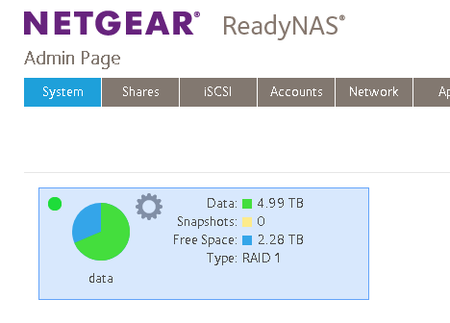
This is to test my assumption, that on this RN214 and for unknown reasons, automatic snapshots are not working anymore, neither smart ones nor custom ones. Perhaps because some daemon is not running or ill-configured. Just for the records: That box is running a 8TB 2-disk XRAID (so essentially a RAID-1) and it has 2.28TB free space. Snapshot pruning occurs at 90% capacity (I left the option at it's default) which the system is quite far away from. I never ran a defrag/scrub/balance since the reinstall.
For the curious: The reinstall became necessary because of a rsync backup gone wrong with the target disconnected and filling the mount point in the OS partion instead of the USB drive that should have been mounted there which had me ending up with the system volume root's usage at 99% and the admin page being unavailable.
No SSH, no other option. I had a backup of my data though.
Addendum: Several hours have passed, no automatic snapshot(s). Just as I expected. What now? What is blocking that job from running?
- VolkerBNov 07, 2021Aspirant
So I have disabled disk spindown, created a custom hourly snapshot schedule but without the "only make snapshots with changes" option set. This should get me exactly one snapshot per hour and test my assumption, that on this RN214 and for unknown reasons, automatic snapshots are not working anymore, neither smart ones nor custom ones. Perhaps because some daemon is not running or ill-configured. That box has 2.28TB of 8TB free and is running a XRAID. Snapshot pruning occurs at 90% capacity (default). I never ran a defrag/scrub/balance since the reinstall.
After several hours have passed, no automatic snapshot(s). Just as expected.
cron.log:
Nov 07 07:16:03 rn214-volker cron[1911]: (CRON) INFO (pidfile fd = 3)
Nov 07 07:16:03 rn214-volker cron[1911]: (CRON) INFO (Running @reboot jobs)
Nov 07 07:17:02 rn214-volker cron[1911]: (*system*spindown) RELOAD (/etc/cron.d/spindown)
Nov 07 07:17:02 rn214-volker CRON[2807]: (root) CMD (   cd / && run-parts --report /etc/cron.hourly)
btrfs.log
=== filesystem /data ===
Data, single: total=4.99TiB, used=4.99TiB
System, DUP: total=8.00MiB, used=576.00KiB
Metadata, DUP: total=2.00GiB, used=1.35GiB
GlobalReserve, single: total=512.00MiB, used=0.00B
=== subvolume /data ===
ID 257 gen 72 top level 5 path home
ID 258 gen 2253 top level 5 path .apps
ID 259 gen 12 top level 5 path .vault
ID 260 gen 2255 top level 5 path ._share
ID 265 gen 2254 top level 5 path .timemachine
ID 270 gen 2238 top level 5 path Media
ID 271 gen 1880 top level 270 path Media/.snapshots
ID 274 gen 2222 top level 5 path Software
ID 275 gen 1881 top level 274 path Software/.snapshots
ID 276 gen 2235 top level 5 path Temp
ID 277 gen 2237 top level 276 path Temp/.snapshots
ID 278 gen 122 top level 5 path .purge
ID 279 gen 2249 top level 257 path home/volker
ID 280 gen 2247 top level 257 path home/admin
ID 281 gen 2247 top level 257 path home/anja
ID 419 gen 1880 top level 5 path Backup
ID 421 gen 1880 top level 419 path Backup/.snapshots
auth.log
Nov 07 07:17:02 rn214-volker CRON[2806]: pam_unix(cron:session): session opened for user root by (uid=0)
Nov 07 07:17:02 rn214-volker CRON[2806]: pam_unix(cron:session): session closed for user root
Nov 07 07:23:14 rn214-volker apache2[2373]: pam_unix(frontview:auth): authentication failure; logname= uid=0 euid=0 tty= ruser= rhost=10.0.0.20  user=admin
Nov 07 07:23:16 rn214-volker apache2[2373]: pam_unix(frontview:auth): authentication failure; logname= uid=0 euid=0 tty= ruser= rhost=10.0.0.20  user=admin
(no idea what this authentication failure is about)
mounts.log
udev on /dev type devtmpfs (rw,noatime,nodiratime,size=10240k,nr_inodes=187927,mode=755)
devpts on /dev/pts type devpts (rw,noatime,nodiratime,mode=600,ptmxmode=000)
/dev/md0 on / type ext4 (rw,noatime,nodiratime,data=ordered)
sysfs on /sys type sysfs (rw,nosuid,nodev,noexec,noatime,nodiratime)
proc on /proc type proc (rw,nosuid,nodev,noexec,noatime,nodiratime)
tmpfs on /dev/shm type tmpfs (rw,nosuid,nodev)
tmpfs on /run type tmpfs (rw,nosuid,nodev,mode=755)
tmpfs on /run/lock type tmpfs (rw,nosuid,nodev,noexec,noatime,nodiratime,size=516500k)
tmpfs on /sys/fs/cgroup type tmpfs (ro,nosuid,nodev,noexec,mode=755)
cgroup on /sys/fs/cgroup/systemd type cgroup (rw,nosuid,nodev,noexec,noatime,nodiratime,xattr,release_agent=/lib/systemd/systemd-cgroups-agent,name=systemd)
cgroup on /sys/fs/cgroup/devices type cgroup (rw,nosuid,nodev,noexec,noatime,nodiratime,devices)
cgroup on /sys/fs/cgroup/cpu,cpuacct type cgroup (rw,nosuid,nodev,noexec,noatime,nodiratime,cpu,cpuacct)
cgroup on /sys/fs/cgroup/freezer type cgroup (rw,nosuid,nodev,noexec,noatime,nodiratime,freezer)
cgroup on /sys/fs/cgroup/cpuset type cgroup (rw,nosuid,nodev,noexec,noatime,nodiratime,cpuset)
cgroup on /sys/fs/cgroup/blkio type cgroup (rw,nosuid,nodev,noexec,noatime,nodiratime,blkio)
mqueue on /dev/mqueue type mqueue (rw,noatime,nodiratime)
configfs on /sys/kernel/config type configfs (rw,noatime,nodiratime)
fusectl on /sys/fs/fuse/connections type fusectl (rw,noatime,nodiratime)
/dev/md127 on /data type btrfs (rw,noatime,nodiratime,nospace_cache,subvolid=5,subvol=/)
/dev/md127 on /apps type btrfs (rw,noatime,nodiratime,nospace_cache,subvolid=258,subvol=/.apps)
/dev/md127 on /home type btrfs (rw,noatime,nodiratime,nospace_cache,subvolid=257,subvol=/home)
tmpfs on /home/admin/snapshot type tmpfs (rw,noatime,nodiratime,size=4k)
tmpfs on /data/home/admin/snapshot type tmpfs (rw,noatime,nodiratime,size=4k)
tmpfs on /home/anja/snapshot type tmpfs (rw,noatime,nodiratime,size=4k)
tmpfs on /data/home/anja/snapshot type tmpfs (rw,noatime,nodiratime,size=4k)
tmpfs on /home/volker/snapshot type tmpfs (rw,noatime,nodiratime,size=4k)
tmpfs on /data/home/volker/snapshot type tmpfs (rw,noatime,nodiratime,size=4k)
BTRFS-related in processes.log
S root      1060     2  1060  0    1  60 -20     0     0 rescue 07:15 ?        00:00:00 [btrfs-worker]
S root      1062     2  1062  0    1  60 -20     0     0 rescue 07:15 ?        00:00:00 [btrfs-worker-hi]
S root      1063     2  1063  0    1  60 -20     0     0 rescue 07:15 ?        00:00:00 [btrfs-delalloc]
S root      1064     2  1064  0    1  60 -20     0     0 rescue 07:15 ?        00:00:00 [btrfs-flush_del]
S root      1065     2  1065  0    1  60 -20     0     0 rescue 07:15 ?        00:00:00 [btrfs-cache]
S root      1066     2  1066  0    1  60 -20     0     0 rescue 07:15 ?        00:00:00 [btrfs-submit]
S root      1067     2  1067  0    1  60 -20     0     0 rescue 07:15 ?        00:00:00 [btrfs-fixup]
S root      1068     2  1068  0    1  60 -20     0     0 rescue 07:15 ?        00:00:00 [btrfs-endio]
S root      1069     2  1069  0    1  60 -20     0     0 rescue 07:15 ?        00:00:00 [btrfs-endio-met]
S root      1070     2  1070  0    1  60 -20     0     0 rescue 07:15 ?        00:00:00 [btrfs-endio-met]
S root      1071     2  1071  0    1  60 -20     0     0 rescue 07:15 ?        00:00:00 [btrfs-endio-rai]
S root      1072     2  1072  0    1  60 -20     0     0 rescue 07:15 ?        00:00:00 [btrfs-endio-rep]
S root      1073     2  1073  0    1  60 -20     0     0 rescue 07:15 ?        00:00:00 [btrfs-rmw]
S root      1074     2  1074  0    1  60 -20     0     0 rescue 07:15 ?        00:00:00 [btrfs-endio-wri]
S root      1075     2  1075  0    1  60 -20     0     0 rescue 07:15 ?        00:00:00 [btrfs-freespace]
S root      1076     2  1076  0    1  60 -20     0     0 rescue 07:15 ?        00:00:00 [btrfs-delayed-m]
S root      1077     2  1077  0    1  60 -20     0     0 rescue 07:15 ?        00:00:00 [btrfs-readahead]
S root      1078     2  1078  0    1  60 -20     0     0 rescue 07:15 ?        00:00:00 [btrfs-qgroup-re]
S root      1079     2  1079  0    1  60 -20     0     0 rescue 07:15 ?        00:00:00 [btrfs-extent-re]
S root      1899     2  1899  0    1  80   0     0     0 cleane 07:16 ?        00:00:00 [btrfs-cleaner]
S root      1900     2  1900  0    1  80   0     0     0 transa 07:16 ?        00:00:00 [btrfs-transacti]
readynasd.log
Nov 06 09:43:35 rn214-volker readynasd[2158]: readynasd log started
Nov 06 09:43:35 rn214-volker readynasd[2158]: readynasd started. (restarted=0)
Nov 06 09:43:54 rn214-volker readynasd[2158]: Using fan mode: quiet
Nov 06 09:44:02 rn214-volker readynasd[2158]: ReadyNASOS background service started.
Nov 06 09:49:12 rn214-volker readynasd[2158]: Protocol 'daap' is stopped
Nov 06 10:39:19 rn214-volker readynasd[2158]: Snapshot Test was successfully created for share or LUN Temp.
Nov 06 10:39:39 rn214-volker readynasd[2158]: Snapshot Test was successfully deleted from share or LUN Temp.
Nov 06 10:40:49 rn214-volker readynasd[2158]: Snapshot Test was successfully created for share or LUN Temp.
Nov 06 10:43:40 rn214-volker readynasd[2158]: Snapshot Test was successfully deleted from share or LUN Temp.
Nov 06 11:04:21 rn214-volker readynasd[2158]: The system is shutting down.
Nov 06 11:05:03 rn214-volker readynasd[2158]: Exit main thread by SIGTERM.
Nov 06 11:05:03 rn214-volker readynasd[2158]: readynasd is halted.
-- Reboot --
Nov 07 07:16:11 rn214-volker readynasd[2160]: readynasd log started
Nov 07 07:16:12 rn214-volker readynasd[2160]: readynasd started. (restarted=0)
Nov 07 07:16:29 rn214-volker readynasd[2160]: Using fan mode: quiet
Nov 07 07:16:39 rn214-volker readynasd[2160]: ReadyNASOS background service started.
Nov 07 07:16:49 rn214-volker readynasd[2160]: Automatic disk spin-down disabled.
Nov 07 07:19:00 rn214-volker readynasd[2160]: Protocol 'daap' is stopped
snapper.log
Config: 0, subvolume: /data/Backup
Type   | # | Pre # | Date | User | Cleanup | Description | Userdata
-------+---+-------+------+------+---------+-------------+---------
single | 0 |       |      | root |         | current     |

Config: 4, subvolume: /data/Media
Type   | # | Pre # | Date | User | Cleanup | Description | Userdata
-------+---+-------+------+------+---------+-------------+---------
single | 0 |       |      | root |         | current     |

Config: 6, subvolume: /data/Software
Type   | # | Pre # | Date | User | Cleanup | Description | Userdata
-------+---+-------+------+------+---------+-------------+---------
single | 0 |       |      | root |         | current     |

Config: 7, subvolume: /data/Temp
Type   | # | Pre # | Date | User | Cleanup | Description | Userdata
-------+---+-------+------+------+---------+-------------+---------
single | 0 |       |      | root |         | current     |
system.log
Nov 07 07:23:13 rn214-volker apache_access[2372]: 10.0.0.20 "GET /admin/ HTTP/1.1" 401
Nov 07 07:23:14 rn214-volker apache2[2373]: pam_unix(frontview:auth): authentication failure; logname= uid=0 euid=0 tty= ruser= rhost=10.0.0.20  user=admin
Nov 07 07:23:16 rn214-volker apache2[2373]: pam_unix(frontview:auth): authentication failure; logname= uid=0 euid=0 tty= ruser= rhost=10.0.0.20  user=admin
Nov 07 07:23:18 rn214-volker apache2[2377]: [auth_basic:error] [pid 2377] [client 10.0.0.20:63234] AH01617: user admin: authentication failure for "/admin/": Password Mismatch, referer: http://rn214-volker/admin/
Nov 07 07:23:20 rn214-volker apache2[2582]: [auth_basic:error] [pid 2582] [client 10.0.0.20:59991] AH01617: user admin: authentication failure for "/dbbroker": Password Mismatch, referer: http://rn214-volker/admin/
Nov 07 07:23:20 rn214-volker apache_access[2372]: Suppressed 2 duplicate messages
Nov 07 07:23:20 rn214-volker apache_access[2372]: 10.0.0.20 "POST /dbbroker HTTP/1.1" 401
Nov 07 07:23:37 rn214-volker apache_access[2372]: ::1 "OPTIONS * HTTP/1.0" 200
Nov 07 07:24:41 rn214-volker connmand[2044]: ntp: adjust (slew): -0.000328 sec
Nov 07 07:25:20 rn214-volker apache_access[2372]: 10.0.0.20 "GET /admin/ HTTP/1.1" 401
Nov 07 07:25:26 rn214-volker apache_access[2372]: 10.0.0.20 "POST /dbbroker HTTP/1.1" 401
Nov 07 07:25:39 rn214-volker apache_access[2372]: 10.0.0.20 "GET /ispdb.xml?_dc=1636266339745 HTTP/1.1" 200
Nov 07 07:26:12 rn214-volker apache_access[2372]: ::1 "OPTIONS * HTTP/1.0" 200
Nov 07 07:26:51 rn214-volker nmbd[2051]: [2021/11/07 07:26:51.851691,  0] ../source3/nmbd/nmbd_become_lmb.c:397(become_local_master_stage2)
Nov 07 07:26:51 rn214-volker nmbd[2051]:   ***** Samba name server RN214-VOLKER is now a local master browser for workgroup TRUDERING on subnet 10.0.0.22 *****
Nov 07 07:33:13 rn214-volker connmand[2044]: ntp: adjust (slew): +0.005345 sec
Nov 07 07:46:05 rn214-volker apache_access[2372]: 10.0.0.20 "GET /admin/images/system/buttons/btn-question-w.png HTTP/1.1" 404
Nov 07 07:50:17 rn214-volker connmand[2044]: ntp: adjust (slew): +0.002576 sec
Nov 07 08:03:37 rn214-volker apache_access[2372]: ::1 "OPTIONS * HTTP/1.0" 200
Nov 07 08:04:04 rn214-volker dbus[1913]: [system] Activating service name='org.opensuse.Snapper' (using servicehelper)
Nov 07 08:04:04 rn214-volker dbus[1913]: [system] Successfully activated service 'org.opensuse.Snapper'
Nov 07 08:07:21 rn214-volker connmand[2044]: ntp: adjust (slew): +0.008024 sec
Nov 07 08:08:23 rn214-volker dbus[1913]: [system] Activating service name='org.opensuse.Snapper' (using servicehelper)
Nov 07 08:08:23 rn214-volker dbus[1913]: [system] Successfully activated service 'org.opensuse.Snapper'
Nov 07 08:08:24 rn214-volker rnutil[5140]: Failed to get tier from /dev/md0 : 25
... does not look too alarming. At least no failed cron jobs around 08:00:00.
- VolkerBNov 07, 2021Aspirant
... after some fiddling with SSH:
admin@rn214-volker:/etc/cron.d$ ls -la
total 20
drwxr-xr-x  2 root root 4096 Nov  7 07:16 .
drwxr-xr-x 82 root root 4096 Nov  7 07:19 ..
-rw-r--r--  1 root root    0 Sep 27 12:50 frontview-backup
-rw-r--r--  1 root root  102 Jul  4  2012 .placeholder
-rw-r--r--  1 root root   59 Nov  6 11:03 poweroff
-rw-r--r--  1 root root   60 Nov  7 07:16 spindown

root@rn214-volker:/etc/cron.hourly# ls -la
total 12
drwxr-xr-x 2 root root 4096 Sep 22 16:58 .
drwxr-xr-x 82 root root 4096 Nov 7 08:56 ..
-rw-r--r-- 1 root root 102 Jul 4 2012 .placeholder

admin@rn214-volker:/usr/bin$ snapper list
The config 'root' does not exist. Likely snapper is not configured.
See 'man snapper' for further instructions.
admin@rn214-volker:/usr/bin$ snapper list-configs
Config | Subvolume
-------+---------------
0 | /data/Backup
4 | /data/Media
6 | /data/Software
7 | /data/Temp

root@rn214-volker:/# ls -la home
total 4
drwxr-xr-x 1 admin admin 30 Sep 22 16:58 .
drwxr-xr-x 24 root root 4096 Nov 7 08:08 ..
drwx------ 1 admin admin 76 Nov 6 13:44 admin
drwx------ 1 anja users 1354 Nov 6 13:44 anja
drwx------ 1 volker users 412 Nov 6 13:44 volker
Since I'm not familiar with the subtleties of automatic snapshot creation, I don't know if there should be any related cron job existin in either cron.d or cron.hourly. That there is no config root for snapper sounds a bit weird and there could also be an issue with access rights to the users' home directories. So I set up another custom hourly snapshot schedule for /data/Temp (which is rwx for everybody) - so if that fails as well, then I believe there's a generic issue with automatically running the process that should take the snapshot.
Result: In fact the (automatic) snapshot for /data/Temp has been taken successfully:
So it might be a problem with access rights. No idea though where to look...
Related Content
NETGEAR Academy

Boost your skills with the Netgear Academy - Get trained, certified and stay ahead with the latest Netgear technology!
Join Us!
