NETGEAR is aware of a growing number of phone and online scams. To learn how to stay safe click here.
Forum Discussion

ITisTheLaw
May 14, 2017Guide
RN3220 / RN4200 Crippling iSCSI Write Performance
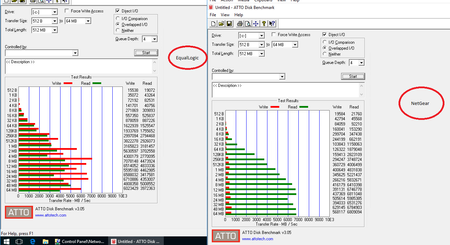
I've got a mixed OEM ecosystem with several Tier 2 RN3220's and RN4200's along with Tier 1 EqualLogic storage appliances. All ReadyNAS appliances have 12 drive compliments Seagate Enterprise 4TB ...

mdgm-ntgr
May 24, 2017NETGEAR Employee Retired
ITisTheLaw
May 25, 2017Guide
Hi mdgm,
Thanks for replying,
I have installed 6.7.3 as advised and rebooted.
Going from 9000/1500 on the Netgear, 9014/1514 on the hypervisor yields a more stable sequential file transfer when moving the test VM back in (102GB). It broadly sits between 580 and 660Mbps, predominatly over 600Mbps. This is on 1x1GbE Netgear side. Max Rx on eth2 on the Netgear states 76.7MB (613.6Mbps).
Here is an off thing though, I've set the eth2 IP address to 192.168.171.1 on 1500 MTU and then rebooted the array. Yet, i can still ping 192.168.171.1 with a 8000 byte ICMP echo. ARP confirms that it is talking to the correct NIC.
I've set the hypervisor to 1514
Jumbo Packet Disabled *JumboPacket {1514}
Rebooted the hypervisor.
Inside the CSV:
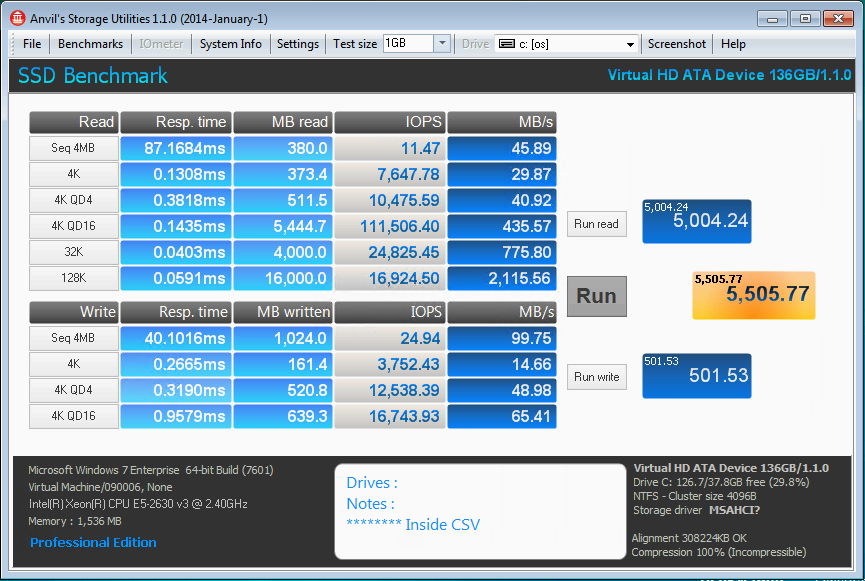
Not in a CSV (E:\ as a local iSCSI mount) - this was painful as the array had to copy from and to itself via the Hypervisor. The hypervisor was receiving and sending on the NIC at 380Mbps, the Netgear eth2 says 43.6MB. A larger burst variance was visible during the copy, between 230 and 480Mbps.
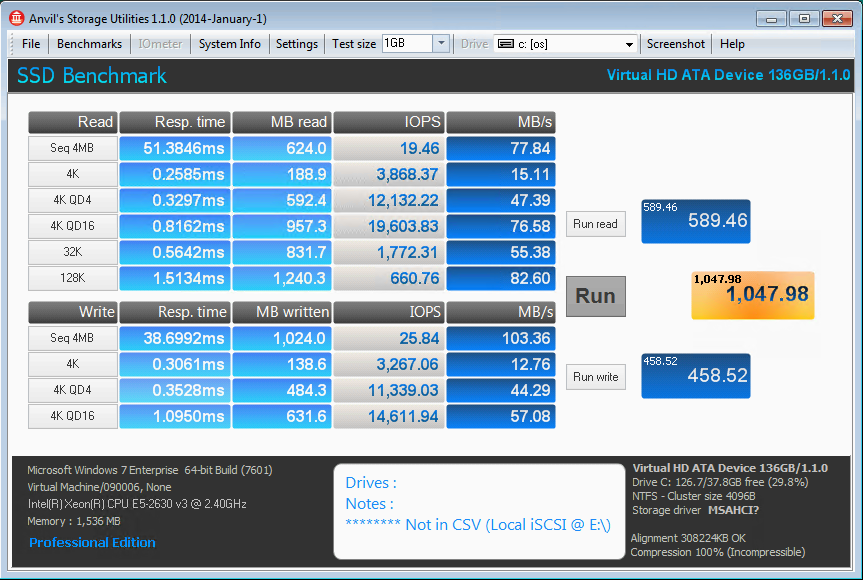
Max values on the NICs have dropped to 55.8MB, which would presumably be down to the lack of 9K
- ITisTheLawMay 28, 2017Guide
Incidentally, these are the numbers off of a QNAP TVS-1271U-RP on 12x4TB WD Red over the 10GbE controller, same switch fabric, on a very similar hypervisor (PE R630) near-by on local iSCSI (not CSV).
Spot the difference...
- ITisTheLawAug 24, 2017Guide
Well this is a bit better!
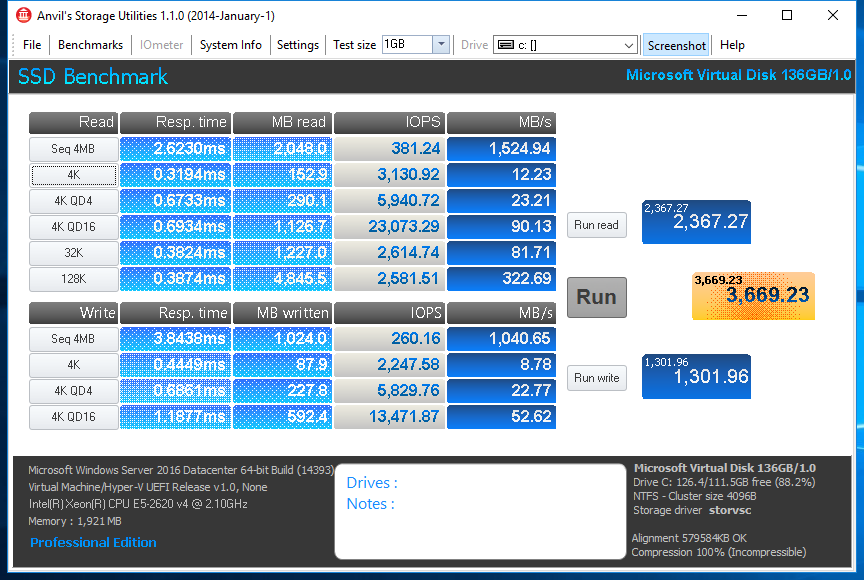
Clean installed onto OS 6.8.0 and built onto a new X-RAID 10 - all other fabric and infrastructure is identical to previous posts. The is a non-CSV test:
Keeping in mind that we started with a Seq 4MB write of 35.9MB, this is positively glorious. Not amazing but, the VM isn't unusable!
 nxtgenOct 23, 2017Apprentice
I'm having an almost identical experience (and configuration) with my 4220. Dual 10Gb Intel NICs, 10Gb switch, jumbo frames enabled end to end (and tried standard frames as well), also with a cluster and CSV. As you experienced, local disk performance is excellent, but the minute I put a VM in the CSV the performance is nearly unusable. I've been fighting this for a week (actually, I've been fighting this for almost a year, and I'm swithing from DPM to Veeam because of all of the problems I had with DPM...only to now realize that my problem was likely with the ReadyNAS)... so I'm doing the installs of a couple new VMs and it's been nearly 4 hours and the OS still isnt installed in the VMs yet.
Performance on the same hosts to our EQL is amazing... so it's not a network fabric issue.
Do you feel like your "fix" was to factory reset the device and reconfigure?
I just updated to 6.8.1 this past weekend with no change...but I havent done a factory reset.
Related Content
NETGEAR Academy

Boost your skills with the Netgear Academy - Get trained, certified and stay ahead with the latest Netgear technology!
Join Us!
