NETGEAR is aware of a growing number of phone and online scams. To learn how to stay safe click here.
Forum Discussion

ITisTheLaw
May 14, 2017Guide
RN3220 / RN4200 Crippling iSCSI Write Performance
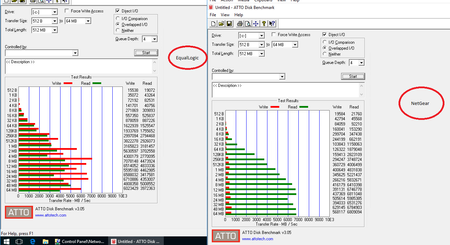
I've got a mixed OEM ecosystem with several Tier 2 RN3220's and RN4200's along with Tier 1 EqualLogic storage appliances. All ReadyNAS appliances have 12 drive compliments Seagate Enterprise 4TB ...

nxtgen
Oct 23, 2017Apprentice
I'm having an almost identical experience (and configuration) with my 4220. Dual 10Gb Intel NICs, 10Gb switch, jumbo frames enabled end to end (and tried standard frames as well), also with a cluster and CSV. As you experienced, local disk performance is excellent, but the minute I put a VM in the CSV the performance is nearly unusable. I've been fighting this for a week (actually, I've been fighting this for almost a year, and I'm swithing from DPM to Veeam because of all of the problems I had with DPM...only to now realize that my problem was likely with the ReadyNAS)... so I'm doing the installs of a couple new VMs and it's been nearly 4 hours and the OS still isnt installed in the VMs yet.
Performance on the same hosts to our EQL is amazing... so it's not a network fabric issue.
Do you feel like your "fix" was to factory reset the device and reconfigure?
I just updated to 6.8.1 this past weekend with no change...but I havent done a factory reset.
ITisTheLaw
Oct 24, 2017Guide
Basically, the short answer is that for CSV use, it isn't fixed. It just doesn't work. It never did for me. OS 6.8 did give an improvement in local iSCSI performance though with a cleanly reinstalled and fully synched X-RAID volume (see the above post).
In replying to you I thought that I would copy a 4GB file into a Windows 10 1709 test VM planted into a CSV on the RAID10 RN3220. It is BURSTING at 2.77MB/s and by bursting, I mean copying 2.77MB and then returning to 0MB/s for 4 seconds before bursting again. Disk latencies are between 0.7ms and 3.27ms.
It sounds as though, like me you are not having fabric issues - 4x aggregate 1GB, single or dual SFP+DA 10GbE makes no difference. Over CSVL iSCSI there is nothing that you can do.
Take it out and use it as local storage and it will give usable, but mediocre performance. An identical QNAP with the same 7200 RPM Seagate Enterprise drives puts it completely to shame. It isn't enterprise hardware, certainly this is true. Yet, if after this many OS releases there hasn't been any change in performance characteristics, we can assume that there isn't going to be.
If you want to iSCSI on a low RPM array, on SATA, and especially if you want to use a cluster or concurrent access file system, stay clear of Netgear. It isn't the product for you.
- nxtgenOct 24, 2017Apprentice
Thanks for your follow up. I did factory reset and rebuild the X-RAID volume last night, and I was able to get "better" performance out of the device today (even dropping the IOPS of two drives to be global spares). One thing I noted... I had to disable sync writes on EVERY LUN... When I tried it disabled on 1 LUN, nothing was better, but after I disabled it on every LUN it improved. This may be a bug (or limitation).
I hate to always come to the forum and bash Netgear, but I agree the overall enterprise readiness of the devices seems to have degraded (as you may note form my previous posts). I have had just nothing but problems out of the new devices, and my love for them came out of the rock solid behavior and performance of the older models (with 4.x firmware). That just doesnt seem to be the case any more unfortunately.
Oh and the cheap plastic drive trays are cracking at the screws. Apparently this plastic cracks in datacenter temperatures...lol
I may give QNAP or Synology a spin... I know many people swear by them.
Luckily, we are keeping our EQL for production data, and this has (and will always be) a backup target/location...but I'm just floored that I cant even run a single 500GB LUN with a few VMs on it with adequate performance.
Thanks again!
- ITisTheLawOct 24, 2017Guide
I havn't observed the sync writes perfomance metric as you say, but I've always turned it off because I could see it was a problem way back when I inherited the array (and this headache).
The irony is that a 2 drive, 1 NIC ReadyNAS Duo v2 with a VHDX sitting on it gives better performance than a 12 drive RN3220/RN4220X does.
For the hell of it, I just span up a 0.5TB local iSCSI target using 2x1GbE (i.e. not in the CSVL) to see what the performance was like with the same VM on the same hypervisor that I just did that 4GB test copy with, using the same file from the same source. It still burts, but it burts between 40MB/s and 74MB/s. Somewhat better than 0 to 2.77MB/s...
- nxtgenOct 24, 2017Apprentice
That does seem REALLY bad... I think my performance is much better than yours. Do you have stock/default memory in it? (I think 8GB?).
I upgraded ours to 32GB right off the bat (the memory they shipped with it was bad!!!...and I had 4 sticks laying around from other projects I used).
I wonder if a memory upgrade would help.
Here's where I'm at right now...which is acceptable (but this is under 0 load with no VMs running, and NOT in CSV).
10 drive X-RAID RAID6 (2 global spares). Just factory reset and rebuilt on 6.8.1. Dual 10Gb Intel X520 NICs (not the crap they come with), jumbo frames
This is WAY better than I was getting yesterday (total score was 1,045)
I used all defaults in the software.
 StephenBOct 24, 2017Guru - Experienced User
Not something I have much experience with, but I do wonder if RAID-50 would give faster speeds.
- nxtgenOct 24, 2017Apprentice
Yea, that would definitely help.
If you're looking to test the theoretical maximum performance you can get from your box, 12 drives in a RAID0 would remove any disk bottlenecks. Then you'd have to figure out where the next bottleneck is.
Obviously RAID0 isnt the best choice for critical production data, so RAID50 or 60 would be a likely choice if you can take the hit on total disk space. I'm not willing to give up 1/2 my disk space though, so RAID6 is better for me (and in my configuration I lose 1/3 of my total disk space).
- ITisTheLawOct 25, 2017Guide
Quite! Those numbers are closer to the QNAP array figures.
I'm not using 10GbE of course, which will add a little pep to the numbers.
RAID10, 12 drives, 6.8.1, Dual 1GbE (onboard). As you can see, dreadful.
Are you running HyperV, VMWare, Zen? Was your VHDX dynamic or fixed?
RAM: Yes, I did consider it as there are only 8GB in both, but the system never reports using it if you SSH into it. I don't have any compatible sticks lying around though to try and I'm not prepared to spend on these at this point. Chicken or Egg?
nxtgen, if you scroll back through the thread you'll see that I did RAID0 it, with no changes in the numbers. I've also done RAID6 and RAID10. There's virtually nothing between them in CSVL or local numbers.
- ITisTheLawOct 25, 2017Guide
For the heck of it, I converted the test VM from a dynamic to a fixed size VHDX and re-ran the numbers
The slight reduction in performance is likely just because we're into business hours now and the system is getting busier. So it isn't inefficiencies in dynamic disks.
- mdgm-ntgrOct 25, 2017NETGEAR Employee Retired
In addition to trying RAID-50 you may also wish to consider trying SSD Metadata Tiering (a new feature in 6.9.0).
- ITisTheLawOct 25, 2017Guide
While that is a very nice feature to have, and I compliment Netgear on finally adding it - and for the other changes in the 6.9.0 changelog. Sticking a SSD cache plaster over a fundimental problem won't address the bottle neck in the product line and encourages people to spend more money on a solution that masks, instead of fixes the problem. In the absense of knowing what the bottle neck is - it may not even fix the problem to begin with.
It also means pulling out two drives from the already populated 12 drive array.
I've got one of the arrays updating to 6.9.0 at the moment.
- ITisTheLawOct 25, 2017Guide
Here we go, hot off the press.
This is an identically spec'd RN3220, with identical config, wiring etc, speaking to the same hypervisor over 2x 1GbE. The only config difference is that this is on RAID6 rather than RAID10; which my 'usual' victim shelf is currently runing with.
This was a dirty upgrade, not a clean array rebuild.
A within the margin of error improvment.
- nxtgenOct 25, 2017Apprentice
Hyper-V with dynamic VHDX files. The LUNs are fixed/thick though.
- SandsharkOct 25, 2017Sensei
I think he is getting a lot more than "a litttle pep" out of 10GBE.
- nxtgenOct 26, 2017Apprentice
Side note (and I dont remember if this was mentioned)... you should be using MPIO as well. "Bonding"/Load Balancing/LACP dont provide the same performance as MPIO.
- ITisTheLawOct 27, 2017Guide
So to clarify after the above replies:
- I'm ONLY using fixed size LUN's on the RN's
- I've tried both fixed and dynamic VHDX's, there's virtually nothing between them stat wise
- Sync writes are disabled
- Copy on write isn't used anywhere
- I agree, you should never team iSCSI, that's page 1 stuff. I've tested with single channel or MPIO in dual channel
Based on the previous comment on RAM from nxtgen, I pulled some DDR3 1866 dimm's from a server temporarily and replaced the DDR3 1600 dimm's. The initial test set it to 12GB, single channel due to 3 dimms.
The second to 16GB, all dimm's identical, dual channel
This is the RAID6 array again, with nothing else on it, still running 6.9.0 and local iSCSI, not CSVL. I repeated the test with MPIO on and off. Writes get dented slightly in no MPIO mode, but that 4MB sequential number just won't move up on these arrays.
As you can see, a whole lot of nada. Running top in SSH shown that with enough activity, the system will claim the full amount for cache, leaving about 400MB free every time.
Rebooting the NAS, booting the VM and running Anvil, leave the NAS with about 4.4GB RAM used and the rest free.
I didn't screen shot it, but I put the array down to 4GB RAM, single channel and ran it again. The numbers were identical! No difference!!!
Copy a file to them over SMB or NFS and the arrays will saturate the link(s), no issues there. It's purely the iSCSI.
- ITisTheLawNov 13, 2017Guide
Now that we've got the 1GbE write up to par (remember we started with 34MB/s, I've gone back to the 10GbE.
RAID6 array, 1x10GbE on TwinAx DAC, local, not CSVL (CSV doesn't work still)
It isn't anywhere near touching the 7200 x12 QNAP, and the write's are still way down, but it is better than it was.
- ITisTheLawNov 13, 2017Guide
Now that we've got the 1GbE write up to par (remember we started with 34MB/s, I've gone back to the 10GbE.
RAID6 array, 1x10GbE on TwinAx DAC, local, not CSVL (CSV doesn't work still)
It isn't anywhere near touching the 7200 x12 QNAP, and the write's are still way down, but it is better than it was.


Related Content
NETGEAR Academy

Boost your skills with the Netgear Academy - Get trained, certified and stay ahead with the latest Netgear technology!
Join Us!
