NETGEAR is aware of a growing number of phone and online scams. To learn how to stay safe click here.
Forum Discussion

montybiggleswor
May 03, 2016Aspirant
Snapshots not visible in Windows
Hi, I have a RN104 with 4 2TB WD Reds set up as RAID 5 array. I had snapshots working before but now they are no longer visible from Windows Explorer - if I click on Previous Versions I get t...
 May 07, 2016
I think deleting NETWORK will work ok, but you are wise in having a backup in place first.
The share isn't that large, perhaps it would be safer to just copy the share to a new one (instead of cloning) with a backup job. Then if snapshots work properly, just delete CLONE and NETWORK.
If you do delete NETWORK, let us know what happened.
StephenB
May 03, 2016Guru - Experienced User
Are you seeing snapshots in the admin UI (pick a share, click on the settings wheel and choose "recover".)
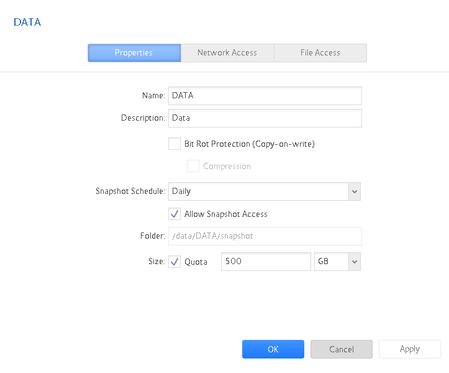
Using DATA as the sharename and data as the volume name isn't the best practice. If you access the NAS with admin credentials you can see the data volume folder, but that conflicts with your share name (since SMB is case insensitive). So you might pick a different share name.
- montybigglesworMay 03, 2016Aspirant
Hi,
I tried what you said and I can see the snapshots in the Netgear UI. It looks like they are being taken by the RN104, they go way back to last year as expected and occur every day. I don't really want to try clicking "recover" as I am not sure what that will do and if it's reversable!
Thanks for the tip re naming, I have now re-named the volume as you suggested- but it did work before.
Any more ideas what could be wrong?
I tried "previous versions" on another machine on the network and have the same problem.
It's a real shame as it's a realy useful tool!
Thanks!- StephenBMay 03, 2016Guru - Experienced User
montybiggleswor wrote:
Hi,
I tried what you said and I can see the snapshots in the Netgear UI. It looks like they are being taken by the RN104, they go way back to last year as expected and occur every day. I don't really want to try clicking "recover" as I am not sure what that will do and if it's reversable!
The recover option was just to show you the snapshots - you don't want to actually do the recover.
montybiggleswor wrote:
I tried "previous versions" on another machine on the network and have the same problem.
Windows 10 or Windows 7?
What firmware are you running on the NAS?
montybiggleswor wrote:
Thanks for the tip re naming, I will look at re-naming the volume as you suggested but it did work before.
Any more ideas what could be wrong?
I'd rename the share. I don't think its possible to rename the volume.
You might need help from Netgear on this - let's see one of their folks has an additional suggestion (or is willing to analyze your logs).
- montybigglesworMay 03, 2016Aspirant
Hi,
6.4.2 is the FW on the RN104, I checked the other day and this is the latest version.
Both computers are running Windows 7 Pro, 64 bit.
Sorry, I meant that I renamed the share, not the volume :)
I was very un-sure what settings I needed on "Network Access" tab; I played about with the settings on here a lot when I first got the NAS to be able to access my films - to be honest I was searching tips online and trying various settings until it worked!
Is there anything on there that may be causing an issue?
Here's a screen shot of the settings for SMB. It is very possible I have set something wrong, I have no idea what most of the settings do!
Thanks again for your help!
Rob

Related Content
NETGEAR Academy

Boost your skills with the Netgear Academy - Get trained, certified and stay ahead with the latest Netgear technology!
Join Us!
